



We have about 2,900 Amiga games on My Abandonware, a fairly good number as Lemon Amiga lists about 5,000 games. We also have CD32 and CDTV games, the two CD consoles built on Amiga hardware.
Several Amiga computers were released from 1985 to 1996, and emulation started in 1995 with UAE. All the emulators below come from UAE, and they are still updated today.
Amiga emulators
FS-UAE is the one we recommend: free, on Windows, Mac and Linux, and easy to start. WinUAE and Amiberry are great choices too.
You have 4 choices for emulating Amiga machines on your computer:
- FS-UAE: a versatile Amiga emulator with tons of options, available for Windows, Mac, Linux and more. Clean interface, connected to the Open Amiga Game Database, and open source. It comes with a free replacement Kickstart ROM. Recommended.
- WinUAE: the most accurate Amiga emulator, for Windows only. FS-UAE uses its emulation code. It has more options than you will ever need, which may scare you at first. Another solid choice for Windows users.
- Amiberry: made for the Raspberry Pi, now on Windows, Mac (Apple Silicon included) and Linux too. It starts WHDLoad games (see below) with no setup at all.
- Amiga Forever: an easy to use Amiga emulator for Windows only. It costs $20 to $60, and contains legal Amiga Kickstart ROMs to play your favorite games immediately.
On a phone or tablet, use RetroArch with its Amiga core, or Amigo, a free app for iPhone and iPad under active work. Our mobile guide has the details.
Kickstart ROMs
An Amiga emulator needs a Kickstart ROM: the built-in program of the Amiga. These ROMs are copyrighted, so emulators don't include them, but FS-UAE has a free replacement.
The Kickstart ROM is the program the Amiga runs when you switch it on. Having the right Kickstart ROM will allow you to emulate games in an optimal way. You have 3 choices to get these ROMs:
- Buy Amiga Forever, which comes with licensed Kickstart ROMs. Its ROM files also work in FS-UAE and WinUAE, on any system.
- Extract the Kickstart ROM from your own Amiga computer, as explained on Amiga Legal Emulation.
- Find websites with downloadable ROMs on the internet, using Google or Bing.
There are several Kickstart ROMs, one per Amiga model. Most games want Kickstart 1.3 (Amiga 500); games made for the Amiga 1200 (AGA games) want Kickstart 3.1. The FS-UAE Kickstart page lists which file each model needs. Once you've got your own Amiga Kickstart ROM, you can play Amiga games on your computer.
FS-UAE has a built-in replacement Kickstart, made from the AROS project: choose "Internal" as the Kickstart in the launcher. You can try running games with it before getting the real ROMs. It works with fewer games than the original ones.
Running Amiga games in FS-UAE
Unzip the game, choose an Amiga model in FS-UAE, put the .adf file in the first floppy drive, and click Start. The steps below show it with pictures.
Many of our archives contain several versions of the game: try to run the one that works best. After unzipping the game archive, you'll get one or more .adf files (Amiga Disk File), the standard floppy image format of Amiga emulators.
Step 1
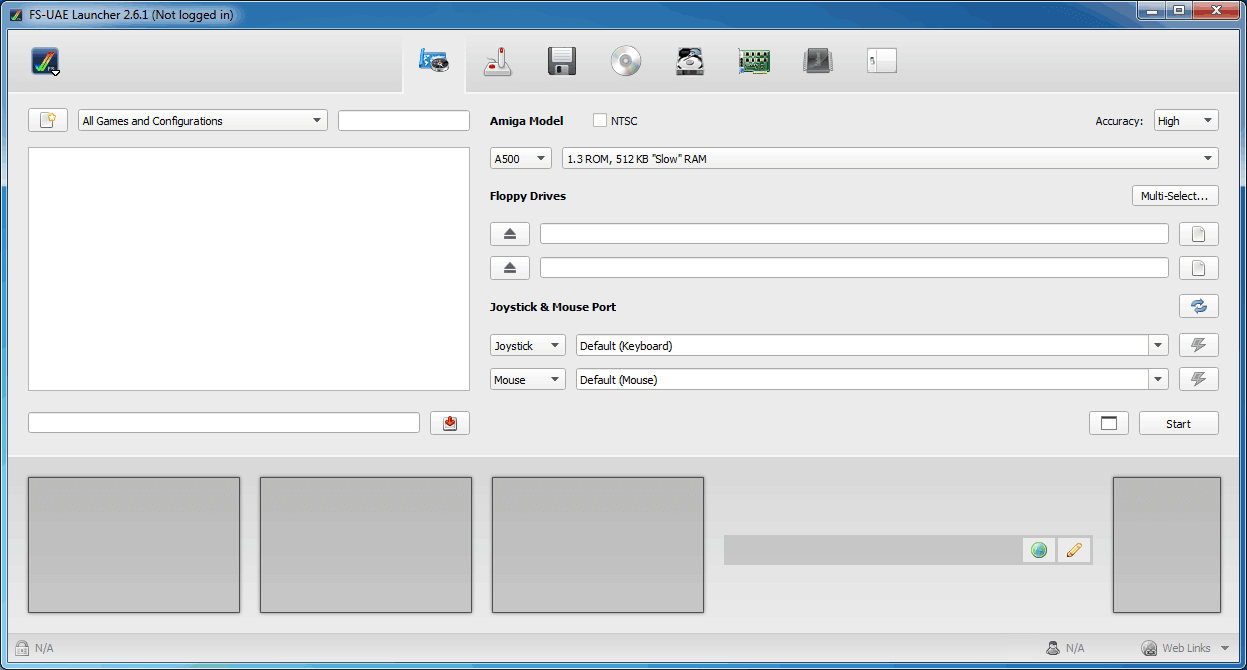
The first time you launch the FS-UAE Launcher, you'll get this screen. It lets you quickly run games without fiddling with the options.
Step 2
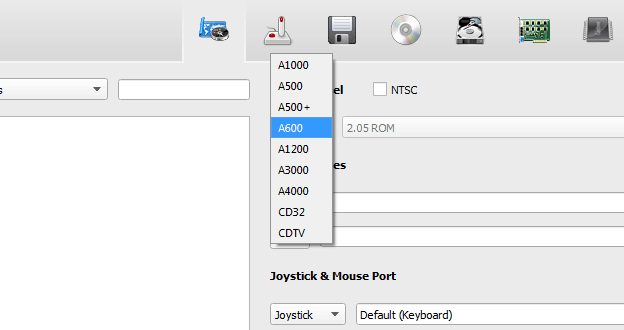
Select the Amiga computer you want to emulate. For most games, the Amiga 500 is the right choice. You may try several of them before finding one that runs the game well: AGA games need the Amiga 1200.
Step 3
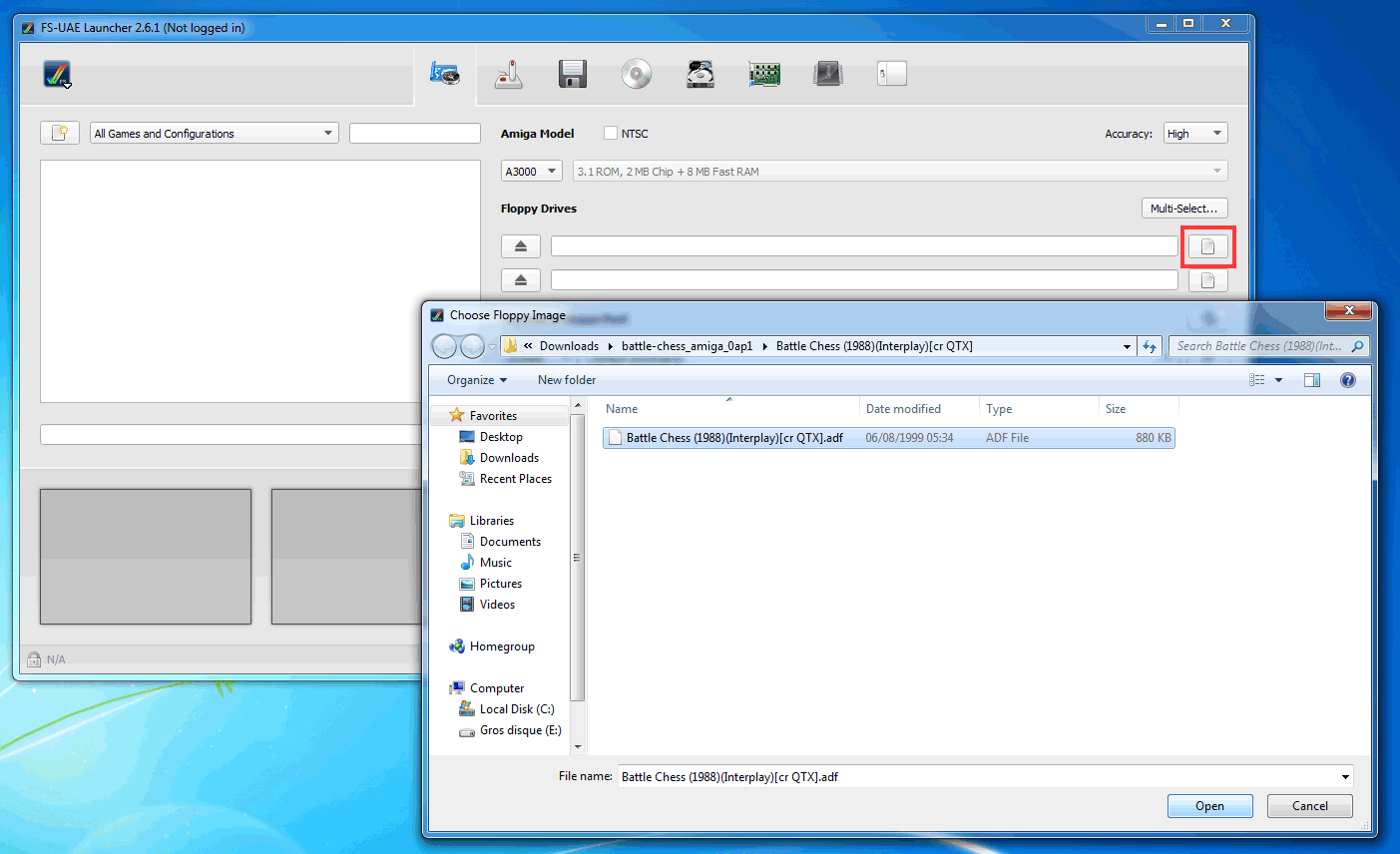
Click the icon at the right of the first floppy drive, and find the .adf file of the game you unzipped before. You'll see the file in the white field after selecting it.
Step 4
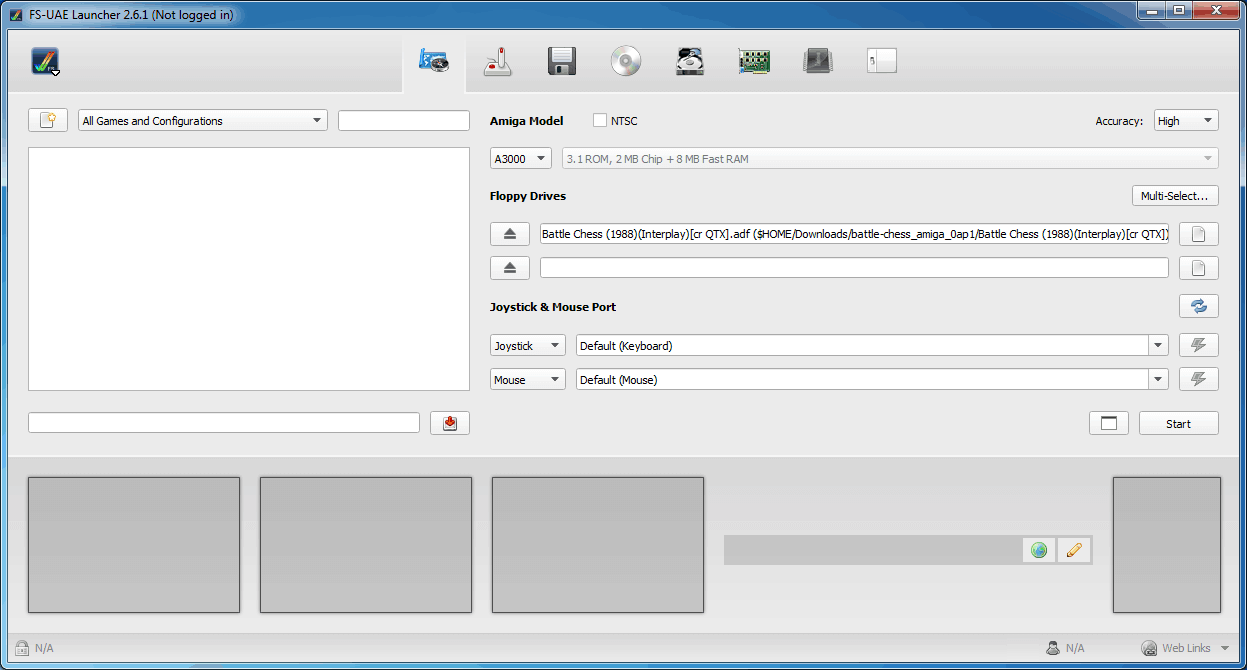
Once this is done, you should have this screen. Click on "Start".
Step 5
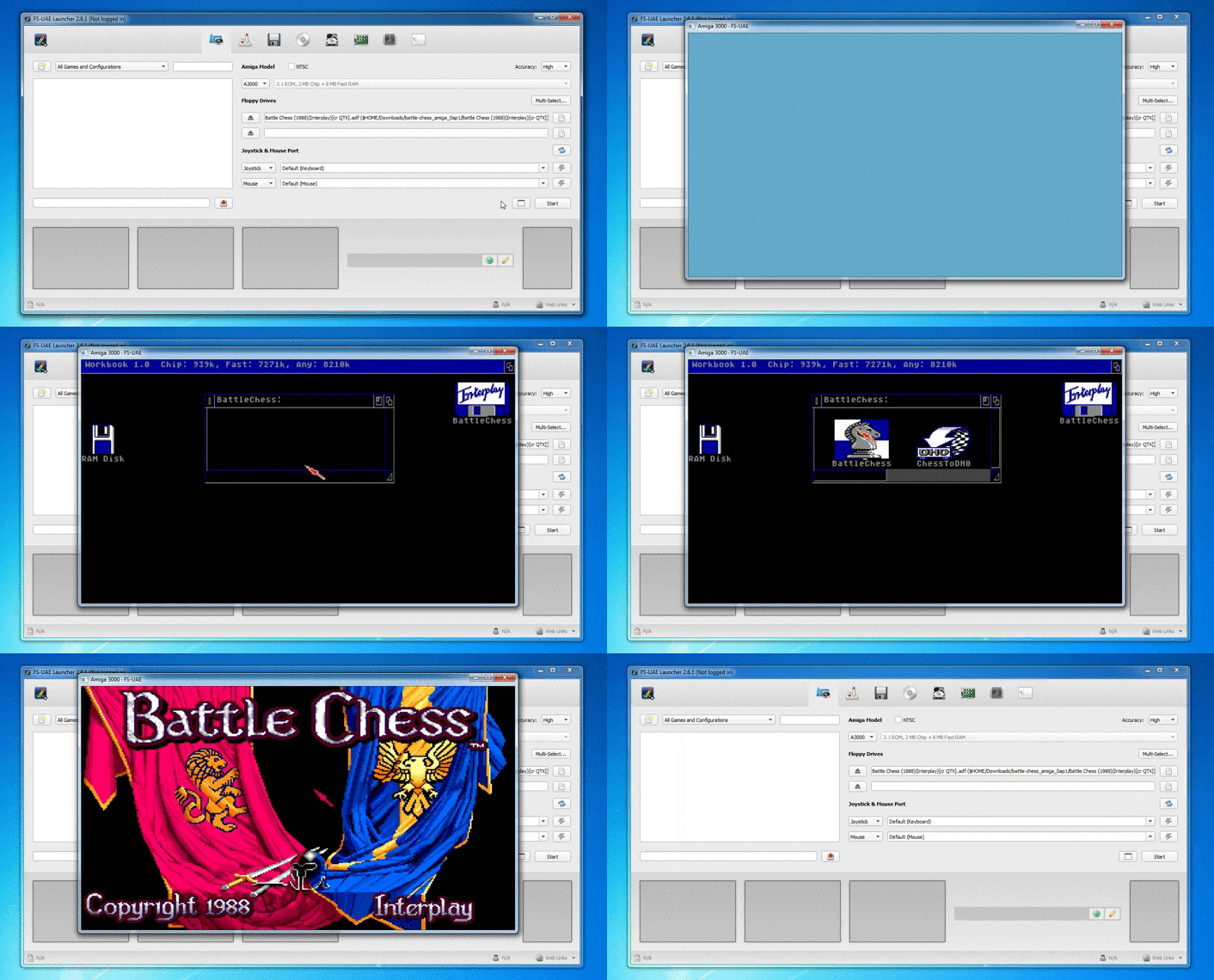
The Amiga starts from the floppy, just like the real one. Most games start by themselves; some show a desktop with the content of the floppy disk, and you choose the program to run. Enjoy!
Games with several disks
Many Amiga games came on several floppy disks. Put up to 4 disks in the floppy drives before starting, and swap them from the emulator menu when the game asks.
In the FS-UAE Launcher, add the other .adf files to the floppy drives 2 to 4, in order. If more than 4 floppies are required, add them all to the floppy swap list of the launcher. When the game asks for another disk, press F12 (on a Mac: Cmd-Fn-F12) to open the emulator menu and change the disk in the drive. The FS-UAE floppy guide explains it in detail.
WHDLoad games
WHDLoad games are Amiga games installed on a hard disk, with no floppy to swap. They usually come as .lha files, and Amiberry starts them with no setup at all.
WHDLoad was made to install floppy games on the hard disk of an Amiga, and to fix games for later models. It's the most comfortable way to play today: games start faster, and you never swap disks. In Amiberry, open the .lha file and the game starts. In FS-UAE and WinUAE, you need a hard disk with WHDLoad installed on it, which takes some setup: follow their documentation.
CD32 and CDTV games
The CD32 (1993) and the CDTV (1991) are CD consoles made by Commodore from Amiga hardware. FS-UAE and WinUAE play their games, with one extra ROM file.
Choose "CD32" or "CDTV" as the Amiga model in FS-UAE, then put the CD image of the game in the CD-ROM drive, instead of a floppy. Always open the .cue file when there is one, not the .bin: it holds the music tracks. Besides the Kickstart, these consoles need an extended ROM:
- CD32: Kickstart 3.1 (r40.60) and the CD32 extended ROM (r40.60).
- CDTV: Kickstart 1.3 (Amiga 500) and the CDTV extended ROM (v1.0).
The Plus and Premium editions of Amiga Forever include these files. The CD32 controller has 7 buttons: check the joystick settings of your emulator to map them on your gamepad.
I need help!
We do not provide support for running abandonware games. The Amiga community is very active, and helpful.
Ask your questions on the English Amiga Board or the Lemon Amiga forums. The FS-UAE documentation answers most setup questions.
First written by hand, and brought up to date in October 2026 against each program's own documentation and, where it exists, its source code. Game counts and file sizes come from our own catalogue. The update was drafted with the help of an AI assistant and checked by hand before publishing. If something here is out of date, tell us.