



About 4,600 C64 games are available on MyAbandonware. A small part compared to the 30,000 entries listed by GameBase64, but you can already spend days playing the Commodore 64 games we have. This quick how-to will help you run them on Windows, Mac or Linux.
The C64 is the best-selling home computer of all time, and its community is still very active on websites like C64.com or Lemon64. We also have games for the other Commodore computers: see the end of this page.
The easiest way: C64 Dreams
C64 Dreams is a curated collection of about 3,000 Commodore 64 games, each one tested and set up to start with a click. It's the best choice if you want to play a lot of games.
C64 Dreams was made by Zombeaver: every game has been manually tested and configured, and many come with their manuals and reviews. Just download the huge archive and play! It runs on Windows.
Commodore 64 emulators
VICE is the one we recommend: free, on Windows, Mac and Linux, and it runs every Commodore computer. CCS64 and Hoxs64 are very good Windows alternatives.
- VICE: stands for "Versatile Commodore Emulator". It runs on Windows, Mac (Apple Silicon included) and Linux, and emulates almost all Commodore computers. A very solid emulator with tons of options, recommended. On Windows, take the GTK3 version, as the VICE team advises.
- CCS64: an ongoing project started in 1995, still updated in 2026, Windows only. CCS64 is free to use; if you enjoy it, please register your version to support the author.
- Hoxs64: a very accurate C64 emulator for Windows 10 and 11, still updated.
- C64 Forever: an easy to use VICE frontend for Windows, with a free and a paid version.
- GameBase: a frontend and database program to play games on various platforms, including the Commodore computers. It's made to work with the GameBase64 database.
As VICE is the most versatile emulator, this page will use it for the tutorial. Other emulators are quite similar and should not pose any problem.
Running C64 games in VICE
VICE comes with one program per Commodore computer. For the C64, start x64sc, then drop the game file on its window: the game loads and starts by itself.
This tutorial is focused on Windows, but it's almost the same on other systems. The C64 program was called x64 in older versions of VICE; since version 3.4 it's x64sc (x64sc.exe on Windows).
After downloading a C64 game and unzipping it, you will usually find one .nfo file containing game information, and one or more files containing the game itself. Game files can be stored in various formats:
- .d64, disk format: the most popular format for games. Some of the later games were released on several disks.
- .tap or .t64, tape format: tapes were very popular too, especially in Europe. Loading from a tape is slow, just like on the real machine.
- .crt, cartridge format: cartridges were fast, but expensive, so fewer than 400 games came on one, according to C64-Wiki.
- .prg, plain program file: a program that loads immediately, not a physical format as such.
Look for the game file, or the first one if the game is on multiple disks. Most of the time, multiple disks are named GAME0.D64, GAME1.D64, and so on.
Drag and drop into VICE
Most C64 games start in a few seconds: drag the game file, or the first one, and drop it on the VICE window, where you see the Commodore 64 prompt screen.
Alternatively, select File > Smart attach, then select the game file: VICE shows its content, and you can pick the program to run.
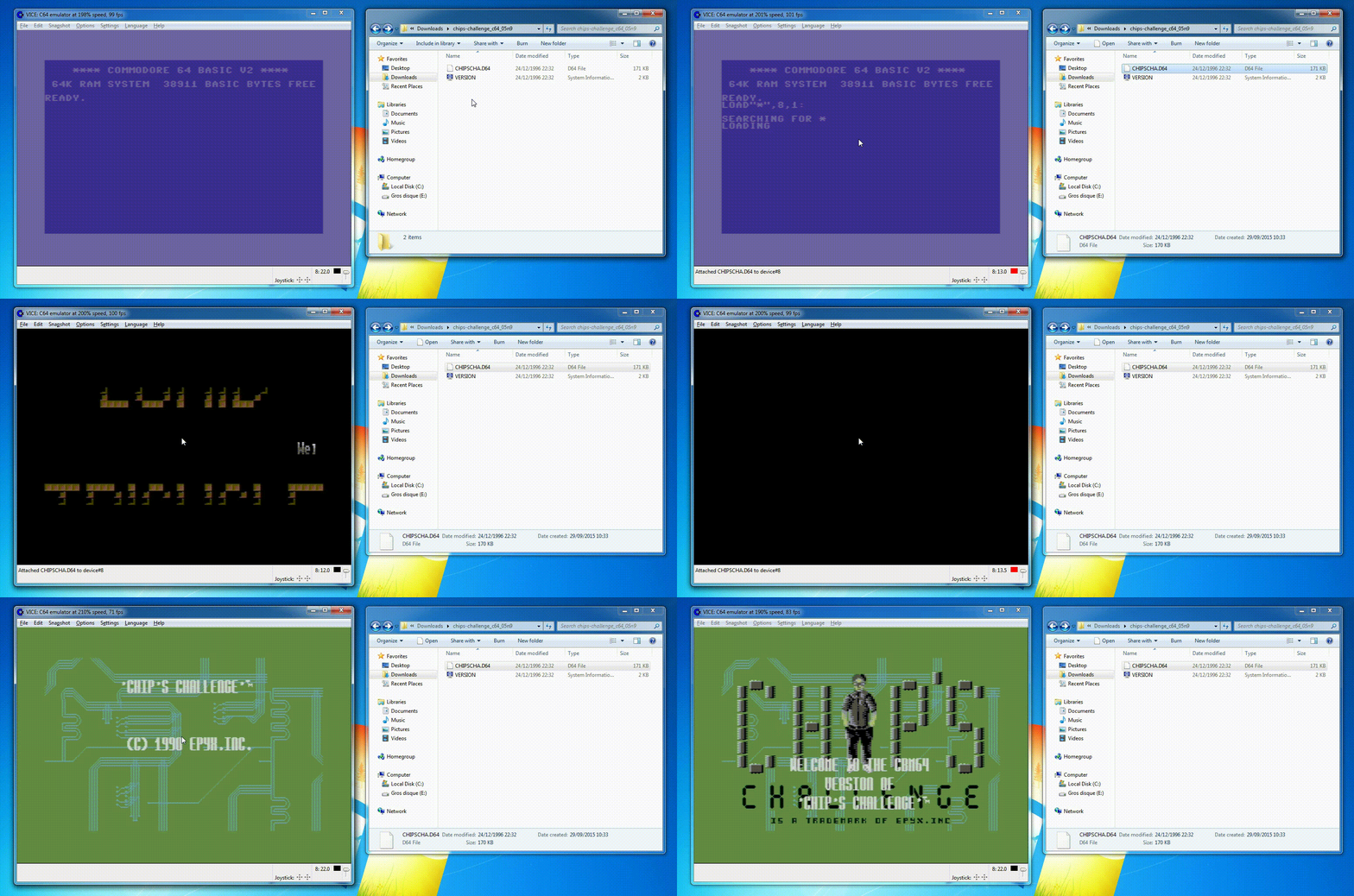
Simple drag and drop of the Chip's Challenge d64 file into the VICE window. Works the same on Mac. Click on the picture to see a bigger GIF.
Games with several disks
When a game asks for disk two or more, attach the next disk image, then press a key to continue. Use File > Attach disk image and choose drive 8.
If a game still refuses to load, try to change the options of the disk drive in the settings: turning True drive emulation on fixes many games with copy protection or fast loaders.
Commodore 16, Plus/4, C128 and PET games
VICE also runs the other Commodore computers: each has its own program in the VICE folder. Start the right one, and drop the game on it as for the C64.
- Commodore 16 and Plus/4 (about 240 games): start
xplus4. These 1984 computers are not compatible with the C64. YAPE, a Windows emulator made only for them, is a good alternative, and Plus/4 World is the reference site for their games. - Commodore 128: start
x128. The C128 also runs C64 games in its C64 mode. - Commodore PET: start
xpet. The PET (1977) was Commodore's first computer, mostly used in schools and offices. It had no color and no sound chip, and its games are mostly text.
The VIC-20 has its own page.
I need help!
We do not provide support for running abandonware games. The C64 community is huge, and very helpful.
If you really need help, the best place to ask politely is the Lemon64 forums. The VICE documentation explains every setting.
First written by hand, and brought up to date in October 2026 against each program's own documentation and, where it exists, its source code. Game counts and file sizes come from our own catalogue. The update was drafted with the help of an AI assistant and checked by hand before publishing. If something here is out of date, tell us.