You are on the beta version of My Abandonware. The live site is still myabandonware.com. Your favorites and ratings here are copied to the live site. Comments and other changes are not — we delete them every morning at 08:00 Paris time, when this site goes down for about an hour. Leave feedback through this link to Pastel (email required).
The beta goes down at 08:00 Paris time, in a few minutes. We rebuild the database from the live site. It comes back in about an hour.
I've been making mods for this game since the day it came out, and they're currently active on the2005season website.
0
el loco de la caza axis14 May. 2026
quiero la vercion completa con todas las armas y mapas
2
asbjorn15 Aug. 2025
Top comment
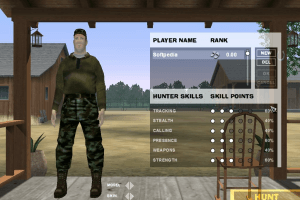
Myabandonware needs to upload a no cd crack. There is no hunt button.
18
good-old-games28 Feb. 2025
@GRAHAM It probably doesn't work on Windows 11.
0
GRAHAM13 Feb. 2025
When i download the game it says cannot open and i have to re-install the game but this doesnt do anything. Any advice? Running windows 11 on a very up to date pc. could this be the issue?
1
micha13 May. 2024
want to play free
-2
Some random guy01 Nov. 2022
Audio won’t work for me, could be a personal issue tho
0
don't understand12 Apr. 2022
How do I take movie / screen video, because i accidentally did and i don't know how.
0
black_static4405 Apr. 2022
Top comment
I downloaded and installed the game. It works well after the 1.2 patch, and it is a lot of fun. One big issue I'm having is that when I go to the graphics settings to change the resolution away from the default setting (1024X768), the game freezes and kicks me to the desktop, but as long as I stick to the default resolution it still works. Is there a way to fix this so I can change the resolution to something closer to my native display (1680X1050)? Any help would be appreciated.
The PC I'm using isn't great (built in mid 2014 with spare parts), but it's definitely overkill for this game. Specs: - AMD Phenom II x3 B77 CPU 3.2ghz -Radeon 5450 1GB graphics card -4GB DDR3 1066mhz RAM -500GB HDD -Windows 10
I also have the latest drivers and DirectX 11
9
genokent francis15 Mar. 2022
the game so good
1
Ali14 Jan. 2022
Top comment
Hi, the previous words were wrong. The main issue is that the "HUNT" button written in the yellow box, which is to start the game, is not for me. What is the problem of your game being incomplete? Please give me the answer. It has been done !! Please answer !!
7
Ali13 Jan. 2022
Hi, I downloaded this game and when I try to enter the game, it gives a CD-KEY error, but the game runs, but the Extras option is not for me, and I can not start the game, and I am now upset T_T
4
augustdiva26 Dec. 2021
got game downloaded but wont install help
1
Buck-A-Roo29 Sep. 2021
Classic Game :-)
-2
BOB LYLE SAID29 Sep. 2021
CUNT!
-5
not sure18 Aug. 2021
"deer hunter 2005 v1.2 no-cd patch" got the game up and running and restored the HUNT button. the first no-cd v1.2 patch i downloaded didnt work, so i tried another v1.2 version
4
not sure18 Aug. 2021
win10 - installed game then patch, game loads to menu screen okay, 1.menu music "cracking skipping" went to "in-game" audio settings seemed to fix back to normal. 2.changed video settings a few times, "wanted higher res" but screen went blank, so ran and launched game in compatibility mode but didn't help. 3.biggest problem was --- the was no "HUNT" button to load a map to play lol, cannot find a button to load and play a map, where my hunt button gone? =(
-1
Anna Rusnarczyk16 May. 2021
gra mojego dzieciństwa
0
Boomer45421 Nov. 2020
Thank you for uploading this classic. I have a problem, though. After an errorless installation, when I go to run the game, it tells me "could not init graphics" and doesn't open the normal game. Anybody here got a fix for this issue?
0
No comment nor review for this game at the moment.








 English





Comments and reviews
I've been making mods for this game since the day it came out, and they're currently active on the2005season website.
quiero la vercion completa con todas las armas y mapas
Myabandonware needs to upload a no cd crack. There is no hunt button.
@GRAHAM
It probably doesn't work on Windows 11.
When i download the game it says cannot open and i have to re-install the game but this doesnt do anything. Any advice? Running windows 11 on a very up to date pc. could this be the issue?
want to play free
Audio won’t work for me, could be a personal issue tho
How do I take movie / screen video, because i accidentally did and i don't know how.
I downloaded and installed the game. It works well after the 1.2 patch, and it is a lot of fun. One big issue I'm having is that when I go to the graphics settings to change the resolution away from the default setting (1024X768), the game freezes and kicks me to the desktop, but as long as I stick to the default resolution it still works. Is there a way to fix this so I can change the resolution to something closer to my native display (1680X1050)? Any help would be appreciated.
The PC I'm using isn't great (built in mid 2014 with spare parts), but it's definitely overkill for this game.
Specs:
- AMD Phenom II x3 B77 CPU 3.2ghz
-Radeon 5450 1GB graphics card
-4GB DDR3 1066mhz RAM
-500GB HDD
-Windows 10
I also have the latest drivers and DirectX 11
the game so good
Hi, the previous words were wrong. The main issue is that the "HUNT" button written in the yellow box, which is to start the game, is not for me. What is the problem of your game being incomplete? Please give me the answer. It has been done !! Please answer !!
Hi, I downloaded this game and when I try to enter the game, it gives a CD-KEY error, but the game runs, but the Extras option is not for me, and I can not start the game, and I am now upset T_T
got game downloaded but wont install
help
Classic Game :-)
CUNT!
"deer hunter 2005 v1.2 no-cd patch" got the game up and running and restored the HUNT button. the first no-cd v1.2 patch i downloaded didnt work, so i tried another v1.2 version
win10 - installed game then patch,
game loads to menu screen okay,
1.menu music "cracking skipping" went to "in-game" audio settings seemed to fix back to normal.
2.changed video settings a few times, "wanted higher res" but screen went blank, so ran and launched game in compatibility mode but didn't help.
3.biggest problem was --- the was no "HUNT" button to load a map to play lol, cannot find a button to load and play a map, where my hunt button gone? =(
gra mojego dzieciństwa
Thank you for uploading this classic.
I have a problem, though. After an errorless installation, when I go to run the game, it tells me "could not init graphics" and doesn't open the normal game.
Anybody here got a fix for this issue?
No comment nor review for this game at the moment.