You are on the beta version of My Abandonware. The live site is still myabandonware.com. Your favorites and ratings here are copied to the live site. Comments and other changes are not — we delete them every morning at 08:00 Paris time, when this site goes down for about an hour. Leave feedback through this link to Pastel (email required).
The beta goes down at 08:00 Paris time, in a few minutes. We rebuild the database from the live site. It comes back in about an hour.
DOES ANY1 KNOW HOW TO GET IT IN CZECH PLEASE I NEED IT ITS MY CHILDHOOD PLEASE PLEASE also i dont want it paid (not trina get scammed)
0
Miharu22 Sep. 2026
the installer won't work
0
cat10 Jul. 2026
i downloaded this game on crossover to adapt the windows10 to my macbook. i was able to successfully play it, but i’m getting the black screen people were talking about during the stage building mini game. i’ve tried everything and can’t get the full screen functioned disabled. does anyone know what to do?
0
Coco05 Apr. 2026
I've done everything but keep getting this error:
Invalid Art Path Could not open Art File Path 'z:\seg\build'
:(
1
Bz3ta10 Jul. 2025
🛠️ Two working ways to run Barbie(TM) Diaries – High School Mystery on modern systems: ✅ Option 1: Manual installation via PowerShell (recommended)
If the installer crashes with "The wizard was interrupted...", you can install the game manually:
Open PowerShell as administrator (search → right-click → "Run as administrator").
Navigate to the installer folder.
Run this command:
msiexec /i "Barbie(TM) Diaries High School Mystery.msi" /qb
This skips the broken installer UI and installs the game directly. ✅ Option 2: Skip installation entirely
If you downloaded a version that includes a ProgramFiles folder, it contains the full game already.
You can just create a shortcut with the following target:
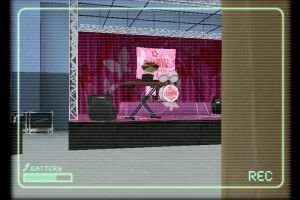
⚠️ Fullscreen mode may cause a black screen during the stage-building minigame. Use -EnableFullScreen false to avoid this issue.
💡 No VirtualBox needed! The game works on Windows 10/11 without emulators if launched correctly.
3
Bz3ta10 Jul. 2025
The installer will likely fail with an error, but you don’t need it. Inside the installer folder, there's a subfolder called ProgramFiles – it already contains the full game.
To run the game, use this command (or a shortcut with these parameters): '"C:\path\to\file\game.exe" -title Barbie -EnableFullScreen false -xsize 800 -ysize 600' ✅ Fullscreen mode can cause a black screen during the stage-building minigame – disabling it solves the issue.
So you don’t need VirtualBox or Windows XP – this works on modern Windows systems as long as the proper parameters are used.






 English



Comments and reviews
DOES ANY1 KNOW HOW TO GET IT IN CZECH PLEASE I NEED IT ITS MY CHILDHOOD PLEASE PLEASE also i dont want it paid (not trina get scammed)
the installer won't work
i downloaded this game on crossover to adapt the windows10 to my macbook. i was able to successfully play it, but i’m getting the black screen people were talking about during the stage building mini game. i’ve tried everything and can’t get the full screen functioned disabled. does anyone know what to do?
I've done everything but keep getting this error:
Invalid Art Path
Could not open Art File Path 'z:\seg\build'
:(
🛠️ Two working ways to run Barbie(TM) Diaries – High School Mystery on modern systems:
✅ Option 1: Manual installation via PowerShell (recommended)
If the installer crashes with "The wizard was interrupted...", you can install the game manually:
Open PowerShell as administrator (search → right-click → "Run as administrator").
Navigate to the installer folder.
Run this command:
msiexec /i "Barbie(TM) Diaries High School Mystery.msi" /qb
This skips the broken installer UI and installs the game directly.
✅ Option 2: Skip installation entirely
If you downloaded a version that includes a ProgramFiles folder, it contains the full game already.
You can just create a shortcut with the following target:
game.exe -title Barbie -EnableFullScreen false -xsize 800 -ysize 600
⚠️ Fullscreen mode may cause a black screen during the stage-building minigame. Use -EnableFullScreen false to avoid this issue.
💡 No VirtualBox needed! The game works on Windows 10/11 without emulators if launched correctly.
The installer will likely fail with an error, but you don’t need it.
Inside the installer folder, there's a subfolder called ProgramFiles – it already contains the full game.
To run the game, use this command (or a shortcut with these parameters):
'"C:\path\to\file\game.exe" -title Barbie -EnableFullScreen false -xsize 800 -ysize 600'
✅ Fullscreen mode can cause a black screen during the stage-building minigame – disabling it solves the issue.
So you don’t need VirtualBox or Windows XP – this works on modern Windows systems as long as the proper parameters are used.
Czech :
https://archive.org/details/barbie-denicek-tajemstvi-stredni-skoly/
to install on windows 10 , https://www.pcgamingwiki.com/wiki/Barbie_Diaries:_High_School_Mystery#Problem_installing_the_CD_version
doesnt work on recent operating systems, played it through a virtual machine
this game won't work on operating systems past Windows XP due to the installer
No comment nor review for this game at the moment.