
How to Play
Notes:
- The best way to play the game on modern systems is to run it on Virtual Machine, like DOSBox-X + Windows 95 or VirtualPC + Windows 98 (but looks like it doesn't work on VMWare + Windows 98). It seems that the game works the best on Windows XP, so it is recommended to run it on Virtual Machine with Windows XP
- To install the game on Windows XP, set the compatibility mode with Windows 98 for Instalar.exe. To play the game, set the compatibility mode with Windows 98 for Trueno.exe, otherwise the game may freeze during the loading. If it didn't work, try to run it without any compatibility modes or try modes with other Windows OS, also try to set 16-bit color mode and 640x480 screen resolution
- Also, it seems that it is possible to run the game on Windows 10 without any Virtual Machines. The sequel of this game - El Capitán Trueno: La Espada del Toledano - works on Windows 10 if to run it through dgVoodoo 2 utility, and since both games use the same engine, it is probably possible to run the first game with dgVoodoo 2 too. We haven't tested it ourselves but try to play with different dgVoodoo 2 settings and see if the will work on your system
- To be able to play the game without the disc, copy resdata.gb2, actions.gb2 files and the whole
Datafolder from the disc and put it into the folder with installed game. Then open Windows Registry editor (press Win+R and type regedit.exe) and in the pathHKEY_LOCAL_MACHINE\SOFTWARE\WOW6432Node\Zeta Multimedia\Capitán Trueno1.00.000(if you have 32-bit Windows, the path is the same but withoutWOW6432Node) editCDPATHvalue, enter the path to folder where you copied the files - If you have a trouble when the mouse cursor in the game disappears, try to use D3DWindower tool. We additionally recommend to check this thread if you have any other technical problems with the game
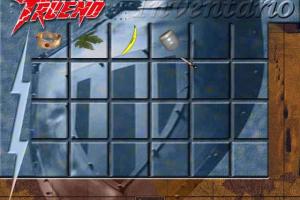
- To open the inventory in the game, press Spacebar, to use the item click on it with mouse and then press Spacebar again. If you stuck at some hard place in the game, here's the walkthrough guide in Spanish
 Spanish





Comments and reviews
No comment nor review for this game at the moment.