You are on the beta version of My Abandonware. The live site is still myabandonware.com. Your favorites and ratings here are copied to the live site. Comments and other changes are not — we delete them every morning at 08:00 Paris time, when this site goes down for about an hour. Leave feedback through this link to Pastel (email required).
The beta goes down at 08:00 Paris time, in a few minutes. We rebuild the database from the live site. It comes back in about an hour.
(Note: That the emulator to download is "Sega Genesis") (Nota: Que el emulador a descargar sea "Sega Genesis")
2. Once our emulator is downloaded, we are going to open it. 2. Una vez descargado nuestro emulador, vamos a abrirlo. Folder: Genecyst App: Genecyst
3. Coincidentally, as it happens in other emulators (in this case with Sega Genesis), it will ask us to "Load a Rom". To do this, we should have already extracted the Text file that resulted in WinRar (The Ninja) 3. Casualmente como ocurre en otros emuladores (en este caso con Sega Genesis), nos pedirá "Cargar una Rom". Para ello, ya deberíamos haber extraído el archivo de Texto que nos dió como resultado el WinRar (The Ninja)
4. Next: After opening the Emulator, we will select "File", then "Load Rom" And the Library will open, in order to find the Rom of the game or games that we want to run / Read. 4. A continuación: Luego de abrir el Emulador, seleccionaremos "Archivo", después "Cargar Rom" Y se nos abrirá la Biblioteca, en pos de buscar la Rom del o de los juegos que queramos que ejecute/Lea.
5. Finally we look for the Rom of our game from within the Library window that the Emulator opened by default. 5. Finalmente buscamos la Rom de nuestro juego desde dentro de la ventana de la Biblioteca que nos abrió el Emulador por defecto.
a) With these steps we should already be playing The Ninja and other Rom games well. It is worth mentioning that depending on the game it is a different emulator. For Example: The Sega Genesis emulator will not make you read a Mario Bros. Rom. According to the game, it is your Emulator. a)Con estos pasos ya deberiamos estar jugando bien The Ninja y otros juegos de Rom. Cabe mencionar que dependiendo el juego es un emulador distinto. Por Ejemplo: El emulador de Sega Genesis no te hará lectura de un Rom de Mario Bros. Conforme el juego, es su Emulador.
0
Alon13 Sep. 2022
Buen día! Espero que alguien logre ayudarme de mi duda. ¿Qué emulador necesita The Ninja para ser ejecutado?, tengo los archivos ya descargados, busco en internet el cómo hacerlo, pero nada soluciona mi problema :( . Por favor, un caballero o quien pueda orientarme. Muchas gracias!
0
Sega is the master system13 Nov. 2020
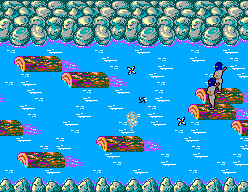
Bring back sega had the sega master system 1 and 2 we got the 2 from a car booty and what a console hours of fun I still get the mega drive hits for the ps but needs ninja I just remember the log level is there a remake I missing but not shinobi
0
No comment nor review for this game at the moment.

 English



Comments and reviews
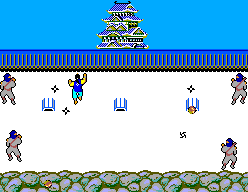
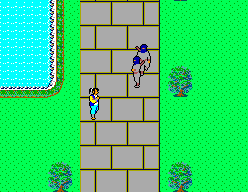
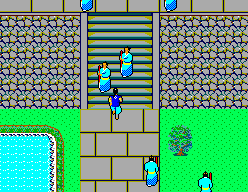
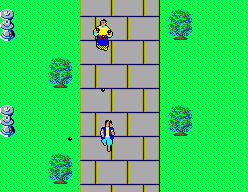
Steps to run games like The Ninja as ROM
Pasos para ejecutar juegos como The Ninja como ROM
1.http://www.mediafire.com/file/qvjldtbbz5gkvwa/Sega_Genesis_FrontEnd_v0.3b.zip/file
Enter the website and download: "Sega Genesis Front End V0.3b"
1. Ingresa al sitio web y descarta: "Sega Genesis Front End V0.3b"
(Note: That the emulator to download is "Sega Genesis")
(Nota: Que el emulador a descargar sea "Sega Genesis")
2. Once our emulator is downloaded, we are going to open it.
2. Una vez descargado nuestro emulador, vamos a abrirlo.
Folder: Genecyst App: Genecyst
3. Coincidentally, as it happens in other emulators (in this case with Sega Genesis), it will ask us to "Load a Rom". To do this, we should have already extracted the Text file that resulted in WinRar (The Ninja)
3. Casualmente como ocurre en otros emuladores (en este caso con Sega Genesis), nos pedirá "Cargar una Rom". Para ello, ya deberíamos haber extraído el archivo de Texto que nos dió como resultado el WinRar (The Ninja)
4. Next: After opening the Emulator, we will select "File", then "Load Rom"
And the Library will open, in order to find the Rom of the game or games that we want to run / Read.
4. A continuación: Luego de abrir el Emulador, seleccionaremos "Archivo", después "Cargar Rom"
Y se nos abrirá la Biblioteca, en pos de buscar la Rom del o de los juegos que queramos que ejecute/Lea.
5. Finally we look for the Rom of our game from within the Library window that the Emulator opened by default.
5. Finalmente buscamos la Rom de nuestro juego desde dentro de la ventana de la Biblioteca que nos abrió el Emulador por defecto.
a) With these steps we should already be playing The Ninja and other Rom games well. It is worth mentioning that depending on the game it is a different emulator. For Example: The Sega Genesis emulator will not make you read a Mario Bros. Rom.
According to the game, it is your Emulator.
a)Con estos pasos ya deberiamos estar jugando bien The Ninja y otros juegos de Rom. Cabe mencionar que dependiendo el juego es un emulador distinto. Por Ejemplo: El emulador de Sega Genesis no te hará lectura de un Rom de Mario Bros.
Conforme el juego, es su Emulador.
Buen día!
Espero que alguien logre ayudarme de mi duda.
¿Qué emulador necesita The Ninja para ser ejecutado?, tengo los archivos ya descargados, busco en internet el cómo hacerlo, pero nada soluciona mi problema :( . Por favor, un caballero o quien pueda orientarme. Muchas gracias!
Bring back sega had the sega master system 1 and 2 we got the 2 from a car booty and what a console hours of fun I still get the mega drive hits for the ps but needs ninja I just remember the log level is there a remake I missing but not shinobi
No comment nor review for this game at the moment.