You are on the beta version of My Abandonware. The live site is still myabandonware.com. Your favorites and ratings here are copied to the live site. Comments and other changes are not — we delete them every morning at 08:00 Paris time, when this site goes down for about an hour. Leave feedback through this link to Pastel (email required).
The beta goes down at 08:00 Paris time, in a few minutes. We rebuild the database from the live site. It comes back in about an hour.
wie starte ich das spiel und wie funktioniert das mit den ganzen ordnern?
0
Gabriel08 Oct. 2025
I had to close a lot of non windows pgrm in task manager and setup finally worked !!
0
PK5K18 Jan. 2025
Setup.exe didn't start for me (as installer for Porting Kit on MacOS M1), here's how to install the game manually (should also work for Windows):
1. Step only required using MacOS + Porting Kit:
- create a new port using the not working Setup.exe - I used following settings for the port: Engine = WS11WineCX21.2.0, OS = Win7, Window driver = XQuartz 11 - ignore the selection of an executable at the end of the installer
2. mount or extract the ISO file to access it's content 3. use a CLI tool like "unshield" to extract data1.cab of the ISO file (this is the whole game) 4. copy extracted folder into "C:\Program Files" and rename it to e.g. "BSR" (optional) 5. install patch 1.10b into "C:\Program Files\BSR\" 6. install patch 1.11b (= replace "C:\Program Files\BSR\Big Scale Racing.exe") 7. only on MacOS + Porting Kit: Set start executable of port to "C:\Program Files\BSR\Big Scale Racing.exe" 8. run the game
when asked for the serial keys: the last one worked for me.
have fun!
2
Ditarcul22 Oct. 2024
In case Setup.exe doesn't appear I found a solution to run it normally and play the game. Just close any programs you have open (especially on the right bottom windows bar), close all the duplicate setup installer processes and then try again (Be careful not to close any Windows processes), if it doesn't work try compatibility settings too.
To me the Setup.exe started as soon as i closed some programs (be careful again not to close Windows processes)
0
scriptoLAB14 Mar. 2024
Really amazing game ! Love it ! But I get an error while installing : a fil cannot be written (something with grass). Therefore the last two circuits have no ground texture. If someone knows how to fix it... Thanks.
0
Cyanity19 Mar. 2023
Game asks for CD. I extracted the ISO file, ran setup.exe, applied both of the patches provided. The only options i have when launching the game is "OK" (which doesn't do anything) and "Cancel" (which immediately exits the game). You gave some sort of serial number to download but there is nowhere to input those codes. So yeah, it's unplayable.
-2
Rggh26 Oct. 2021
proportional control with a game controller seems basically the same as a non proportional keyboard or d-pad. Anyone know if an actual joystick would make a difference?
1
Toni02 Jun. 2020
CRISPELL maybe your setup.exe file has disappeared due to the antivirus
-3
CrisPell02 Mar. 2020
Setup.exe doesn't appear on screen.
0
No comment nor review for this game at the moment.





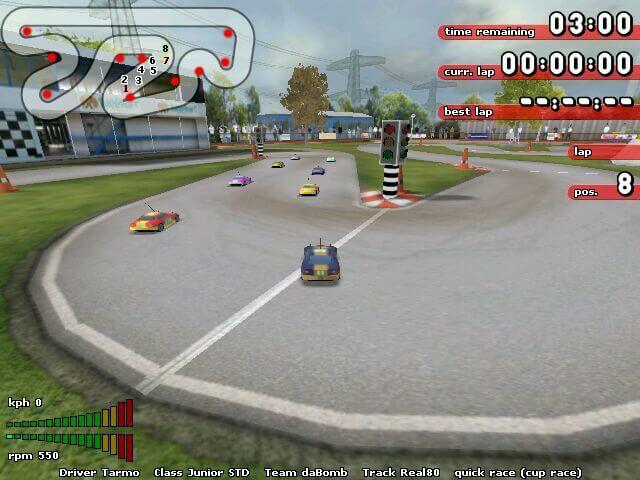


 English





Comments and reviews
theres just a bin file
wie starte ich das spiel und wie funktioniert das mit den ganzen ordnern?
I had to close a lot of non windows pgrm in task manager and setup finally worked !!
Setup.exe didn't start for me (as installer for Porting Kit on MacOS M1), here's how to install the game manually (should also work for Windows):
1. Step only required using MacOS + Porting Kit:
- create a new port using the not working Setup.exe
- I used following settings for the port: Engine = WS11WineCX21.2.0, OS = Win7, Window driver = XQuartz 11
- ignore the selection of an executable at the end of the installer
2. mount or extract the ISO file to access it's content
3. use a CLI tool like "unshield" to extract data1.cab of the ISO file (this is the whole game)
4. copy extracted folder into "C:\Program Files" and rename it to e.g. "BSR" (optional)
5. install patch 1.10b into "C:\Program Files\BSR\"
6. install patch 1.11b (= replace "C:\Program Files\BSR\Big Scale Racing.exe")
7. only on MacOS + Porting Kit: Set start executable of port to "C:\Program Files\BSR\Big Scale Racing.exe"
8. run the game
when asked for the serial keys: the last one worked for me.
have fun!
In case Setup.exe doesn't appear I found a solution to run it normally and play the game. Just close any programs you have open (especially on the right bottom windows bar), close all the duplicate setup installer processes and then try again (Be careful not to close any Windows processes), if it doesn't work try compatibility settings too.
To me the Setup.exe started as soon as i closed some programs (be careful again not to close Windows processes)
Really amazing game ! Love it !
But I get an error while installing : a fil cannot be written (something with grass). Therefore the last two circuits have no ground texture.
If someone knows how to fix it... Thanks.
Game asks for CD. I extracted the ISO file, ran setup.exe, applied both of the patches provided. The only options i have when launching the game is "OK" (which doesn't do anything) and "Cancel" (which immediately exits the game). You gave some sort of serial number to download but there is nowhere to input those codes. So yeah, it's unplayable.
proportional control with a game controller seems basically the same as a non proportional keyboard or d-pad. Anyone know if an actual joystick would make a difference?
CRISPELL maybe your setup.exe file has disappeared due to the antivirus
Setup.exe doesn't appear on screen.
No comment nor review for this game at the moment.