You are on the beta version of My Abandonware. The live site is still myabandonware.com. Your favorites and ratings here are copied to the live site. Comments and other changes are not — we delete them every morning at 08:00 Paris time, when this site goes down for about an hour. Leave feedback through this link to Pastel (email required).
The beta goes down at 08:00 Paris time, in a few minutes. We rebuild the database from the live site. It comes back in about an hour.
Limit FPS to 60 and install ONLY the D3D8.dll from dgVoodoo, should fix most of the issues. If you use dgVoodoo Control Panel and the mouse is still glitching, it's because the resolution in dgVoodoo doesn't match the resolution in the autoexec.cfg, so open that and change "screenwidth"/"screenheight" to the correct amount. Can also turn off splashscreens from this file if you want to.
3
Szymondro1123418 Jun. 2026
Why in this game and also Elite Forces Navy Seals, Elite Forces Navy Seals Weapons of Mass Destruction and Western Outlaw mouse completely dont work
0
fdsa15 Dec. 2025
this game does not seem to recognize mouse in game play and there is no way to configure it. it's unplayable without the mouse
1
JT16 Jan. 2024
I've used DXwnd and DGvoodoo 2 and still crashes. For some reason in event viewer it only mentions "Lithtech.exe"
-1
JT16 Jan. 2024
@BLOXIANCRAFT Running as admin and compatibility mode for windows 7 doesn't work and still crashes. Does anyone have any solutions? Thanks
0
LeRutY20 Nov. 2023
Limiting the fps to 60 and putting in the MS x86 dgvoodoo files in the game folder fixes the gamebreaking stuff (speed, graphical issues and crashes), mouse movement is still janky
1
Mr. Kroobs16 Jan. 2023
I tried to get dgVoodoo to work with no success. can start the game up but it wont let me press anything. D3d8to9 works but it fucks up the character models so I'm at a loss.
0
Dexter Gremory18 Nov. 2022
or try d3d8to9
0
Dexter Gremory18 Nov. 2022
Hi guys...if you have problems with high speed animations,fps (enemies etc.) try running these old games with dgVoodoo...this fixed the issues for me in many games...especially Global Operations which uses similiar engine...
-1
Phoenix03 Sep. 2022
Has anyone figured out how to fix the super speed and leathalness, and the not able to do anything but lean issues? i have the game running but all those issues are constant no matter what settings i use
0
Somerandomperson01 Jun. 2022
@hossahunter22 I have the original CD version and this exactly the same problem I face even on windows 10
1
hossahunter2210 Oct. 2021
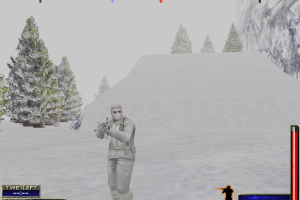
@BLOXIANCRAFT I'm having trouble looking left/right-up/down with my mouse... also the enemies seem to be super OP and way more aggressive (ie they charge down the hill in the opening level). The AK fire is also much faster than usual (sounds like it's being played at 3x speed). I'm playing on Windows 10 and I tried using the Windows 7 comp mode
1
bloxiancraft14 Sep. 2021
@JT try run in compatibility mode for windows 7 and run as administrator
-2
JT09 Apr. 2021
Tried to figure out how to run this game but it just crashes on start up, if anyone knows any tips or somehow manage to get this working comment or something ty, I am on windows 10 btw.
1
No comment nor review for this game at the moment.






 English



Comments and reviews
Limit FPS to 60 and install ONLY the D3D8.dll from dgVoodoo, should fix most of the issues. If you use dgVoodoo Control Panel and the mouse is still glitching, it's because the resolution in dgVoodoo doesn't match the resolution in the autoexec.cfg, so open that and change "screenwidth"/"screenheight" to the correct amount. Can also turn off splashscreens from this file if you want to.
Why in this game and also Elite Forces Navy Seals, Elite Forces Navy Seals Weapons of Mass Destruction and Western Outlaw mouse completely dont work
this game does not seem to recognize mouse in game play and there is no way to configure it. it's unplayable without the mouse
I've used DXwnd and DGvoodoo 2 and still crashes. For some reason in event viewer it only mentions "Lithtech.exe"
@BLOXIANCRAFT Running as admin and compatibility mode for windows 7 doesn't work and still crashes. Does anyone have any solutions? Thanks
Limiting the fps to 60 and putting in the MS x86 dgvoodoo files in the game folder fixes the gamebreaking stuff (speed, graphical issues and crashes), mouse movement is still janky
I tried to get dgVoodoo to work with no success. can start the game up but it wont let me press anything. D3d8to9 works but it fucks up the character models so I'm at a loss.
or try d3d8to9
Hi guys...if you have problems with high speed animations,fps (enemies etc.) try running these old games with dgVoodoo...this fixed the issues for me in many games...especially Global Operations which uses similiar engine...
Has anyone figured out how to fix the super speed and leathalness, and the not able to do anything but lean issues? i have the game running but all those issues are constant no matter what settings i use
@hossahunter22 I have the original CD version and this exactly the same problem I face even on windows 10
@BLOXIANCRAFT I'm having trouble looking left/right-up/down with my mouse... also the enemies seem to be super OP and way more aggressive (ie they charge down the hill in the opening level). The AK fire is also much faster than usual (sounds like it's being played at 3x speed). I'm playing on Windows 10 and I tried using the Windows 7 comp mode
@JT
try run in compatibility mode for windows 7 and run as administrator
Tried to figure out how to run this game but it just crashes on start up, if anyone knows any tips or somehow manage to get this working comment or something ty, I am on windows 10 btw.
No comment nor review for this game at the moment.