


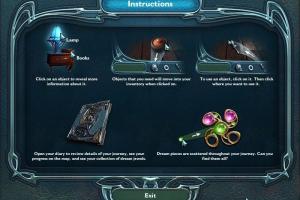
How to Play
Windows
CD version of the game includes a lot of "trash" files, that's why it is so big. The installed game takes up only about 20~30MB of space of the hard drive
Notes:
- The game is using SWF (Flash) videos, new versions of Windows OS doesn't support Flash technology anymore. Install Macromedia Flash 8 to play with in-game videos, or use an additional tool, like CleanFlash or Ruffle, to watch the in-game videos
- If the game doesn't start - add Dream.exe to the exceptions of DEP (Data Execution Prevention): Go to
Control Panel -> System Properties -> Advanced System Settings. From theSystem Propertiesdialog, selectSettings. Select theData Execution Preventiontab. Select "Turn on DEP for all programs and services except those I select". ClickAddand use the browse feature to show the path to the program executable you want to exclude, in that case Dream.exe inside the game folder. Here's the guide with pictures - If you see flickering of the screen or mouse cursor when you play - switch the game to Windowed mode in settings
Mac
Visit MacintoshGarden for more details about Mac version
 English
  French
  Russian





Comments and reviews
I remember this game. The graphics, audio and gameplay was worth playing. I remember purchasing this game on BigFishGames. I also played the sequels as well. I wish the the rest of the series were completed.
No comment nor review for this game at the moment.