




A Living Park on Your Computer!
Maxis seems determined to create a computer simulation for everything known to human civilization. Their latest is SimPark, which is designed to let kids ages 8 and up experience the pleasures and problems of designing and running a park that allows plants, animals, and humans to peacefully coexist. SimPark succeeds brilliantly at teaching kids (and adults too!) the importance of balance to an ecosystem.
Documentation, Installation, and Technical Requirements
SimPark comes with a 28-page jewel case insert manual that is more than adequate for getting the program up and running and running. An on-line tutorial makes it easy to get started building a park. The package also includes a 34-page Activity Guide so that parents and kids can take the lessons learned in the program and apply them in real-life parks. SimPark installs easily from the Windows 95 autoplay menu and can be uninstalled either from its included utility or the computer's Control Panel. A choice of hard drive installations is offered from as little as 3 MB to more than 90. The middle 60 MB installation seemed to work best on my Pentium 120 with 4X CD-ROM drive. A minor annoyance is that SimPark requires resetting the computer's video resolution to 256 colors. It's not much of annoyance, however, if you download and install Microsoft's Quickres "Powertoy," which does away with the need to reboot after resetting your video resolution. Click here to go to the Microsoft Powertoys page.
Playing the Game
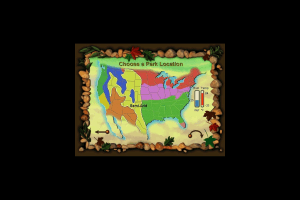
The first thing kids do in SimPark is choose a climatological area of the country for their park. Different climates support different plants and animals better than others and success in SimParkrequires awareness of this fact. There are three levels of difficulty in the game, which affect things like the speed at which changes occur and the player's budget. That's right, money management is an aspect of the game too! Kids have to keep their parks financially as well as ecologically viable.
Not to worry though.*** SimPark*** makes it easy to get a nice park going. Once the area the climate and difficulty level are chosen, players are presented with park overviews of several possible layouts. Some layouts are mostly land, some mostly water, and some are evenly divided between the two. Once the layout is selected, the park overview is always available to provide both a look at how the park is doing as a whole and for quick navigation from one point to another.
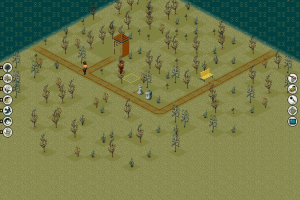
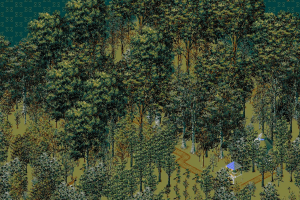
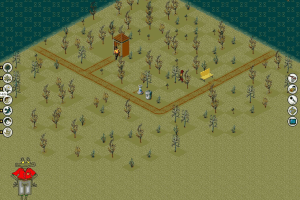
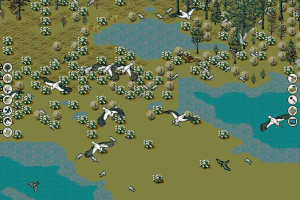
Once a layout is chosen, the view changes to an isometric view of a small portion of the park. Buttons down the left side of the screen allow the player to choose between such items as trees, shrubs, grasses and flowers, birds, reptiles and mammals. The player simply clicks on the desired category, then clicks on a choice within a category. After that, it's simply a matter of clicking on the place that the player wants the item to go and its placed. Thus, placing a row of trees, a grassy meadow, or a patch of daffodils is a snap. The same goes for animals. In no time at all the park starts to fill in, because what the player plants will attract wildlife from outside the park that has a natural interest in that species. Thus, if the player plants berries, bears will soon appear in the park whether the player placed them there or not. If it starts to seem confusing, Rizzo the frog is always on hand to offer advice, and the likes and dislikes of each species are well-explained in the on-line field guide.
The player must also take human visitors into account, because there is that budget to manage.SimPark, therefore, allows the player to place items in the park that will attract human visitors, such as carousels and refreshment stands. Humans, however, are a dirty species, and the player soon learns that its necessary to include the proper facilities and trash cans or the rat population of the park will start increasing alarmingly.
Speaking of rats. They're part of one of the four possible disasters that can strike the player's park. (What would a Maxis sim be without disasters?) The garbage dump disaster, naturally, includes the rats. The other possible disasters are fire, alien invasion (you need to look at the park overview screen to understand the consequences of this humorous "disaster"), and, a brilliant inclusion by Maxis, kudzu! As in other Maxis sims, the player can switch disasters off, or, if the player wishes to inflict instant mayhem on the park's population, any disaster can be called up immediately.
The Learning Game
Properly designing the park is not enough to win sustained praise and promotions from the head ranger. SimPark also requires the player to learn to identify the park's plant and animal life and to properly manage its animal and plant population.
Identification learning is handled by the "Identa-Species" game that the head ranger will insist that each player complete. A series of clues aids the player in identifying each species of plant and animal life in the park. The Identa-Species log is continuously updated as new species are placed or enter into the park from the outside.
SimPark also requires the player to understand the importance of ecological balance. The player soon learns that if no flat-leafed flowers are planted, the park won't attract bees. And if the park doesn't attract bees, pollenation won't occur and the park won't thrive. On the other side of the coin, the player must monitor existing populations for excess growth. Let too many deer run wild in the park and, just as in real life, they'll soon deprive the park of food for many other species. All-in-all SimPark is a marvelous program that allows kids to have fun while learning just how delicate the balance of nature really is.
Review By GamesDomain
 English
  German
  French
  Swedish





Comments and reviews
oh my childhood
Swedish :
https://archive.org/details/simpark_202406
OH MY NOSTALGIA
DAX Just search "INI" in the game folder and it will come up
https://www.google.com/amp/s/www.howtogeek.com/104725/how-to-use-dosbox-to-run-dos-games-and-old-apps/amp/
This helps walk through the basics of mounting, installing and running a game on DosBox
i don't know how to get into the ini file to edit it i looked up simpark.ini and nothing comes up, either i don't understand how it works or i'm doing something wrong... i wish i knew someone who could figure these things out that could come over and help me i don't learn from reading (my brain) i learn by seeing what and how to do things... maybe i just can't play ms dos games on my windows 10 maybe my computer is too advanced for it... I wish someone would make a new good park building game inspired by this game... little bit of a ramble typing... must have been possessed by stewie griffin(similar to his rambling writings, if you know that episode(was 1st or 2nd season (where he travels to jolly farm to live there with mother maggie)
For those of you who are running into problems with saved games, you need to edit the SIMPARK.INI file in the directory where SimPark is to reflect the full path of where it is installed.
For example, if you have it installed in c:\simpark, your SIMPARK.INI file should read:
[smacker]
path=c:\simpark\data
[spud]
main=c:\simpark\data\simpark.spd
soundz=c:\simpark\data\soundz.spd
pda=c:\simpark\data\computer.spd
rizzo=c:\simpark\data\rizzo.spd
[TUTORIAL]
path=
Hope that helps!
i also get the insert cd i do have a cd but it doesn't seem let me play it says something like this app can't run on your pc, and to look on the publisher's site
which i have never found one. i don't know if they even exist anymore since maxis is gone
Is there any way to save the game? And in what folder should you put game saves? Whenever I try to save a game it bugs out and says I should insert the CD. Any clues?
The game seems to play fine, but the animals are all wonky. They jump all over the screen and don't move smoothly like the original game. I tried different programs, settings, etc. to fix this, but I have yet to find a way to fix the animations.
If this doesn't bother you, you'll enjoy the game.
No comment nor review for this game at the moment.