You are on the beta version of My Abandonware. The live site is still myabandonware.com. Your favorites and ratings here are copied to the live site. Comments and other changes are not — we delete them every morning at 08:00 Paris time, when this site goes down for about an hour. Leave feedback through this link to Pastel (email required).
The beta goes down at 08:00 Paris time, in a few minutes. We rebuild the database from the live site. It comes back in about an hour.
Please consider adding the original version to Steam for owners of the re-release. I just bought Switchball HD only to find that it doesn't work properly on Windows 7 or 8.
-1
ATOMICELBOW17 May. 2021
The game is now re-released on Steam!
1
sOYLENT26 Apr. 2021
Try installing "NVIDIA PHYSX SYSTEM SOFTWARE 9.18.0907"
0
Edward_D16 Feb. 2021
VMware Workstation has much better 3D capabilities than Virtual Box, not playable with Virtual Box using lowest settings (just runs basically frame by frame). VMware has a 30 day trial.
Download the game, the two files, msvcp71.dll and msvcr71.dll, and PhysX version 8.09.04 (needs this version). Put the two files in C:\Windows\System32 (I put them in the game folder also just in case). Right click on the Switchball desktop shortcut and under the Compatibility tab, check 'Run this program as an administrator' and 'Run this program in compatibility mode for:' Windows XP (Service Pack 2) worked for me.
Under VMware Workstation, this runs almost perfectly. Just has some minor flickering, but it runs at full speed. Hopefully this helps somebody. Switchball is majorly worth the hours of effort to get running.
2
hitler814 Feb. 2021
Best game ever@!
1
Maddy01 Nov. 2020
I'm too computer illiterate to understand any of these comments. Thank you anyway.
1
POE19 Aug. 2020
Stop wasting your time trying to get things working on the horrid windows10, just build a retro machine based on amd socket 939
-10
Brouz31 Jul. 2020
I have the game and physx drivers installed in a windows 7 vm but the game still crashes right before getting to the main menu, can anyone help me out?
2
Zumfra06 Jul. 2020
After trying all propositions to make this game working under Windows 10, I finally installed Linux Mint 19 on a separate partition and proceeded as in this tutorial: https://www.myabandonware.com/howto/wine
Just one thing, when he says: Install Windows Dll,
dotnet40 dotnet452
Please install dotnet452 first then it install dotnet40 automatically. Installind dotnet40 first creating a final issue. After installing exactly as he says, the game works fine, and you'll have your first contact with Linux World! :-)
0
Zumfra03 Jul. 2020
Hello Nightwalker, what do you mean with "I just installed Win7 to be able to play this one and Black and White 1 without problems."? Where did you install Win7 on an other PC? On Virtual Box? and what is "Black and White 1"? Can you explain please exactly what you did and how you did it? Many thanks!
0
[deleted]28 Jun. 2020
Was trying to get this game to run on Windows 10 for 3 years. None of what I tried worked. In the end, I just installed Win7 to be able to play this one and Black and White 1 without problems.
0
ERTASDOUMV28 Jun. 2020
work in windows vista see in switchball+left mousetroubleshoot compatibility try the recommended settings to see
0
MAKE THUNDER13 May. 2020
I can confirm that the exe requires two .dll files that were a part of an older Visual C++ package.
I cannot get this to work, gives me the same errors as others, have redownloaded like it said. some feedback on how to fix this would be nice
1
littlewarrior9907 Apr. 2020
I can't get this to run after installing the dll and drivers.
2
dyn19 Mar. 2020
I tried everything I could to make this work on win10, including installing every .net framework and every C++ Redistributable, also copied the MSVCP71.DLL by hand into the system32 and the game folder... Also compatibility did not work at all - I don't think this is playable on windows10 :(
1
DarkStarChaos17 Feb. 2020
I first played the demo on the Xbox 360 and I fell in love with this little hidden gem. It set the stage for what I look for in a puzzle game. I was very exited when I found out that there was a PC version too. I still haven't had the time to finish it unfortunately.
I loved the simplicity of the gameplay and the uniqueness of the puzzles. I loved the level design, the art direction, but the atmosphere I loved even more. The developer made a game that I truly enjoy and I hope that you enjoy it too...
0
Retro Drew29 Jun. 2019
The MSVCP71.DLL is a Microsoft Virtual C++ Redistributable file if I remember correctly so you would have to download it there.
1
old_timer06 Mar. 2019
In windows 10 it gives the following error codes: MSVCP71.DLL was not found MSVCR71.DLL was not found
I installed the PhysX driver first. Does anyone know how to run this thing?
1
Atomicelbow14 Feb. 2019
Be sure to install the PhysX driver, should be included in the original installer.
-6
NN_11504 Feb. 2019
I can't play it on windows 10
4
No comment nor review for this game at the moment.
Buy on Digital Stores
Switchball is available for a small price on the following website, and is no longer abandonware.
Comments and reviews
Please consider adding the original version to Steam for owners of the re-release. I just bought Switchball HD only to find that it doesn't work properly on Windows 7 or 8.
The game is now re-released on Steam!
Try installing "NVIDIA PHYSX SYSTEM SOFTWARE 9.18.0907"
VMware Workstation has much better 3D capabilities than Virtual Box, not playable with Virtual Box using lowest settings (just runs basically frame by frame). VMware has a 30 day trial.
Download the game, the two files, msvcp71.dll and msvcr71.dll, and PhysX version 8.09.04 (needs this version). Put the two files in C:\Windows\System32 (I put them in the game folder also just in case). Right click on the Switchball desktop shortcut and under the Compatibility tab, check 'Run this program as an administrator' and 'Run this program in compatibility mode for:' Windows XP (Service Pack 2) worked for me.
Under VMware Workstation, this runs almost perfectly. Just has some minor flickering, but it runs at full speed. Hopefully this helps somebody. Switchball is majorly worth the hours of effort to get running.
Best game ever@!
I'm too computer illiterate to understand any of these comments. Thank you anyway.
Stop wasting your time trying to get things working on the horrid windows10, just build a retro machine based on amd socket 939
I have the game and physx drivers installed in a windows 7 vm but the game still crashes right before getting to the main menu, can anyone help me out?
After trying all propositions to make this game working under Windows 10,
I finally installed Linux Mint 19 on a separate partition and proceeded as in this tutorial:
https://www.myabandonware.com/howto/wine
Just one thing, when he says: Install Windows Dll,
dotnet40
dotnet452
Please install dotnet452 first then it install dotnet40 automatically. Installind dotnet40 first creating a final issue.
After installing exactly as he says, the game works fine, and you'll have your first contact with Linux World! :-)
Hello Nightwalker, what do you mean with "I just installed Win7 to be able to play this one and Black and White 1 without problems."?
Where did you install Win7 on an other PC? On Virtual Box? and what is "Black and White 1"?
Can you explain please exactly what you did and how you did it?
Many thanks!
Was trying to get this game to run on Windows 10 for 3 years. None of what I tried worked. In the end, I just installed Win7 to be able to play this one and Black and White 1 without problems.
work in windows vista see in switchball+left mousetroubleshoot compatibility
try the recommended settings to see
I can confirm that the exe requires two .dll files that were a part of an older Visual C++ package.
One is MSVCP71.dll and the other is MSVCR71.dll
dll-files.com has both of these files. I downloaded the newest versions for each file and copied them to the Switchball folder that contained Switchball.exe the game loaded on Windows 7 64-bit. You may perform virus analysis on either file.
https://www.dll-files.com/msvcp71.dll.html
https://www.dll-files.com/msvcr71.dll.html
I cannot get this to work, gives me the same errors as others, have redownloaded like it said. some feedback on how to fix this would be nice
I can't get this to run after installing the dll and drivers.
I tried everything I could to make this work on win10, including installing every .net framework and every C++ Redistributable, also copied the MSVCP71.DLL by hand into the system32 and the game folder... Also compatibility did not work at all - I don't think this is playable on windows10 :(
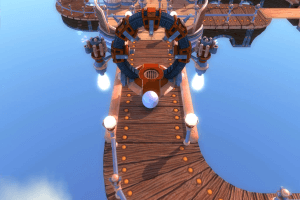
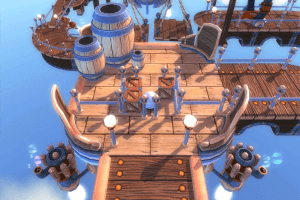
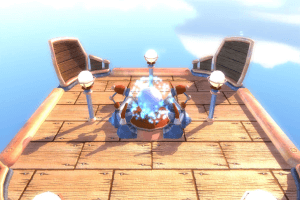
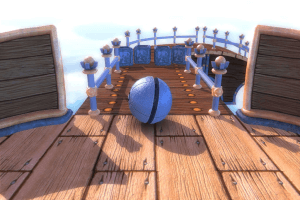
I first played the demo on the Xbox 360 and I fell in love with this little hidden gem. It set the stage for what I look for in a puzzle game. I was very exited when I found out that there was a PC version too. I still haven't had the time to finish it unfortunately.
I loved the simplicity of the gameplay and the uniqueness of the puzzles. I loved the level design, the art direction, but the atmosphere I loved even more. The developer made a game that I truly enjoy and I hope that you enjoy it too...
The MSVCP71.DLL is a Microsoft Virtual C++ Redistributable file if I remember correctly so you would have to download it there.
In windows 10 it gives the following error codes:
MSVCP71.DLL was not found
MSVCR71.DLL was not found
I installed the PhysX driver first. Does anyone know how to run this thing?
Be sure to install the PhysX driver, should be included in the original installer.
I can't play it on windows 10
No comment nor review for this game at the moment.