


How to Play
3 CD version includes US release of the game and has only English language. DVD version includes European release and has 4 available languages: English, Deutsch, Italian and Spanish, with voice acting in all languages.
The game with widescreen fix and NoCD has been tested on Windows 7 64-bit and Windows 10, works with no problem
Install & play guide:
- Mount the disc image of CD1/DVD. You will need the utility for mounting disc image files, like WinCDEmu, UltraISO, Alcohol 52%/Alcohol 102% or Daemon Tools Lite
- Launch the installation (autorun requires Macromedia Flash Player for work, if autorun doesn't work - simply launch the installation from Setup.exe inside the disc)
- It is recommended to install the game not in default path, but in some other, non-system folder, like
C:/Games/Ultimate Spider-Man, so you won't have troubles with NoCD or fix - For CD version: When the installation process will ask for CD2 - mount the disc image of CD2. Do the same when the installation process will ask for next discs
- After you installed the game - install NoCD, simply copy USM.exe from the archive and put it into game folder, agree to replace original file
- Optionally install Widescreen fix by ThirteenAG - simply copy all files from the archive in game directory as it is, including the whole "Scripts" folder (not just files inside but the folder itself)
- Also make sure that you enabled DirectPlay if you didn't make it before, read this or this guide how to do it (if you're using Windows 7 or older - just install DirectX from the disc)
- Launch the game and play. If the game doesn't run - open the directory with the game and find USM.exe. Right click on USM.exe - Properties - Compatibility - Set "Run this app in compatibility mode with Windows XP"
Full-Rip is based on CD version, NoCD and widescreen fix are included
Notes:
- If the installation doesn't start - try to launch Setup.exe in compatibility mode with old version of Windows (98, 2000 or XP)
- NoCD is required for the launch because the game is using SafeDisc DRM protection, which doesn't work correctly on modern systems. That NoCD "breaks" DRM protection and allows the game to work on modern systems
- It is recommended to install all versions of Microsoft Visual C++ Redistributable, and NET Framework for the correct work of the game for the correct work of the game
- Also it is recommended to install RAD Video Tools and K-Lite Codec Pack for the correct work of the game
- The game works on DirectX 9, so if you're using Windows 8, 8.1, 10 or 11 - you need to enable DirectPlay: Go to Control Panel, and select 'Programs'. Select 'Turn Windows features on and off', click on 'Legacy Components' and check the box 'DirectPlay'. Select OK, once the installation is done, restart your computer
- In order to play the game on Windows 10 - install both Widescreen fix and NoCD, otherwise it may not work correctly
- On Windows 11 and latest updates of Windows 10 the game crashes on startup, for many users. In that case use Vulkan translation layer, which will make the game work through Vulkan API, that should help
- The game's screen refresh rate is always locked on 60 Hz in Fullscreen, even if you have the display with higher screen refresh rate. But it is possible to play with high refresh rate - you can use d3d9-wrapper by ThirteenAG or Special K app. Both methods should be compatible with Widescreen fix, but note that it may result in FPS drop on low specs. Alternatively, you can enable Windowed mode in UltimateSpiderMan.WidescreenFix.ini and run the game in Borderless Windowed mode with Borderless Gaming
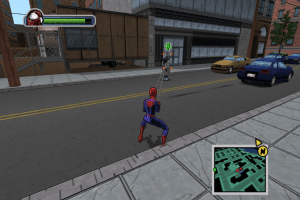
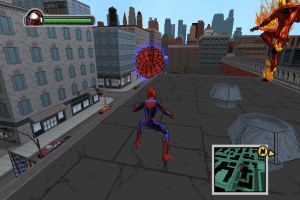
- If you have problem with HUD elements, like you don't see the minimap background - open UltimateSpiderMan.WidescreenFix.ini and change
FixHUD = 1toFixHUD = 0. The interface will be stretched, but all elements and the minimap will display normally - With widescreen fix you may see minor issues in cutscenes, like some 3D models that should be outside the scene but you see them anyway. That happens because most of cutscenes are on game engine and were designed for old 4:3 displays, not modern widescreen displays
- Some players complained about minor visual bugs, like flickering textures on some models. That happens not because of NoCD or fix, it is specifics of the game itself
- Also, in some cutscenes audio doesn't synchronize. It is specifics of the game too, the possible solution can be to lock the framerate at 59 FPS, try to set framerate limit in UltimateSpiderMan.WidescreenFix.ini to 59. Or cap the game's framerate in control panel of your video card, or with framerate limiter
- Make sure to complete all tutorial missions when you play the game for the first time, you get the option to make save games only if you complete the tutorial
- There can be a rare bug when you cannot play after some point in the game, even if you completed the mission. In that case you can use New Game Plus Save File that unlocks all missions in game, or Debug menu mod where you can set your progress
- Don't forget to check PCGamingWiki if you have troubles
 English
  German
  Italian
  Spanish
  Polish







Comments and reviews
fgdshttps://www.myabandonware.com/game/ultimate-spider-man-jic#
nice super to play and interesting
I used the full rip and it runs like a dream. I've had issues with getting games to work on this site. whoever did this full rip is a absolute G! Modded and even a read me that tells you exactly how to get it installed. One of the few games where you can play as Venom. Thank you to whoever got this together. BRAVO!!!
hermoso y muy infancia
when i try to save it says "save failed" and "insufficient space on the hard drive" and i do have space
i tried everything i found so if you know a fix email me on tomerratson11@gmail.com since u cant reply here
Good old games 😄
goood game ✨✨✨✨✨
i run it smooth on windows 7 version
The game seems to work on Windows 11 now, as of writing this. But I do not think that the game has a complete gamepad support.
It is a best game
??????????
hello, someone managed to run polish version of the game?
É seguro. Sem virus por aqui. Jogaço marcou minha infancia
This game is full are crack version
every time i open it it crashes i have a 2k$ PC so it like cant be my PC
I love this game
it very best game
J, aime bien mais je peux pas l, instale mon papa me la interdi
The game doesn't seem to create a Save Folder for me, Whenever I try to save (after playing through the tutorial) it simply says "save failed" and then "insufficient free space on the hard drive" needless to say, I do have sufficient space on my hard drive.
Would really appreciate any help with resolving this issue.
P.S I've already tried things like, disabling controlled folder access, disableing One Drive and trying to play through a different windows account. Tho, that was a while ago.
i dont have th sound.cab file
I like it. it is a great game and good graphics to me
Any hope for a download of the French version of the game? 🙏🙏
An update. If it crashes on the first screen, run it as administrator. It's fast and simple. I don't know why I didn't think of that to begin with lol.
The game appears to crash whenever I open it? My pc can run it as it can run high end games, so why is it crashing? Help would be awesome thank you!
So I did everything it took hours for me but when I would get to the opening screen and I press start it shuts off and when I try starting it again it won’t work I’m doin something wrong so could someone help me
it doesont work in german. cann someone help me
it the spider
like it much
is a cool game i like
i also like other game too
these are here al together
and downloading
them now
This game sucks!
Dudes, is the Bonus Disc just a Behind the Scenes video or is there more to it?
Work great in W10 (2024)
Thank you!!!!
Was working fine for a while and all of a sudden won't open. Reinstalled it too. Any time I open it, it forces itself into full screen which is normal but straight away, it minimizes itself so I can't play it. This happening to anyone else?
Because I didn't play this young I think I missed all of the fun on the console thank you for letting me play this :)
THANKS FOR THIS GAME I WANT JAMES BOND OO7 IN 1GB PLEASE
This is a great Spidey game, glad to see it here :-) I am so going to enjoy it again.
An underrated game. The modern Spiderman games are usually quite good and this one usually gets overlooked. I always really liked the game.
I updated the guide a little bit, added some new advise for possible troubles. Looks like the game really doesn't work on Windows 11 and some of revisions of Windows 10, PCGamingWiki recommends to use Vulkan API translation layer in that case https://www.pcgamingwiki.com/wiki/Ultimate_Spider-Man#Fix_crashing_on_startup_on_later_versions_of_Windows_10.2F11
So this game worked for me for a time until a Windows 10 update earlier this year had dropped, basically rendering this port of the game somewhat dead. Tried various fixes and nothing seems to work. There's only one I haven't tried, but it seems to create a point of vulnerability to your OS, which shouldn't be an option anyone should have to settle with. If there's anyone out there that's able to have this run without an instant crash on modern hardware, I'd love to pick your brain.
I am running the CD version, i did everything as intended, downloaded the fixes and set the compatibility and it still doesnt run help
It is an awesome. Game
Hey, for anyone who has the cutscene syncing issues: after struggling to find an answer, I managed to fix it, at least for myself (some folks never seem to have the issue, so I can't promise it'll work for everyone).
For whatever reason, using a program to limit the framerate to 59 fps fixed the problem for me. I used the nVidia control panel myself, but you could also use RivaTuner or another such program.
Using the rip on windows 10. Every time it tries to load the wolverine fight the game crashes. Already tried running as admin with windows xp (service pack 3) compatibility enabled
is there a way to play in windows mode
does anyone else have issue's with audio not syncing in cutscenes?
For those of you who can't save the game: all you have to do is to play through the tutorial, because after you do the game will automatically create a save folder. Hope this helps, enjoy!
Can't seem to save, any fixes for this?
This game is insane ,I love it
@PCGAMER90
If you have artifacts during cutscenes - try to disable HUD stretching (open UltimateSpiderMan.WidescreenFix.ini and change FixHUD = 1 to FixHUD = 0). Cutscenes are working on game engine, most of them are not pre-rendered, maybe the artifacts is the result of conflict with widescreen fix
update: it does save my progress the game now works flawlessly
It doesn't save my progress
The rip works great in Win 10 from what I can tell. Some of the cutscenes do have artifacts, but that experience might be subjective to me. Other people might not have these problems.
No comment nor review for this game at the moment.