


How to Play
The game has been tested on Windows 7 64-bit, Windows 8 and Windows 10, it works fine. You may experience some small troubles when you play the game on modern systems, check our Guide and Notes for troubleshooting
Install & play guide:
- Mount the disc image with virtual drive utility, like WinCDEmu, UltraISO, Alcohol 52%/Alcohol 120% or Daemon Tools Lite, etc.
- Install the game (if the installation doesn't start - launch Setup.exe in compatibility mode with Windows 95 or 98). It is recommended to install the game not in default path, but in some other, non-system folder, like
C:/Games/The King of Fighters Evolution, so you won't have troubles with fixes - Open the game folder and find KOF99.exe. Right-click on KOF99.exe -> Properties -> Compatibility -> Set "Run this app in compatibility mode with Windows XP" and "Run as Administrator"
- Launch the game and play, the disc must be mounted in virtual drive. If the game doesn't start - try to run it again, sometimes the game may show error at the first few starts
Notes:
- If the game doesn't work in compatibility mode with Windows XP - try to launch it in Compatibility mode with other old version of Windows, like Windows 95, 98, 2000, etc.
- It is recommended to install all versions of Microsoft Visual C++ Redistributable and NET Framework for the correct work of the game. Also it is recommended to install K-Lite Codec Pack for the correct work of in-game videos
- The game works on DirectX 7, so if you're using Windows 8, 8.1, 10 or 11 - you need to enable DirectPlay: Go to Control Panel, and select 'Programs'. Select 'Turn Windows features on and off', click on 'Legacy Components' and check the box 'DirectPlay'. Select OK, once the installation is done, restart your computer
- The game is using CD Audio music, so in order to hear the music, you must mount the disc in virtual drive. Alternatively, you can rip the audio tracks in OGG-format and use ogg-winmm CD Audio emulator
- If you have troubles with running the game on modern systems, use dgVoodoo 2 or DxWnd utilities. If you play the game with DxWnd, don't forget to use CDAudio proxy for DxWnd
- The game works only in 640x480 screen resolution, the in-game image will be stretched to Fullscreen if you run it on bigger display. But you can run the game through dgVoodoo 2 or DxWnd utilities and set the higher screen resolution or enable the forced Windowed mode to play in original 640x480 window
- The game has the framerate cap at 60 FPS, it is not recommended to unlock the framerate cap with any extra tools, like Special K or similar, because the game speed is tied to the framerate
- The game has full controller support, it supports both DirectInput and XInput devices and should work fine with any type of gamepads. However, you cannot remap the gamepad controls in the game. If you want to remap the controls, you will have to use one of the extra tools from PCGamingWiki guide for controllers. Also, we recommend to check that guide if the game doesn't recognize your gamepad
- You can play the game in Local play for 2 players, either on one keyboard or two connected controllers (2 keyboards or gamepads). Before running the game in Local play, don't forget to select & configure the controllers in Configurater.exe. The game doesn't have support of LAN or online multiplayer, but you can try to play it online with emulators of Local play such as Remote Play Together, check this page for more details
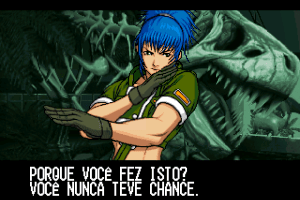
- Even though that the English version has the option to select Spanish and Portuguese languages (check the screenshot), that option doesn't change the language of menu and interface, the user interface stays in English. That option affects only the subtitles for in-game videos
- Don't forget to check PCGamingWiki page if you have troubles!
 English
  Japanese






Comments and reviews
Hola! finalmente encontré cómo jugar este tremendo KOF 99 Evolution, que para mí es de los mejores, independientemente de los juegos posteriores.
EL problema que he tenido es el audio: no puedo jugar KOF con sonido alguno.
No comment nor review for this game at the moment.