You are on the beta version of My Abandonware. The live site is still myabandonware.com. Your favorites and ratings here are copied to the live site. Comments and other changes are not — we delete them every morning at 08:00 Paris time, when this site goes down for about an hour. Leave feedback through this link to Pastel (email required).
The beta goes down at 08:00 Paris time, in a few minutes. We rebuild the database from the live site. It comes back in about an hour.
The Need for Speed Special Edition on modern Windows
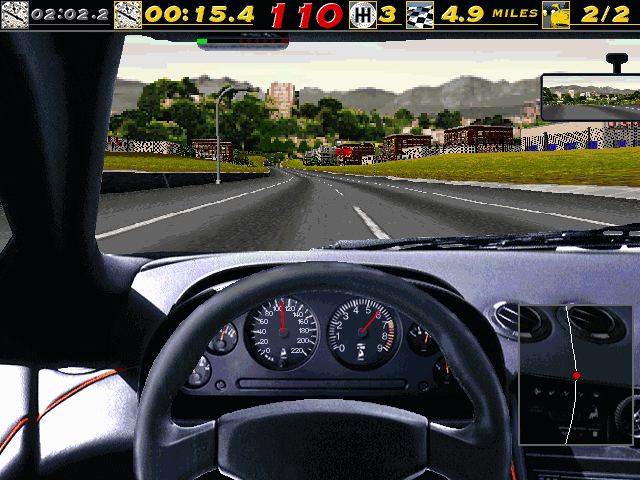
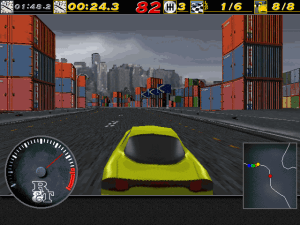
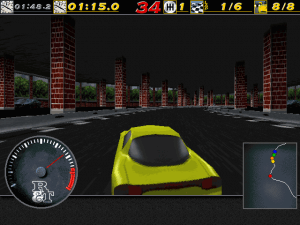
NFSSE is my independent compatibility and preservation project for the Windows version of The Need for Speed Special Edition. Its goal is to make the original game easier to install and enjoy on modern Windows while preserving its engine, artwork and gameplay.
Features - Portable installation: game files, settings, records and saves stay inside the game folder. Move the complete folder to relocate it. - Borderless fullscreen scaling and a movable window, preserving image proportions and the original 640×480 gameplay rendering. - Fixes addressing legacy startup, memory detection, video playback, menu presentation and keyboard focus problems. - Player-name persistence, settings and records saved on normal exit, and corrected disk-space checks for modern drives. - Optional English, German and Japanese selection. Japanese requires your own supported Japanese media. - Normal play without the physical CD after installation.
Quickstart You need your own supported English Windows Special Edition media and approximately 520 MB of writable space. The installer validates the supported executable; other builds and the DOS version are unsupported.
1. Download and fully extract the patch-kit ZIP linked below. 2. Run Install-NFSSE.cmd. 3. Select the media folder containing NFS_WIN.EXE and choose a new, empty destination, such as C:\Games\NFSSE. 4. Optionally enable language selection and supply Japanese media. 5. After installation succeeds, launch NFSSE.exe from the destination. No administrator rights, Python or Visual Studio are required. Use the game's Save/Load controls for tournament progress, and back up GAMEDATA before updating.
AI assistance AI tools, including OpenAI Codex, assisted with executable analysis, compatibility code, test tooling and documentation under my direction. I also performed hands-on play checks. Testing includes Windows 11, but exhaustive championship, multiplayer and other-system coverage remains incomplete.
Disclaimer As project owner and build provider, I provide this software “as is,” without warranty. Use it at your own risk. To the extent permitted by applicable law, I accept no liability for data loss, damage or other consequences arising from its use. Back up your saves and existing installation. This project is unaffiliated with Electronic Arts. The patch kit contains no original game executable, artwork or audio; you must supply your own media. Original game rights remain with their respective owners. Project code and documentation are MIT-licensed.
To be honest, I never played original two Need for Speed games. Cause my journey with it started with Need for Speed Underground 1 and continued on with games after that. But I played most of the old NFS games these days and they cool to some degree. So I will maybe give this one a shot.
6
YOU_ROCK_THANK_U16 Nov. 2023
Top comment
the trick is using DOSBOX ECE version... their site is not up anymore, you have to get on Web Archive... I could not get the RIP version to work... mount ISO, install game (recommended install, no need to copy any files to disk, keep the ISO it's just 200 MB difference) Play game normally with ISO command: imgmount D .\NFS.ISO -t iso Dosbox ECE running at 148.000 cycles
6
Gab_Avant24 Sep. 2023
NERD's guide in this thread absolutely works !! Win10 64bits. Thank You!
2
grumpyzimum23 Sep. 2023
NERD's guide in this thread absolutely works, could not have gotten this working without it!
0
BUZ30 Apr. 2023
The Rip version is 1/5 the size of the ISO? What kinda black magic is that? Isn't the Rip just the CD files in folder format? Can anyone explain how that works to me?
-1
Universal G01 Apr. 2023
FYI for people trying to install it in Windows 98SE and are having issues. Do this, it worked for me. Right-click on the Desktop, select Properties, then click on the Settings tab, click the Advanced button, then click the Performance tab and lower the Hardware Acceleration slider by 1-2 notches. After doing this, both the installer and the game worked for me.
2
Acn1502 Jan. 2023
You can use this guide for installation. https://www.youtube.com/watch?v=QuI8DNda3Ko (Credit to FLAKKA - 2018) Also you can use any other mounting tools rather than Daemon Tools.
Any reliable fixes for the Windows version? They only seem to work for a while.
1
Troels10 May. 2022
I got no sound, and searched everywhere for a solution. Found out you'll need to edit nsf.bat : remove "no sound" and just write AWE and the save the file. Then use nfssb.bat as the executive file instead of TNFS.exe In-game options, change audio to 16-bit stereo.
1
sss01 Feb. 2022
I don’t know how to use it on win10
-1
Moses20 Jan. 2022
Actually it's amazing to have an old dos pc... yeah that's why I don't struggle using dosbox ...
-4
kvakec21 Jun. 2021
guys, for dosbox users, it's much easier to work with D-Fend Reloaded ver. of dosbox
1
MateusAuri03 Apr. 2021
I was having some trouble with some "openhandle mouse.fsh FILE ERROR" messages when trying to start it, and then, no sound at all when I got to force it to work. It seemed to be a problem with the installer, which didn't keep my settings properly for some reason. If you're having any of these problems I've mentioned, just try reinstalling. That did the trick for me.
Oh, and by the way, you don't need to open the .iso file to be able to mount it in DOSBox. You can simply mount it straight from the file, with this command:
imgmount d [INSERT THE PATH TO THE ISO FILE HERE] -t iso
And running the UNIVBE.EXE driver before installing the game will make the video test display properly. Not sure if it helps in any other capacity, though.
0
John Mooth23 Feb. 2021
Can work on Windows 10?
-2
John Mooth23 Feb. 2021
The RIP Version needs a CD, can you help me? how to run on DosBOX?
0
Wood21 Feb. 2021
And also, the car never moves, I press the accelerate key, and it just revs but doesn't move, that's also annoying
0
Wood21 Feb. 2021
To - NERD I did do everything you told to do, although my resolution is still 680*300 (something like that), could someone help me with that ?
-1
jetdogy21 Feb. 2021
It runs with window 10 but no sound!
0
sahani06 Oct. 2020
one of the best pc game ever 90 kids era
2
vrekman24 Aug. 2020
Very good comments. I'll add one for the controllers: Steering with the keyboard is very slow. Use an analogue controller for both steering and throttle/brake. Using analogue controls may lead to better times too. I assume that you have and xbox controller or something similar, with analogue stick and analogue triggers (I have a logitech F310). I also assume that you use dosbox svn r4356 or later. Also joystick in dosbox conf file should be "auto" --it is by default.
After installation of the game on the dosbox command prompt in the installed game folder, use jcu.exe and select "generic 4 button joystick" map the buttons as you like, or change them around, press F1 for help on this topic, although default mapping is ok. On the axis configuration page, select only axis X and Y (put "No" to the other 2 axes). Save configuration of jcu.exe and run game. Calibrate the 2 axes in control options (move around the left analogue until the circle stops jerking). Make sure you select analogue steering and throttle/braking (joystick left/right - joystick up/down) from the same menu. Run a test and make sure that pressing the up and down on the left stick accelerates and stops successfully.
NOW
press Ctrl+F1 and enter keymapper. Click Y- axis button on the first box and then "add" button. Press the right trigger on your controller. Click Y+ axis button on the first box and then "add" button. Press the left trigger on your controller. You can also assign 'a' and 'z' keys to the bumper buttons for gear change using the same method, but that's personal preference. Click save and exit. Now you have somehow "modern" controls for this very old game. I hope I helped
2
Dinscer15 Aug. 2020
To Ali Amir,you can't download it on Mac,You need Dosbox to run this game
0
pissblast06 May. 2020
one of the first games i bought for the ps1 , great soundtrack but the game is shockingly bad , like tring to steer a brick , perhaps the DOS version is different ?
0
Dosdosdosdosdosdosdosdosdosdosdosdos30 Mar. 2020
Woud it come on the dos box so i can play it right here on the browser :P ?
0
HELP!20 Mar. 2020
Can you run this on winXP? Please tell me soon.
2
Nerd05 Oct. 2019
Top comment
This is the only way to get the best version of The Need for Speed, thanks a lot MyAbandonware!
How to play the game on Windows 10, with a desktop shortcut and the manual.
1. Create the folder NFSSE in Windows (C:)
2. Download the ISO version of the game in the bottom of this page. Go to the download folder and transfer the game to the NFSSE folder you created, it will extract it. Go to the NFSSE folder and double-click on the game, it will mount it.
3. Download UniVBE here : http://bit.ly/1FiaQCK . Extract it to the NFSSE folder.
4. Download DosBox and install it.
5. Hit the Windows key and find the DosBox folder, open it and launch DosBox Options. Hit Ctrl+F and search "autoexec". You see this :
"[autoexec] # Lines in this section will be run at startup. # You can put your MOUNT lines here."
Add the following lines and it must be looking like :
"[autoexec] # Lines in this section will be run at startup. # You can put your MOUNT lines here.
mount c c:\NFSSE mount d f:\ -t cdrom"
Close DosBox Options and save the changes.
6. Launch DosBox. Type "D:", hit enter. Type "INSTALLD.EXE", hit enter.
7. Click on Install. Choose automatic for the sound card, click on Done. Click on Done again, a weird video bug might appear but don't worry. Choose "Custom Install" and choose all options to reduce load time in-game, click on "Done". The game is installed but "Play" doesn't work, don't click on it. Click on "Exit", hit any key, type "exit" and hit enter.
8. Open DosBox Options again. Hit Ctrl+F and search "machine=" . You see this :
Change "svga_s3" by "svga_et4000" . It solves the video problem.
9. Hit Ctrl+F and search "autoexec". Add the following lines, it must looks like this now :
"[autoexec] # Lines in this section will be run at startup. # You can put your MOUNT lines here.
mount c c:\NFSSE mount d f:\ -t cdrom c:\univbe.exe c: cd NFSSE nfs"
10. Go to Programs in Windows (C:) and find the folder DosBox, open it, find DosBox and send a shortcut to your desktop using right-click. Then right-click on the shortcut to change the logo. You can find the logo in the NFSSE folder.
11. The Need for Speed - Special Edition manual is not available. However, thanks to MyAbandonware, the manual for the original The Need for Speed is available here : https://dl.myabandonware.com/f/cj7/The-Need-for-Speed_Manual_DOS_EN.pdf .
12. You can now enjoy The Need for Speed as if you had downloaded it from GOG!
37
sally20 Aug. 2019
It has been a while since I have run NFSSE this way but try running it by mounting the whole .iso to a virtual dvd drive.
0
JOHNNY10 Apr. 2019
Hi may I know if this game is working to windows 10 64bit amd ryzen
-5
general waste14 Jan. 2019
for those complaining about dos box not working. get an old laptop from ebay. smtg like 100-200 mhz processor and 32mb ram. play dos games like a baus
-1
Ali Amir28 Nov. 2018
How do you launch it on Mac? I downloaded the game from ISO version already but I can't launch the game!
-2
cheese01 Nov. 2018
thanks so much flakka and thanks to the person who made that youtube video, now I can play NFS :-)
1
Flakka21 Oct. 2018
Man I remember playing this game when I was 5 on a DOS machine..good times.
For those having issues, I used this method to run and install it:
https://www.youtube.com/watch?v=QuI8DNda3Ko
Download the ISO, get Daemon Tools, and DBGL (DosBox Game Launcher, trust me it works better than DosBox alone. It actually works for me whereas if I do DosBox with a different install it won't cooperate and not start at all) I haven't got the videos working, but the game overall works just fine.
Have fun!
2
Abe17 Oct. 2018
When using ISO in DosBox following commands might work. imgmount d NFS.ISO -t cdrom D:\INSTALL
1
cheese06 Oct. 2018
None of these work for me. ISO and rip. Dos and Windows. Like another poster said, I installed the DOS version, and I go to run it but gives the dos4gw thingy. I didn't copy the ISO to a CD first, I just used winrar to extract it. Should I have put it on a CD/DVD first instead? Sorry if this is a stupid question.
0
Gibus Sniper05 Sep. 2018
@Giovanni mount your CD/ISO like this: mount d e:\ -t cdrom If that doesn't work make sure your NFS ISO is mounted or it will think your running a bootleg game!
0
Flemmong17 May. 2018
How many hours I have used back in the 90's on this one! Soo great to play again!
0
Giovanni31 Mar. 2018
Hi! Great game, however I think there's a problem: I've downloaded the ISO, the I installed successfully the game. After the end of installation it says to use the command nfs in order to start the game and it works actually. However, as soon as I close DosBox and try to execute nfs it doesn't start, indeed it is stuck at "DOS/4GW Protected Mode Run-time Version 1.97" etc. Is it a problem of the game or I made something wrong with the installation?
-1
Android7807 Feb. 2018
Hello, I'm new to the dosbox thing. I've managed to download a few games and do the drag and drop thing. However, I'm desperate to play nfsse. Not sure how to get it to run as a message saying : Using joystick USB Gamepad with 2 axes, 10 buttons and 0 hat(s) MAPPER: Loading mapper settings from C:\Users\HPOwner\AppData\Local\DOSBox\mapper-0.74.map DOSBox switched to max cycles, because of the setting: cycles=auto. If the game runs too fast try a fixed cycles amount in DOSBox's options. CPU speed: fixed 3300 cycles. CPU speed: fixed 3630 cycles.
Similar message comes up even without a joybpad plugged in. Any advice would be much appreciated.
1
A.MANAN28 Nov. 2017
Its really a best game for pc ,with best graphics .I enjoyed it very much
0
ssr22 Mar. 2017
It works for me on Mac with boxer. The rip version of SE didn't work when the standard edition did. But with iso the import feature of boxer takes you through the instalation process, and after the installation is complete the game works flawlessly. So i suggest all of you who can't get it to work, try playing around with iso. Thank you! :)
0
curry10 Nov. 2016
Stephen curry the fastest player
0
Troels21 Aug. 2016
Can't get this one to work :(
1
Asad1705 Aug. 2016
In case an old DOS game isn't working on your modern PC, see the "How To Play" section for instructions! Hope you are happy now! :)
-4
gts250gamer10104 Jul. 2016
love this game... retro is great!!! i wish i could run it on my windows 8.1 laptop, tho...
0
OZAN25 Mar. 2016
CAN SOMEBODY TELL ME HOW CAN I RUN & PLAY IT IN WINDOWS 8.1
-2
santiago durez24 Mar. 2016
yo quiero un juego viejo para que tenga sentido
-2
OZAN11 Mar. 2016
IT DOESNT WORK UNDER DFEND-DOSBOX WHEN I RUN IT IT JUST CRASHES
1
PLO11 Mar. 2016
i have this game in my old pc collection, I played it a fair amount back in the day and used to think the graphics were pretty good and enjoyed the feeling of driving really fast but now the graphics just seem yukki and dated(because i'am spoiled) it's funny how you can really enjoy a game during a certain time frame and then years later not really be able to get into it like you used to be able to. also really loved NFS3 on the old PSX console but again I am just too spoiled by games with better graphics and games that give you more freedom like the grand theft auto series, but back in the day both games were really good games.
0
No comment nor review for this game at the moment.









 English
  Japanese



Comments and reviews
The Need for Speed Special Edition on modern Windows
NFSSE is my independent compatibility and preservation project for the Windows version of The Need for Speed Special Edition. Its goal is to make the original game easier to install and enjoy on modern Windows while preserving its engine, artwork and gameplay.
Features
- Portable installation: game files, settings, records and saves stay inside the game folder. Move the complete folder to relocate it.
- Borderless fullscreen scaling and a movable window, preserving image proportions and the original 640×480 gameplay rendering.
- Fixes addressing legacy startup, memory detection, video playback, menu presentation and keyboard focus problems.
- Player-name persistence, settings and records saved on normal exit, and corrected disk-space checks for modern drives.
- Optional English, German and Japanese selection. Japanese requires your own supported Japanese media.
- Normal play without the physical CD after installation.
Quickstart
You need your own supported English Windows Special Edition media and approximately 520 MB of writable space. The installer validates the supported executable; other builds and the DOS version are unsupported.
1. Download and fully extract the patch-kit ZIP linked below.
2. Run Install-NFSSE.cmd.
3. Select the media folder containing NFS_WIN.EXE and choose a new, empty destination, such as C:\Games\NFSSE.
4. Optionally enable language selection and supply Japanese media.
5. After installation succeeds, launch NFSSE.exe from the destination.
No administrator rights, Python or Visual Studio are required. Use the game's Save/Load controls for tournament progress, and back up GAMEDATA before updating.
Source and downloads
GitHub repository:
https://github.com/Buyukcaglar/NFSSE
Latest release and checksums:
https://github.com/Buyukcaglar/NFSSE/releases/latest
Direct v0.2.2 patch-kit download:
https://github.com/Buyukcaglar/NFSSE/releases/download/v0.2.2/NFSSE-v0.2.2-patch-kit.zip
User guide and troubleshooting:
https://github.com/Buyukcaglar/NFSSE/blob/main/docs/USER_GUIDE.md
Bug reports:
https://github.com/Buyukcaglar/NFSSE/issues
AI assistance
AI tools, including OpenAI Codex, assisted with executable analysis, compatibility code, test tooling and documentation under my direction. I also performed hands-on play checks. Testing includes Windows 11, but exhaustive championship, multiplayer and other-system coverage remains incomplete.
Disclaimer
As project owner and build provider, I provide this software “as is,” without warranty. Use it at your own risk. To the extent permitted by applicable law, I accept no liability for data loss, damage or other consequences arising from its use. Back up your saves and existing installation.
This project is unaffiliated with Electronic Arts. The patch kit contains no original game executable, artwork or audio; you must supply your own media. Original game rights remain with their respective owners. Project code and documentation are MIT-licensed.
Japanese :
https://archive.org/details/nfs_se_jp_1996_win
To be honest, I never played original two Need for Speed games. Cause my journey with it started with Need for Speed Underground 1 and continued on with games after that. But I played most of the old NFS games these days and they cool to some degree. So I will maybe give this one a shot.
the trick is using DOSBOX ECE version... their site is not up anymore, you have to get on Web Archive...
I could not get the RIP version to work... mount ISO, install game (recommended install, no need to copy any files to disk, keep the ISO it's just 200 MB difference)
Play game normally with ISO command: imgmount D .\NFS.ISO -t iso
Dosbox ECE running at 148.000 cycles
NERD's guide in this thread absolutely works !! Win10 64bits. Thank You!
NERD's guide in this thread absolutely works, could not have gotten this working without it!
The Rip version is 1/5 the size of the ISO? What kinda black magic is that? Isn't the Rip just the CD files in folder format? Can anyone explain how that works to me?
FYI for people trying to install it in Windows 98SE and are having issues. Do this, it worked for me.
Right-click on the Desktop, select Properties, then click on the Settings tab, click the Advanced button, then click the Performance tab and lower the Hardware Acceleration slider by 1-2 notches. After doing this, both the installer and the game worked for me.
You can use this guide for installation.
https://www.youtube.com/watch?v=QuI8DNda3Ko (Credit to FLAKKA - 2018)
Also you can use any other mounting tools rather than Daemon Tools.
As for video glitch, you can use any Hex editor tools and go to offset 607E6, change value from 00 to 08 and that should fix it (Credit to http://www.os2museum.com/wp/need-for-speed-se-video-glitch/)
Ps. you need to mount the iso each time you want to play the game.
Also you have to launch the game via DBGL everytime too.
Tested on windows 10.
For the Windows version, go to: https://www.pcgamingwiki.com/wiki/The_Need_for_Speed
And follow the instructions from “Issues fixed” (Running the game on Windows 7, 8 or 10, NFS_WIN.exe version)
Any reliable fixes for the Windows version? They only seem to work for a while.
I got no sound, and searched everywhere for a solution. Found out you'll need to edit nsf.bat : remove "no sound" and just write AWE and the save the file.
Then use nfssb.bat as the executive file instead of TNFS.exe
In-game options, change audio to 16-bit stereo.
I don’t know how to use it on win10
Actually it's amazing to have an old dos pc... yeah that's why I don't struggle using dosbox ...
guys, for dosbox users, it's much easier to work with D-Fend Reloaded ver. of dosbox
I was having some trouble with some "openhandle mouse.fsh FILE ERROR" messages when trying to start it, and then, no sound at all when I got to force it to work.
It seemed to be a problem with the installer, which didn't keep my settings properly for some reason.
If you're having any of these problems I've mentioned, just try reinstalling. That did the trick for me.
Oh, and by the way, you don't need to open the .iso file to be able to mount it in DOSBox. You can simply mount it straight from the file, with this command:
imgmount d [INSERT THE PATH TO THE ISO FILE HERE] -t iso
And running the UNIVBE.EXE driver before installing the game will make the video test display properly. Not sure if it helps in any other capacity, though.
Can work on Windows 10?
The RIP Version needs a CD, can you help me? how to run on DosBOX?
And also, the car never moves, I press the accelerate key, and it just revs but doesn't move, that's also annoying
To - NERD
I did do everything you told to do, although my resolution is still 680*300 (something like that), could someone help me with that ?
It runs with window 10 but no sound!
one of the best pc game ever 90 kids era
Very good comments. I'll add one for the controllers:
Steering with the keyboard is very slow. Use an analogue controller for both steering and throttle/brake. Using analogue controls may lead to better times too.
I assume that you have and xbox controller or something similar, with analogue stick and analogue triggers (I have a logitech F310). I also assume that you use dosbox svn r4356 or later. Also joystick in dosbox conf file should be "auto" --it is by default.
After installation of the game on the dosbox command prompt in the installed game folder,
use jcu.exe and select "generic 4 button joystick" map the buttons as you like, or change them around, press F1 for help on this topic, although default mapping is ok. On the axis configuration page, select only axis X and Y (put "No" to the other 2 axes). Save configuration of jcu.exe and run game. Calibrate the 2 axes in control options (move around the left analogue until the circle stops jerking). Make sure you select analogue steering and throttle/braking (joystick left/right - joystick up/down) from the same menu. Run a test and make sure that pressing the up and down on the left stick accelerates and stops successfully.
NOW
press Ctrl+F1 and enter keymapper. Click Y- axis button on the first box and then "add" button. Press the right trigger on your controller. Click Y+ axis button on the first box and then "add" button. Press the left trigger on your controller. You can also assign 'a' and 'z' keys to the bumper buttons for gear change using the same method, but that's personal preference. Click save and exit.
Now you have somehow "modern" controls for this very old game.
I hope I helped
To Ali Amir,you can't download it on Mac,You need Dosbox to run this game
one of the first games i bought for the ps1 , great soundtrack but the game is shockingly bad , like tring to steer a brick , perhaps the DOS version is different ?
Woud it come on the dos box so i can play it right here on the browser :P ?
Can you run this on winXP? Please tell me soon.
This is the only way to get the best version of The Need for Speed, thanks a lot MyAbandonware!
How to play the game on Windows 10, with a desktop shortcut and the manual.
1. Create the folder NFSSE in Windows (C:)
2. Download the ISO version of the game in the bottom of this page. Go to the download folder and transfer the game to the NFSSE folder you created, it will extract it. Go to the NFSSE folder and double-click on the game, it will mount it.
3. Download UniVBE here : http://bit.ly/1FiaQCK . Extract it to the NFSSE folder.
4. Download DosBox and install it.
5. Hit the Windows key and find the DosBox folder, open it and launch DosBox Options. Hit Ctrl+F and search "autoexec". You see this :
"[autoexec]
# Lines in this section will be run at startup.
# You can put your MOUNT lines here."
Add the following lines and it must be looking like :
"[autoexec]
# Lines in this section will be run at startup.
# You can put your MOUNT lines here.
mount c c:\NFSSE
mount d f:\ -t cdrom"
Close DosBox Options and save the changes.
6. Launch DosBox. Type "D:", hit enter. Type "INSTALLD.EXE", hit enter.
7. Click on Install. Choose automatic for the sound card, click on Done. Click on Done again, a weird video bug might appear but don't worry. Choose "Custom Install" and choose all options to reduce load time in-game, click on "Done". The game is installed but "Play" doesn't work, don't click on it. Click on "Exit", hit any key, type "exit" and hit enter.
8. Open DosBox Options again. Hit Ctrl+F and search "machine=" . You see this :
"language=
machine=svga_s3
captures=capture
memsize=16"
Change "svga_s3" by "svga_et4000" . It solves the video problem.
9. Hit Ctrl+F and search "autoexec". Add the following lines, it must looks like this now :
"[autoexec]
# Lines in this section will be run at startup.
# You can put your MOUNT lines here.
mount c c:\NFSSE
mount d f:\ -t cdrom
c:\univbe.exe
c:
cd NFSSE
nfs"
10. Go to Programs in Windows (C:) and find the folder DosBox, open it, find DosBox and send a shortcut to your desktop using right-click. Then right-click on the shortcut to change the logo. You can find the logo in the NFSSE folder.
11. The Need for Speed - Special Edition manual is not available. However, thanks to MyAbandonware, the manual for the original The Need for Speed is available here : https://dl.myabandonware.com/f/cj7/The-Need-for-Speed_Manual_DOS_EN.pdf .
12. You can now enjoy The Need for Speed as if you had downloaded it from GOG!
It has been a while since I have run NFSSE this way but try running it by mounting the whole .iso to a virtual dvd drive.
Hi may I know if this game is working to windows 10 64bit amd ryzen
for those complaining about dos box not working. get an old laptop from ebay. smtg like 100-200 mhz processor and 32mb ram. play dos games like a baus
How do you launch it on Mac? I downloaded the game from ISO version already but I can't launch the game!
thanks so much flakka and thanks to the person who made that youtube video, now I can play NFS :-)
Man I remember playing this game when I was 5 on a DOS machine..good times.
For those having issues, I used this method to run and install it:
https://www.youtube.com/watch?v=QuI8DNda3Ko
Download the ISO, get Daemon Tools, and DBGL (DosBox Game Launcher, trust me it works better than DosBox alone. It actually works for me whereas if I do DosBox with a different install it won't cooperate and not start at all) I haven't got the videos working, but the game overall works just fine.
Have fun!
When using ISO in DosBox following commands might work.
imgmount d NFS.ISO -t cdrom
D:\INSTALL
None of these work for me. ISO and rip. Dos and Windows. Like another poster said, I installed the DOS version, and I go to run it but gives the dos4gw thingy. I didn't copy the ISO to a CD first, I just used winrar to extract it. Should I have put it on a CD/DVD first instead? Sorry if this is a stupid question.
@Giovanni mount your CD/ISO like this:
mount d e:\ -t cdrom
If that doesn't work make sure your NFS ISO is mounted or it will think your running a bootleg game!
How many hours I have used back in the 90's on this one!
Soo great to play again!
Hi! Great game, however I think there's a problem: I've downloaded the ISO, the I installed successfully the game. After the end of installation it says to use the command nfs in order to start the game and it works actually. However, as soon as I close DosBox and try to execute nfs it doesn't start, indeed it is stuck at "DOS/4GW Protected Mode Run-time Version 1.97" etc.
Is it a problem of the game or I made something wrong with the installation?
Hello,
I'm new to the dosbox thing. I've managed to download a few games and do the drag and drop thing. However, I'm desperate to play nfsse. Not sure how to get it to run as a message saying :
Using joystick USB Gamepad with 2 axes, 10 buttons and 0 hat(s)
MAPPER: Loading mapper settings from C:\Users\HPOwner\AppData\Local\DOSBox\mapper-0.74.map
DOSBox switched to max cycles, because of the setting: cycles=auto. If the game runs too fast try a fixed cycles amount in DOSBox's options.
CPU speed: fixed 3300 cycles.
CPU speed: fixed 3630 cycles.
Similar message comes up even without a joybpad plugged in. Any advice would be much appreciated.
Its really a best game for pc ,with best graphics .I enjoyed it very much
It works for me on Mac with boxer. The rip version of SE didn't work when the standard edition did. But with iso the import feature of boxer takes you through the instalation process, and after the installation is complete the game works flawlessly. So i suggest all of you who can't get it to work, try playing around with iso. Thank you! :)
Stephen curry the fastest player
Can't get this one to work :(
In case an old DOS game isn't working on your modern PC, see the "How To Play" section for instructions! Hope you are happy now! :)
love this game... retro is great!!!
i wish i could run it on my windows 8.1 laptop, tho...
CAN SOMEBODY TELL ME HOW CAN I RUN & PLAY IT IN WINDOWS 8.1
yo quiero un juego viejo para que tenga sentido
IT DOESNT WORK UNDER DFEND-DOSBOX
WHEN I RUN IT IT JUST CRASHES
i have this game in my old pc collection, I played it a fair amount back in the day and used to think the graphics were pretty good and enjoyed the feeling of driving really fast but now the graphics just seem yukki and dated(because i'am spoiled) it's funny how you can really enjoy a game during a certain time frame and then years later not really be able to get into it like you used to be able to.
also really loved NFS3 on the old PSX console but again I am just too spoiled
by games with better graphics and games that give you more freedom like the
grand theft auto series, but back in the day both games were really good games.
No comment nor review for this game at the moment.