You are on the beta version of My Abandonware. The live site is still myabandonware.com. Your favorites and ratings here are copied to the live site. Comments and other changes are not — we delete them every morning at 08:00 Paris time, when this site goes down for about an hour. Leave feedback through this link to Pastel (email required).
The beta goes down at 08:00 Paris time, in a few minutes. We rebuild the database from the live site. It comes back in about an hour.
It seems this "Voyeur" does not has any nudity at all or ZERO NUDITY, so you might be want to remove this "Voyeur" from adult theme, because if this game is NOT A NSFW, then failure to recognize the theme for this "Voyeur" will impact bad effect to this "Voyeur" become UNPOPULAR because of FALSE GAME THEME, because when this "Voyeur" became only for adult in a game theme so this "Voyeur" will be in behind an age restricted content in STEAM, so the meaning is it's hard to get this game in STEAM when this "Voyeur" became HIDDEN in STEAM or NOT FOR GENERAL PUBLIC AUDIENCE in STEAM because of age restricted content in STEAM.
-4
Luv21 Jun. 2019
Is there anyway I can play this game on my kindle fire?
-1
the install wizard03 Aug. 2017
okay, I finally figured out how to get this game running with dosbox so I'm writing this guide to save others from the same frustration. you will need these tools:
-winrar to unzip voyeur.zip -daemontools to unpack the .cue file inside the zip file -notepad to open a conf file -some computer literacy skills to figure out what to do
1. unzip "voyeur.zip"--inside will be "voy1" with a folder called "cd". this is where your image files will be called "voyeur.cue" and "voyeur.bin" 2. using daemontools, mount a virtual drive 3. add "voyeur.cue" to your virtual drive by clicking "add file" and run the image by using "mount". there will be a new drive under my computer called BD-ROM Drive (X:) VOYEUR. 4. copy all of the contents inside to an actual hard drive to your computer. we will do it on C: for now. copy it to C:\VOYEURGAME. you can now delete the virtual drive you created with daemontools 5. you will need to know what sound card dosbox is emulating to properly install voyeur by going into your dosbox conf file. in windows 7, it is located in "C:\Users\[YOUR NAME]\AppData\Local\DOSBox". 6. you will need to use notepad to open it. right click--open--use program--find notepad and click that. 7. in the file, find "[sblaster]". there will be some settings that say "sbtype", "irq" and "dma". you will need these during voyeur's installation 8. boot up dosbox and type "mount d C:\VOYEURGAME" without quotation marks. change to the mounted D drive by simply typing "D:" 9. type "install". you will be in your brand new install screen for voyeur. press enter until you get to the sound card part 10. put in the settings you saw in your conf file. keep pressing enter until you complete installation 11. run voyeur by typing "voyeur"
4
mad dog23 May. 2016
how i can play this in linux??
-1
poormanisme28 Jan. 2016
I remember this game from my youth, but I was so disappointed when I get this game b-coz I misunderstand what the game is about, I thought it was a pervert type game,i wanted to spy on the ladies when having sex, taking a shower, going toilet....but that is not what this game is...SOOO LET DOWN in my early years, hahahahahaha-
0
DrFlav23 Apr. 2015
I recommend you to mount /CD folder as a CDROM in D: in DOSBOX, but before you should to extract the files from the .BIN
By the way I'm looking for the codes to access to play
-1
nino09 Mar. 2014
good games cool games
1
VicVIper05 Feb. 2014
Hi, I did run Windows7 teste game: 1) I download the BOX Two program, which emulates a guess MSDOS 6.1 or something ... then, try to run the game gave me error, I had thought this q error with sound card, I got into easy install.exe where configuarion change the sound (NONE & NONE) and ready I enter .. . only now asks for a password that I hope this works since 3333 .... I say .... well .. guess what? ... worked!!
1
drummond1312 Jan. 2013
dosbox worked for me. I had to mount my virtual cd drive and a hard drive in dosbox to do it, but it worked fine.
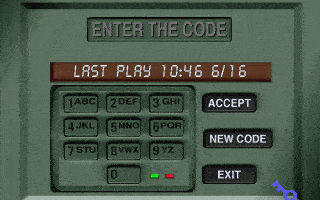
@Nicholas, I entered 3333, like I saw someone do in a youtube video. This worked.
1
Nicholas27 Dec. 2012
Well, I managed to get the game to work, but there's some kind of password screen "Last Play" etc. How would I get through this?
1
TheDeej31 Oct. 2012
you have to run this using a win98 virtual machine like vmware or oracle.
-2
myabandonware16 Aug. 2012
how to run
1 download
2 archive ie winrar is recommended
3 don't try to run with dos box because you wont get anywhere
in the folder there is a folder titled CD and a disk file run it and a nero screen will pop up run it and it wil burn to a dvd rom then install
0
the little chicken27 May. 2012
why would you even think as to go so far as to do the such?
0
alittlehelp15 May. 2012
can any one help i ran dosbox with the config file in the download and dosbox opens and closes so i made my own config file and got the message
illegal command d:\voyeur\voyeur.exe
0
No comment nor review for this game at the moment.
Buy on Digital Stores
Voyeur is available for a small price on the following website, and is no longer abandonware.








 English
Comments and reviews
It seems this "Voyeur" does not has any nudity at all or ZERO NUDITY, so you might be want to remove this "Voyeur" from adult theme, because if this game is NOT A NSFW, then failure to recognize the theme for this "Voyeur" will impact bad effect to this "Voyeur" become UNPOPULAR because of FALSE GAME THEME, because when this "Voyeur" became only for adult in a game theme so this "Voyeur" will be in behind an age restricted content in STEAM, so the meaning is it's hard to get this game in STEAM when this "Voyeur" became HIDDEN in STEAM or NOT FOR GENERAL PUBLIC AUDIENCE in STEAM because of age restricted content in STEAM.
Is there anyway I can play this game on my kindle fire?
okay, I finally figured out how to get this game running with dosbox so I'm writing this guide to save others from the same frustration. you will need these tools:
-winrar to unzip voyeur.zip
-daemontools to unpack the .cue file inside the zip file
-notepad to open a conf file
-some computer literacy skills to figure out what to do
1. unzip "voyeur.zip"--inside will be "voy1" with a folder called "cd". this is where your image files will be called "voyeur.cue" and "voyeur.bin"
2. using daemontools, mount a virtual drive
3. add "voyeur.cue" to your virtual drive by clicking "add file" and run the image by using "mount". there will be a new drive under my computer called BD-ROM Drive (X:) VOYEUR.
4. copy all of the contents inside to an actual hard drive to your computer. we will do it on C: for now. copy it to C:\VOYEURGAME. you can now delete the virtual drive you created with daemontools
5. you will need to know what sound card dosbox is emulating to properly install voyeur by going into your dosbox conf file. in windows 7, it is located in "C:\Users\[YOUR NAME]\AppData\Local\DOSBox".
6. you will need to use notepad to open it. right click--open--use program--find notepad and click that.
7. in the file, find "[sblaster]". there will be some settings that say "sbtype", "irq" and "dma". you will need these during voyeur's installation
8. boot up dosbox and type "mount d C:\VOYEURGAME" without quotation marks. change to the mounted D drive by simply typing "D:"
9. type "install". you will be in your brand new install screen for voyeur. press enter until you get to the sound card part
10. put in the settings you saw in your conf file. keep pressing enter until you complete installation
11. run voyeur by typing "voyeur"
how i can play this in linux??
I remember this game from my youth, but I was so disappointed when I
get this game b-coz I misunderstand what the game is about, I thought it
was a pervert type game,i wanted to spy on the ladies when having sex, taking
a shower, going toilet....but that is not what this game is...SOOO LET DOWN
in my early years, hahahahahaha-
I recommend you to mount /CD folder as a CDROM in D: in DOSBOX, but before you should to extract the files from the .BIN
By the way I'm looking for the codes to access to play
good games
cool games
Hi, I did run Windows7 teste game: 1) I download the BOX Two program, which emulates a guess MSDOS 6.1 or something ... then, try to run the game gave me error, I had thought this q error with sound card, I got into easy install.exe where configuarion change the sound (NONE & NONE) and ready I enter .. . only now asks for a password that I hope this works since 3333 .... I say .... well .. guess what? ... worked!!
dosbox worked for me. I had to mount my virtual cd drive and a hard drive in dosbox to do it, but it worked fine.
@Nicholas, I entered 3333, like I saw someone do in a youtube video. This worked.
Well, I managed to get the game to work, but there's some kind of password screen "Last Play" etc. How would I get through this?
you have to run this using a win98 virtual machine like vmware or oracle.
how to run
1 download
2 archive ie winrar is recommended
3 don't try to run with dos box because you wont get anywhere
in the folder there is a folder titled CD and a disk file run it and a nero screen will pop up run it and it wil burn to a dvd rom then install
why would you even think as to go so far as to do the such?
can any one help i ran dosbox with the config file in the download and dosbox opens and closes so i made my own config file and got the message
illegal command d:\voyeur\voyeur.exe
No comment nor review for this game at the moment.