You are on the beta version of My Abandonware. The live site is still myabandonware.com. Your favorites and ratings here are copied to the live site. Comments and other changes are not — we delete them every morning at 08:00 Paris time, when this site goes down for about an hour. Leave feedback through this link to Pastel (email required).
The beta goes down at 08:00 Paris time, in a few minutes. We rebuild the database from the live site. It comes back in about an hour.
I remember playing this game ages ago, I always picked the Talinie country to win the game since in the missions it had 2 great spells (map and teleport) so easy peasy I got the final treasures fast and with the goblet of undead I recruited skeletons army (no maintenance, high damage and defence) world conquered with armies of undead.
1
Winder2208 Nov. 2025
I remember playing this game as a kid! So much time building up, usually just to be swarmed! never really got the hang of it. I should look into basic strategies for it. lol!
1
Lucio31 Oct. 2025
To make it as simple as possible to install, follow the steps below. It will run the game in a small window and I haven't been able to expand to full screen. For that, I guess the other suggested guides using DosBox will be a little more work but much better game experience.
For this to work, download the ISO version. If you download the Alternative ISO version, use a 3rd party tool to mount it. 1. Mount the iso. 2. Copy the cd in some folder of your choice. 3. Open the BRSETUP.cfg which is in that folder you make. 4. In that file you must change [CD] letter D with where you mount your iso, otherwise it will show you the message "NO CD in D:" , so you change D 5. Run WINBR.exe from the folder where the game was installed/copied.
1
Lucio30 Oct. 2025
The difference between ISO and Alternative ISO is that the ISO is an ISO file. The Alternative ISO is a BIN/Cue. Same thing, but a little different when mounting them. Not sure if Windows has native support for Bin/Cue, so you may need to install a 3rd party tool (such as Daemon Tools).
1
Child of Light22 Oct. 2024
Wooow! I tried to find this game again so many times the last 20 years or so, and I finally found it! Thank you so much!
4
Ronnie26 Jun. 2024
I discovered this blog site where this guy makes installers to help install many games we all likely have grown up with. Pools of Radiance Myth Dranor is how I found this site to also create a installer for this game. Simply visit site download the link and it works perfectly. He also has alot of other games like Magic and Mayhem etc that worked for me as well. I figure I'd pass this along to others to help.
Just a minor note... the "demo" file download zip reads as "corrupt" on several different unzipper tools I've checked, and on more than one machine. It seems to be a bad file.
3
larry23 Jan. 2022
ISO or Alt ISO?
Which would you suggest?
1
anonewbie02 Nov. 2021
Anyone can help me out how to install/run the game? Im having trouble loading it in dosbox.
-1
Marauder27 Oct. 2021
Fun bug: You can use turn undead spell of your priest characters on "live" army units as well.
0
Superdupe11 Feb. 2021
What's the difference between ISO Version & Alternate ISO Version?
2
ismar07 Jun. 2020
Run in DOSBOX, mount the ISO image to install and play from CD or you will get protection error, runs like a charm when you play this way, no need to get running in windows... just make sure memory set to 16 to avoid crashes in the DOSBOX config for the game or you get memory errors.
2
buddyfay08 May. 2020
any idea how to work this properly on windows 10? adventure mode seems to be broken anytime I encounter an enemy my toons wont attack and the enemies just dissapear
-6
Matthew11 Apr. 2020
Played This Game When I Was A Kid...I'm Glad I Get To Play It Again For Free Thanks For Ur Upload For Us To Play
-2
Nick25 Mar. 2019
Anyway to play this on Windows 10?
-4
Budis21 Feb. 2019
A hell of a game, played it when i was a kid, didn't understand anything and still it was so much fun! Thanks for sharing it.
2
No comment nor review for this game at the moment.





 English





Comments and reviews
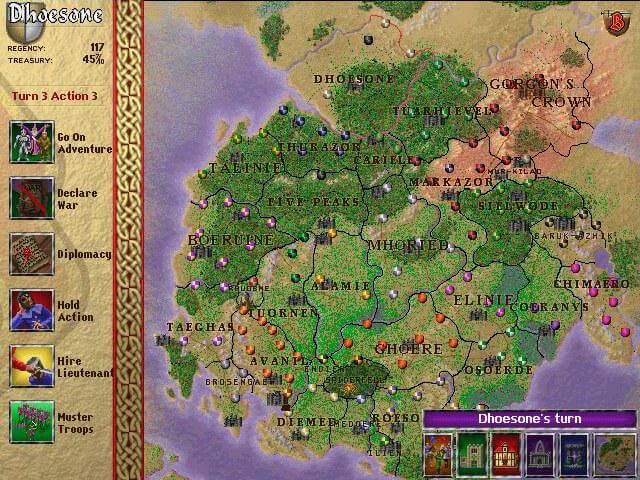
I remember playing this game ages ago, I always picked the Talinie country to win the game since in the missions it had 2 great spells (map and teleport) so easy peasy I got the final treasures fast and with the goblet of undead I recruited skeletons army (no maintenance, high damage and defence) world conquered with armies of undead.
I remember playing this game as a kid! So much time building up, usually just to be swarmed! never really got the hang of it. I should look into basic strategies for it. lol!
To make it as simple as possible to install, follow the steps below. It will run the game in a small window and I haven't been able to expand to full screen. For that, I guess the other suggested guides using DosBox will be a little more work but much better game experience.
For this to work, download the ISO version. If you download the Alternative ISO version, use a 3rd party tool to mount it.
1. Mount the iso.
2. Copy the cd in some folder of your choice.
3. Open the BRSETUP.cfg which is in that folder you make.
4. In that file you must change [CD] letter D with where you mount your iso, otherwise it will show you the message "NO CD in D:" , so you change D
5. Run WINBR.exe from the folder where the game was installed/copied.
The difference between ISO and Alternative ISO is that the ISO is an ISO file. The Alternative ISO is a BIN/Cue. Same thing, but a little different when mounting them.
Not sure if Windows has native support for Bin/Cue, so you may need to install a 3rd party tool (such as Daemon Tools).
Wooow! I tried to find this game again so many times the last 20 years or so, and I finally found it! Thank you so much!
I discovered this blog site where this guy makes installers to help install many games we all likely have grown up with. Pools of Radiance Myth Dranor is how I found this site to also create a installer for this game. Simply visit site download the link and it works perfectly. He also has alot of other games like Magic and Mayhem etc that worked for me as well. I figure I'd pass this along to others to help.
https://collectionchamber.blogspot.com/p/birthright-gorgon-alliance.html
Watch this video for instructions on how to get this game to work - https://youtu.be/5NJXwOxrk48
Just a minor note... the "demo" file download zip reads as "corrupt" on several different unzipper tools I've checked, and on more than one machine. It seems to be a bad file.
ISO or Alt ISO?
Which would you suggest?
Anyone can help me out how to install/run the game? Im having trouble loading it in dosbox.
Fun bug: You can use turn undead spell of your priest characters on "live" army units as well.
What's the difference between ISO Version & Alternate ISO Version?
Run in DOSBOX, mount the ISO image to install and play from CD or you will get protection error, runs like a charm when you play this way, no need to get running in windows... just make sure memory set to 16 to avoid crashes in the DOSBOX config for the game or you get memory errors.
any idea how to work this properly on windows 10? adventure mode seems to be broken anytime I encounter an enemy my toons wont attack and the enemies just dissapear
Played This Game When I Was A Kid...I'm Glad I Get To Play It Again For Free Thanks For Ur Upload For Us To Play
Anyway to play this on Windows 10?
A hell of a game, played it when i was a kid, didn't understand anything and still it was so much fun! Thanks for sharing it.
No comment nor review for this game at the moment.