You are on the beta version of My Abandonware. The live site is still myabandonware.com. Your favorites and ratings here are copied to the live site. Comments and other changes are not — we delete them every morning at 08:00 Paris time, when this site goes down for about an hour. Leave feedback through this link to Pastel (email required).
The beta goes down at 08:00 Paris time, in a few minutes. We rebuild the database from the live site. It comes back in about an hour.
CAN SOMEONE PUT A PREINSTALLED VERSION ANYWHERE ? LINK WITH FRENCH ONE DOESNT WORK. ITS GONNA BE LOST MEDIA. INSTALLER DOESNT WORK
0
Molly13 Sep. 2026
i have tried to download this game multiple times but it still wont start the game? can you upload a video on youtube about how to download and install that game?
0
cmilaure23 Aug. 2026
My upload preinstalled french version. https://archive.org/details/bugs-bunny-voyage-a-travers-le-temps
I have created a pre-installed portable version and tested it on an old PC as well as on 32-bit Windows XP. Everything works perfectly, including the fully French voice acting and music. A No-CD patch is included, as it is essential. You must extract the ZIP file to the C:\Games\ directory. (Note: if you place the folder elsewhere, the game will not launch).
Run the two registry files in this order: bugs1, then bugs2 (only the first time). Then launch BugBunny.exe. Go to the Configuration menu first to adjust the resolution; otherwise, the game will not run in full-screen mode. Then click Play. Important compatibility note: Compatible only with Windows XP and earlier versions. Does not work on modern operating systems.
1
orange12 Jul. 2026
i cant wait to play
0
nicexd30 Jun. 2026
not working asking fo cd rom
-1
E03 Jun. 2026
thank you joel
5
dan09 Feb. 2026
if you get the "insert CD-ROM" message when trying to open the game just mount the iso file as a CD-ROM (right click the iso file and select openWindows Explorer), then launch BugsBunny.exe from the mounted iso
0
tabby cat15 Jan. 2026
thanks, can u make a better download thing because I downloaded a famous five game but couldn't play the game! :
1
keeneddie3322 Oct. 2025
got the graphics adjusted, but i have no sound at all, anybody else have this?
On win 11 it won't even run the setup.exe. It says "Unsupported 16-bit app" with the long paragraph essay asking you to ask the devs for a compatible version of the app.
1
ur mom30 Mar. 2024
I don't have a disk drive on my laptop help
-4
Kyle25 Dec. 2022
Worked under windows 10: -Use win 7 compatibility mode -Without 3D card for fast computers -Highest resolution 1024 x 768, full screen mode
5
Mack16 Aug. 2022
1..When you install game choose not to register.
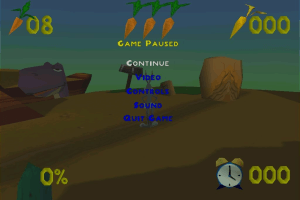
2..When you open game locate options :Video: choose without 3d card for faster computers and select largest resolution you need to play.
This ISO Game works okay on windows 7 professional 64bit.
3
bugs bunny31 Jul. 2022
thank you so much
2
use virtualbox for win xp18 Apr. 2022
win 10 and win 11 causes the bad graphics.
2
Tiago16 Feb. 2022
I having problems with the grahics.The gamelay is all in dark screen.
3
Mare22 Jan. 2022
Loved this game
4
Emilye19 Jan. 2022
Top comment
I installed the setup and when I try to play the game, I get a message saying "Please insert the Bugs Bunny Lost in Time CD-Rom." I cannot find the cd-rom in any of the folders.
Basicly you open task manager and find who is blocking the setup.exe and kill that. Then you can finally see the window for setup and do the installation
6
No comment nor review for this game at the moment.









 English
  Portuguese (Brazil)
  Russian



Comments and reviews
The game runs perfect on Windows 10
CAN SOMEONE PUT A PREINSTALLED VERSION ANYWHERE ? LINK WITH FRENCH ONE DOESNT WORK. ITS GONNA BE LOST MEDIA. INSTALLER DOESNT WORK
i have tried to download this game multiple times but it still wont start the game? can you upload a video on youtube about how to download and install that game?
My upload preinstalled french version.
https://archive.org/details/bugs-bunny-voyage-a-travers-le-temps
I have created a pre-installed portable version and tested it on an old PC as well as on 32-bit Windows XP. Everything works perfectly, including the fully French voice acting and music. A No-CD patch is included, as it is essential.
You must extract the ZIP file to the C:\Games\ directory.
(Note: if you place the folder elsewhere, the game will not launch).
Run the two registry files in this order: bugs1, then bugs2 (only the first time).
Then launch BugBunny.exe.
Go to the Configuration menu first to adjust the resolution; otherwise, the game will not run in full-screen mode.
Then click Play.
Important compatibility note:
Compatible only with Windows XP and earlier versions. Does not work on modern operating systems.
i cant wait to play
not working asking fo cd rom
thank you joel
if you get the "insert CD-ROM" message when trying to open the game just mount the iso file as a CD-ROM (right click the iso file and select openWindows Explorer), then launch BugsBunny.exe from the mounted iso
thanks, can u make a better download thing because I downloaded a famous five game but couldn't play the game! :
got the graphics adjusted, but i have no sound at all, anybody else have this?
este juego no tenia versión en español?
Portuguese :
https://archive.org/details/pernalonga-perdido-tempo
Russian bootleg :
https://archive.org/details/bugsbunny-lostintime-russia-pc
On win 11 it won't even run the setup.exe. It says "Unsupported 16-bit app" with the long paragraph essay asking you to ask the devs for a compatible version of the app.
I don't have a disk drive on my laptop help
Worked under windows 10:
-Use win 7 compatibility mode
-Without 3D card for fast computers
-Highest resolution 1024 x 768, full screen mode
1..When you install game choose not to register.
2..When you open game locate options :Video: choose without 3d card for faster computers and select largest resolution you need to play.
This ISO Game works okay on windows 7 professional 64bit.
thank you so much
win 10 and win 11 causes the bad graphics.
I having problems with the grahics.The gamelay is all in dark screen.
Loved this game
I installed the setup and when I try to play the game, I get a message saying "Please insert the Bugs Bunny Lost in Time CD-Rom." I cannot find the cd-rom in any of the folders.
I love this game
is this game ok for windows 10?
Guys, if you run setup.exe and nothing happens after. The proccess is being blocked on a thread by something. I found the solution here: https://www.reddit.com/r/techsupport/comments/452lyf/32bit_setup_launcher_not_working_on_windows_10/
Basicly you open task manager and find who is blocking the setup.exe and kill that. Then you can finally see the window for setup and do the installation
No comment nor review for this game at the moment.