You are on the beta version of My Abandonware. The live site is still myabandonware.com. Your favorites and ratings here are copied to the live site. Comments and other changes are not — we delete them every morning at 08:00 Paris time, when this site goes down for about an hour. Leave feedback through this link to Pastel (email required).
The beta goes down at 08:00 Paris time, in a few minutes. We rebuild the database from the live site. It comes back in about an hour.
I can confirm that INNO2D's solution works for me: "This game runs well on win 10 a simple exe fix and wrapper, no need for dosbox or installing the game even. Check here: https://ecstatica.fandom.com/wiki/Playing_Ecstatica_II_on_Modern_Systems"
I just downloaded the ISO from MyAbandonWare, and the file from the webpage above, followed the instructions, and it works perfectly on Windows 10, no need to even install it, just copy the ISO (CD) files to a directory on your hard drive and run the new E2WIN95.EXE file.
0
DrakOne08 Jul. 2025
for my it was like the first souls like hahaha, very difficult game
1
EthericBliss30 Jun. 2025
Wow!! Now that's a game I've not heard since...
Thank you for sharing!! : ) Completely ecstatic to play ... again!!
Also, watch out for spiders in this game. They are ruthless.
2
Samurajogurt27 Jan. 2023
If you want to play fullscreen select e2vista.exe click right mouse and select atributes (i don't know how it is in english, the last one option) i compatibility options select "run in 640x480. That's all.
0
Cket10 Nov. 2022
For everyone who wants to play, try Retroarch, the PURE core is perfect. Just drag the "exe" of the game onto the retroarch window with the kernel already loaded
0
MateusAuri10 Jun. 2021
Can't get it to work in fullscreen either. I tried to change gWindowMode to 0 in e2patch.ini and running e2vista.exe, but it returns an "Direct Draw init failed (80004001)" error. Tried to use DxWnd too, but to no avail. Setting gWindowMode to 1 works fine, but the window is just too small!
Another important detail is that the e2patch.ini provided in here comes with gGodMode set to 1, which makes you invincible. You might want to set that to 0 in order to play the game without cheating. There are other interesting values further down, regarding a maze and random enemies.
0
guanxe16 Apr. 2021
lo jugue hace 20 años llevo 3 horas buscandolo en abadoneware y l encontre !! lol
0
Help for NIKHIL SHARMA28 Aug. 2019
On windows you can give a .exe some ocmands in te phat or something I don't know what you need really but you can look on the internet for it sorry for my bad English
-1
nick26 Nov. 2018
how to install this games...please..
-2
rickr00004 Oct. 2018
Win7 patch works great - but does anyone know how to get this full screen? Thanks
-2
Nikhil Sharma10 Dec. 2016
Oh man. This brings memories of the times gone past. I used to play this with my brother during my later teen years. It was an awesome game with a completely new scenario, much unlike the racing or shooting games. Thanks for posting!!
1
admin23 May. 2016
Admin
It is, reuploading now, thanks.
1
blue20 May. 2016
The archive is corrupt
0
No comment nor review for this game at the moment.
DOS, Mac, Genesis, SEGA Master System, Game Gear, Amiga, Amstrad CPC, Atari ST, Apple II, FM Towns, PC-98, SAM Coupé, SEGA CD, Sharp X68000, TurboGrafx CD





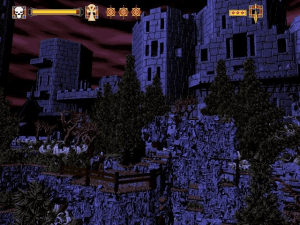
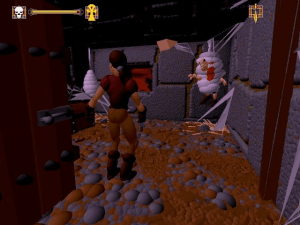
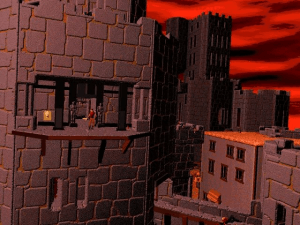
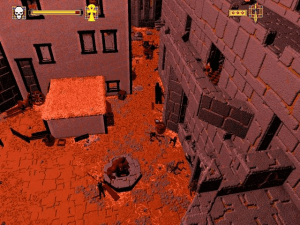


 English
  French





Comments and reviews
I can confirm that INNO2D's solution works for me: "This game runs well on win 10 a simple exe fix and wrapper, no need for dosbox or installing the game even. Check here: https://ecstatica.fandom.com/wiki/Playing_Ecstatica_II_on_Modern_Systems"
I just downloaded the ISO from MyAbandonWare, and the file from the webpage above, followed the instructions, and it works perfectly on Windows 10, no need to even install it, just copy the ISO (CD) files to a directory on your hard drive and run the new E2WIN95.EXE file.
for my it was like the first souls like hahaha, very difficult game
Wow!! Now that's a game I've not heard since...
Thank you for sharing!! : )
Completely ecstatic to play ... again!!
French version provided by the French website Abandonware France :
https://www.abandonware-france.org/ltf_abandon/ltf_jeu.php?id=736&fic=liens
This game runs well on win 10 a simple exe fix and wrapper, no need for dosbox or installing the game even. Check here: https://ecstatica.fandom.com/wiki/Playing_Ecstatica_II_on_Modern_Systems
Also, watch out for spiders in this game. They are ruthless.
If you want to play fullscreen select e2vista.exe click right mouse and select atributes (i don't know how it is in english, the last one option) i compatibility options select "run in 640x480. That's all.
For everyone who wants to play, try Retroarch, the PURE core is perfect. Just drag the "exe" of the game onto the retroarch window with the kernel already loaded
Can't get it to work in fullscreen either. I tried to change gWindowMode to 0 in e2patch.ini and running e2vista.exe, but it returns an "Direct Draw init failed (80004001)" error. Tried to use DxWnd too, but to no avail.
Setting gWindowMode to 1 works fine, but the window is just too small!
Another important detail is that the e2patch.ini provided in here comes with gGodMode set to 1, which makes you invincible. You might want to set that to 0 in order to play the game without cheating. There are other interesting values further down, regarding a maze and random enemies.
lo jugue hace 20 años llevo 3 horas buscandolo en abadoneware y l encontre !! lol
On windows you can give a .exe some ocmands in te phat or something I don't know what you need really but you can look on the internet for it sorry for my bad English
how to install this games...please..
Win7 patch works great - but does anyone know how to get this full screen? Thanks
Oh man. This brings memories of the times gone past. I used to play this with my brother during my later teen years. It was an awesome game with a completely new scenario, much unlike the racing or shooting games. Thanks for posting!!
It is, reuploading now, thanks.
The archive is corrupt
No comment nor review for this game at the moment.