You are on the beta version of My Abandonware. The live site is still myabandonware.com. Your favorites and ratings here are copied to the live site. Comments and other changes are not — we delete them every morning at 08:00 Paris time, when this site goes down for about an hour. Leave feedback through this link to Pastel (email required).
The beta goes down at 08:00 Paris time, in a few minutes. We rebuild the database from the live site. It comes back in about an hour.
The following can be found in the ''Hey_ReadMe_First'' text document once the game has been unpacked:
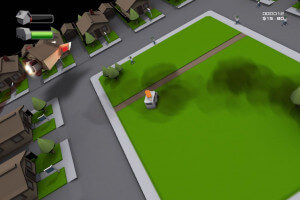
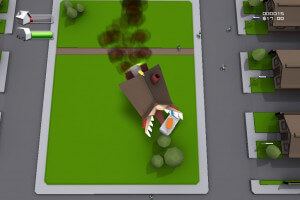
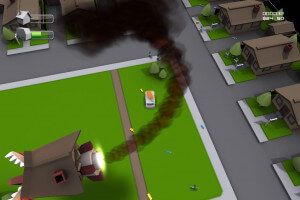
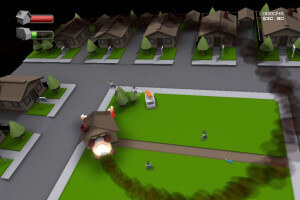
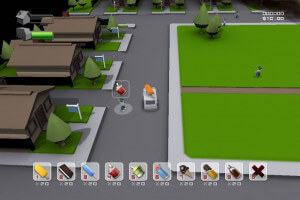
Drive the Ice Cream Truck and sell treats to the children while avoiding the ever Enraged Rocket House.
Made for the TIGSource Video Game Name Generator Competition
How to play ----------------------------------------------------- WASD - drive truck SPACE - open 'sell' menu when in range your truck must be slowed down as well) 1-9 - match sale option 0 - sold out RIGHT - play music ESC - pause / restart / exit
When in range of a child (indicated by the white circle underneath them) and slowed to a safe speed, press SPACE to open the sell menu. You must match their order by pressing the corresponding number key 0-9 with the icon over their head. The quicker you do this, the larger the bonus you receive per sale.
Every sale you complete infuriates the Rocket House, represented by the red Rage bar in the upper left corner. Pressing RIGHT turns on your truck's music, luring the kids in from longer distances while sending the Rocket House into a murderous rage spiral. The more enraged he gets, the more damage he will inflict when he catches you (green bar). However, you will also receive additional points equal to the level of rage the Rocket House is exhibiting at the time of a sale, so sometimes it's worth the added risk.
The force of the Rocket House's ferocious bite will send items from your truck flying through the air. Make sure you pick up the dropped goods before a kid snags a free cone from you.
Keep an eye on your inventory. If you run out of a particular treat, press 0 to cancel and send the kid crying home to mommy.
When installing, you will probably get a Windows protected your PC message via Microsoft Defender Smart Screen. To cancel this and enable the installation click on the underlined More Info. The click on the RUN ANYWAY button to start the installation. A small window appears where you select your resolution ranging between 800x600 to 1900x1200. Once selected (by pressing the appropriate number 1 to 5, where 1 ==800x600 and 5 = 1900x1200), the game will start.
0
No comment nor review for this game at the moment.





 English



Comments and reviews
The game installs and works perfectly on Win 11:
The following can be found in the ''Hey_ReadMe_First'' text document once the game has been unpacked:
Drive the Ice Cream Truck and sell treats to the children while avoiding the ever Enraged Rocket House.
Made for the TIGSource Video Game Name Generator Competition
How to play
-----------------------------------------------------
WASD - drive truck
SPACE - open 'sell' menu when in range your truck must be slowed down as well)
1-9 - match sale option
0 - sold out
RIGHT - play music
ESC - pause / restart / exit
When in range of a child (indicated by the white circle underneath them) and slowed to a safe speed, press SPACE to open the sell menu. You must match their order by pressing the corresponding number key 0-9 with the icon over their head. The quicker you do this, the larger the bonus you receive per sale.
Every sale you complete infuriates the Rocket House, represented by the red Rage bar in the upper left corner. Pressing RIGHT turns on your truck's music, luring the kids in from longer distances while sending the Rocket House into a murderous rage spiral. The more enraged he gets, the more damage he will inflict when he catches you (green bar). However, you will also receive additional points equal to the level of rage the Rocket House is exhibiting at the time of a sale, so sometimes it's worth the added risk.
The force of the Rocket House's ferocious bite will send items from your truck flying through the air. Make sure you pick up the dropped goods before a kid snags a free cone from you.
Keep an eye on your inventory. If you run out of a particular treat, press 0 to cancel and send the kid crying home to mommy.
When installing, you will probably get a Windows protected your PC message via Microsoft Defender Smart Screen. To cancel this and enable the installation click on the underlined More Info. The click on the RUN ANYWAY button to start the installation. A small window appears where you select your resolution ranging between 800x600 to 1900x1200. Once selected (by pressing the appropriate number 1 to 5, where 1 ==800x600 and 5 = 1900x1200), the game will start.
No comment nor review for this game at the moment.