


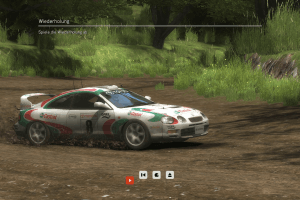
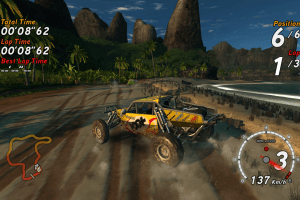
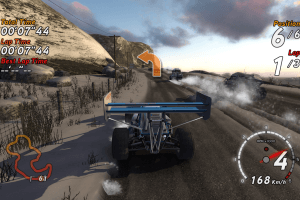
How to Play
The game with patch and NoDVD has been tested on Windows XP SP3, Windows 7 64-bit, Windows 10 and Windows 11 22H2, it works fine, the game supports widescreen resolutions up to 4k. You may experience some small troubles when you play the game on modern systems, check our Guide and Notes for details
Install & play guide:
- Mount the disc image. You will need the utility for mounting disc image files, like WinCDEmu, UltraISO, Alcohol 52%/Alcohol 120% or Daemon Tools Lite
- Install the game (if autorun doesn't work - simply launch the installation from Setup.exe inside the disc). It is recommended to install the game not in default path, but in some other, non-system folder, like
C:/Games/Sega Rally Revo. At the end of the installation, an error may appear about the impossibility of installing the WMP codec, you can skip it - After you installed the game - install the patch v4.060
- Then use NoDVD - simply copy the files from the archive and put it into game folder, agree to replace the original files
- Open the directory with the game and find SEGA Rally.exe and SEGA Rally_SSE1.exe. Right click on both exe-files -> Properties -> Compatibility -> Set "Run this app in compatibility mode with Windows XP" and "Run as administrator"
- Launch the game and play. If the game doesn't work in compatibility mode with Windows XP - try to launch it in compatibility mode with other version of Windows (Windows Vista, Windows 7, etc.)
Notes:
- If the installation doesn't start - try to launch Setup.exe in compatibility mode with old version of Windows (98, 2000 or XP)
- It is recommended to install all versions of Microsoft Visual C++ Redistributable and NET Framework for the correct work of the game. Also it is recommended to install K-Lite Codec Pack for the correct work of in-game videos
- The game works on DirectX 9, so if you're using Windows 8, 8.1, 10 or 11 - you need to enable DirectPlay: Go to Control Panel, and select 'Programs'. Select 'Turn Windows features on and off', click on 'Legacy Components' and check the box 'DirectPlay'. Select OK, once the installation is done, restart your computer
- NoDVD is required for the launch because the game is using SafeDisc DRM protection, which doesn't work correctly on modern systems. NoDVD "cracks" DRM protection and allows to run the game without the disc. If you see error that there's not enough space on the hard drive when you copy NoDVD files - re-install the game in non-system folder, like
D:/Sega Rally Revo, Windows Protection may block copying of files to system folders (likeC:/Program FilesorC:/Windows) - The game has support for 5 languages: English, French, German, Spanish & Italian, with full English audio and text-only localizations for other languages. Language of the game can be changed very easily through Windows Registry: open Registry editor (press Win+R and type regedit.exe), go to
HKEY_LOCAL_MACHINE/SOFTWARE/WOW6432Node/Sega/SEGA Rally(if you have 32-bit system, the path is the same but withoutWOW6432Node), find the linelanguageand change it to enable the another language; then close the Registry editor and run the game - By default the game has very non-intuitive keyboard controls: A and Z for forward and backward, < and > for steering left and right, S - upshift (on a manual transmission), X - downshift and reverse (on a manual transmission), Space - handbrake, Left Ctrl - change camera view, Right Ctrl - rear view. Unfortunately, there's no option to change keyboard controls in the game, but you can try to change the key bindings with additional tools like Key Manager
- If you want to control the car with arrow keys like in most racing games, use the fix from KRBDZSKL, he edited the executables so that the car can be controlled with arrow keys. That fix may trigger some warnings by your antivirus because it is edited exe-files, but all warnings are generic about unsafe/edited file, the files are safe to use, here's the scan report. The fix uses exe-files from NoDVD, so it also works as NoDVD
- If the game doesn't create configuration file in
Documents/Sega Rally/Saved Gamesfolder automatically, or you cannot run the Launcher to change graphics settings - you can manually create config.ini file to change the settings, check this or this guides for details - The game may not recognize some of the modern video cards, especially laptop ones. It can be fixed by manually adding SEGA Rally.exe to the list of applications and setting it to High Performance, check this thread for details. Here's the example for Nvidia cards: go to the 'Settings' app -> 'System' -> 'Display', scroll down to 'Related Settings' -> 'Graphics' -> 'Custom Settings' for apps. Click Add and select 'Desktop App'. Then click Browse and navigate to the Sega Rally folder, select SEGA Rally.exe (not SEGA Rally_SSE1.exe). Now it the list of Apps select Sega Rally, click High Performance and click Save. Run the Launcher (SEGARallyLauncher.exe) and choose your video card
- The game supports high and widescreen resolutions up to 4k, but it doesn't support ultra-widescreen or multiple displays setups. For such cases use Widescreen Fixer, it allows to run the game on ultra-widescreen and multiple displays setups with no problem
- SR3 Desert '95 track mod adds Desert '95 track from Sega Rally 3 to the game. So far it is the only known mod for the game, check this page for more details about it
- The game supports Surround Sound, use DSOAL utility to enable it on modern systems
- If you have problem with broken sound effects or disappearing sound - first try to change the sound settings. If it didn't work - set sound quality to 24 bit, 48000 Hz or 24 bit, 44100 Hz. Read this guide how to do that
- The game has a full controller support, however XInput-type controllers (Xbox gamepads and similar) has only two presets that can be selected in Launcher. If the game doesn't recognize your controller - try using one of the additional tools from PCGamingWiki guide for controllers
- Don't forget to check PCGamingWiki if you have troubles
 English
  French
  German
  Spanish
  Italian
 Czech
Czech 





 Russian


Comments and reviews
I have released a patch for the frame pacing / stuttering voor Sega Rally Revo (PC)!
https://github.com/Martijnsx/Sega-Rally-Revo-Frame-Pacing-Fix
It needs another version/copy of the game (4.0.6.0) but it works!
For those who have frame pacing problems, I found the solution.
I added the following section to PCGamingWiki as well for more visibility.
If your game is version v4.060 it will have frame pacing issues that were introduced by the patch. Use the original DVD version ISO and it works flawlessly in all modes. To get the v1.0 iso go to MyAbandonware.com, download the ISO, install the game and after that use the No_DVD SEGA Rally.exe file for version 1.0, so DON't use the FLT, or the RELOADED crack, use the third one provided in the download section. After that the game works perfectly at last. Confirmed on Windows 10.
Game works great except that i can't use 2 controllers to play multiplayer head to head. For some reason i can play with one controller and then use the keyboard for the second person, but not 2 controllers. I don't know what to do
I was trying many times to download this and stuck at 69%, can't resume the download either
good game, but my game crash in artic and tropical phases
I have a physical copy of Sega Rally (Polish) and tried out the NoDVD patches. After trying that out, the game crashes when trying to launch it. The game worked when I had to load in the disk. Currently using Windows 11.
This is more than i think
no me dejo ejecutarlo no encontre las carpetas que decia la guia intente usar una IA pero tanpoco funciono,de todas formas voy a seguir intentado porque se que este es un sitio confiable que no me metera virus
Works great on windows 11. I used vista compatibility. Service pack 2. Just unzipped. And ran Sega rally evo exe. Where you get to chose graphics and controller options. Xbx controller works perfectly. I genuinely feel like I'm a kid again. Back in the arcade. Thanks so much.
The colors are a bit pale. The First time I ran It, i was requested to select some kind of bright settings, maybe from my graphic card. How could I run in the original colors? Thanks.
The full rip version running perfectly in windows 11. Nothing could be better. Download, unzip, and run the sega rally.exe. Simple like that. No need to install. Using with stering Wheel and pedals, with force feedback. Thanks a Lot.
because ilove drifting rally cars
It seems widescreen fix is only for multiple monitors.
I have an ultrawide monitor and widescreen fix is not enabled when using custom 21:9 aspect ratio. Only 3x16:9 for 3 monitors.
Works great on Linux Debian 12 & Wine with D3D or Vulkan on a XP Container . Just need to create a files in Documents/SEGA Rally/Saved Games/config.ini for max sttings and replace the .exe by KRBDZSKL mod to have a best keyboard layout. Thx!
launcher not working
Works great on Win11. Thank you abandonware!
Thank you for the share. I have it for 360 but it's nice to play it on pc and the xbox controller works perfectly. Only issue is sometime a strip of the screen at the top tears and doesn't match the rest of the screen but it's pretty minor.
Is there anyway to remap controller in windows 10 ?? The launcher app dosent work
WRC: FIA World Rally Championship from 2010 can be considered abandonware?
Thanks for Rip version.
I prefer add in Game extras Polish Dubbing. (The voice of the pilot is Krzysztof Hołowczyc). Polish pilot was add in update patch from a publisher in Poland.
If you guys want to play Sega Rally Revo with custom controls on keyboard (such as WASD), i recommend using X360CE as it overwrites the default Azerty keyboard controls and simulates Xbox 360 controller buttons with keyboard, allowing you to use any key to be used and its simple to set up and thats what i'm using and it's really nice to play this game with WASD.
@NONEED - Okay, looks like I screwed up a little when I was making a Full-Rip. That Full-Rip is based on Polish release, and surprisingly it has Polish audio (surprisingly because all other releases has only English audio), probably I forgot to check the audio files. I replaced audio files in Full-Rip, now it has full English audio and same 6 text localizations
@REVOBLAM Full-Rip is already patched to v4.060, you can simply extract & play. By default it has English language, if you want to change the language - instruction is inside the archive
Copilot is speaking in another langauage. How is that even possible, this game doesn't even support other audio languages.
I downloaded the ful rip.
We updated this page, added ISO image of original DVD plus new Full-Rip with 6 languages. Also, we added the guide and some fixes
Actually saw this on youtube, rlly exited to try this.
Can anyone explain how to get this working on steam deck? I have added exe (and the laucher exe) as non steam games and using proton GE etc, this method has worked for every other non steam windows game I've tried. I've tried lutris but the launcher looks screwed up, just shows "unstranslated" as all the field names. And the game exe just dies.
for anyone having issues running the launcher under windows. make a config.ini file under Documents/Sega Rally/Saved Games and put the following into it (change refresh rate to your liking):
[Audio]
DriverGUID=00000000-0000-0000-0000-000000000000
Quality=2
SoftwareEmulation=1
[GameController]
GUID=
Mapping=000100010000000100000000-0000-0000-0000-0000000000000001000E000F001200130014000200030017001800010000
[Graphics]
AdapterOrdinal=0
RenderDevice=Hardware
AdapterFormat=X8R8G8B8
HorizontalResolution=1920
VerticalResolution=1080
ResolutionFilter=1
BackBufferFormat=A8R8G8B8
DepthStencilFormat=D24S8
AntiAliasingLevel=201
MultisampleType=8
MultisampleQuality=0
GraphicQuality=3
ShadowQuality=2
ReflectionQuality=2
TrackQuality=3
TextureQuality=2
ShaderQuality=1
DrawDistanceQuality=2
ParticleQuality=2
RearViewMirrorQuality=2
MudQuality=1
VSync=0
ShaderVersion=3
RefreshRate=75
A game made in mock play without a PC controller
Game runs very well on my Steam Deck OLED! I used Lutris. Needed to reassign the .exe after installation within Lutris: Right click on gameConfigureGame OptionsExecutableBrowse Add the nessary game .exe file). I start the game via "SegaRallyLauncher.exe" where the resolution can be set to Steam Deck OLED 1280x800 resolution. Love it!
The launcher won't open. I can only play with very low resolution and 4:3 resolution.
I can't find any solution.
Had this game running perfectly on Steam Deck until this morning and then all of a sudden all the graphics settings went back to default including ratio going back to 4:3. No matter what I do, I can get it to readopt the settings I choose in the luncher.
I'm trying to play on Windows 11 and once upon a time I had it working but did a reinstall of windows. How in the world do I get the launcher working to adjust the graphics settings!?
It literally does nothing. Game will launch fine in low resolution and low graphics but launcher won't open. I went into my documents folder and I see the save game that it created but no config file to adjust the graphics settings manually. Any help would be so greatly appreciated.
Back Then, this Game Original Isos was on Abandonsozius.
Another Steam Deck tip: rename the file at "Sega Rally Revo\{app}\frontend\PC\pc_battery_res_data.sbf" to get rid of the in-game battery indicator.
For anyone interested in getting it to work on Steam Deck without using Lutris....
1. Have Protontricks and ProtonUp-QT (The latter is merely a recommendation).
2. Use Protontricks and install "d3dx9_35.dll" on SegaRallyLauncher.exe (not SegaRally.exe since that will be stuck in 4:3 and will be in a lower resolution, don't worry, you can use the launcher to also start the game.) after you import said exe into Steam and activate Proton compatibility on it.
3. At the launcher menu, go to the resolution section and change it to 1280x720, you also MAY have to tinker with the audio section but it should be fine normally (the SEGA intro logo has no audio on my end, but the rest of the game is just fine).
4. (Hopefully) Enjoy!
What a game, thank you myabandonware, incredible times we live in when such a high quality game can be had completely for free. You have literal weeks of fun for free on this website with the games you can download here.
To EVERYONE, I just want to say; This is a SEGA RALLY game, which means that the controls are configured for HOOD CAMERA. Play in HOOD CAMERA and you will LOVE IT. It's a VERY NICE game and the controls are perfect. (Also, you can delete everything but whats in the "app" folder)
Played this game long time ago. And again, another fun game that suffers from cheating AI and freaking rubberbanding.
Please provide a save file with not only all the cars and tracks unlocked, but all the liveries for every single car!
Quite fun! Wasn't expecting it to work as well as it did on Win10, but it does! Needed some control tweaking, but other than that, quite enjoyable! I wish the cars and levels were a little more diverse though.
I downloaded the game, chose control layout, grafics quality and I tried to launch the game, but says, there is missing some file "d3dx9_35.dll"
Could anybody help me please? Thank you!
Any instructions to get this working on steam deck?
Been using it for a while and it still works great on Windows 11. Scanned with McAfee, no issues.
This works flawlessly on Windows 10 + Xbox One Controller. Extract and play. Outstanding. Still looks and plays great in 2023.
i definitely recommend if you like rally games. people that have say there are trojans may not be extracting it or a security unit may say that. i used winRAR to extract and i recommended using an xbox 1 controlelr!
Pour que le jeu fonctionne bien aujourd'hui il faut :
Télécharger l'iso, puis trouvez le patch Sega Rally v4.060 qui est le dernier en date, trouvez le nocd et n'oubliez surtout pas de télécharger directX9.0c - Une fois tout ça fait Installez le jeu, puis le patch 4.060, le directX et le nocd - lancer le SegaRallyLuncher pour configurer le jeu (graphismes à fond - ce ne doit plus être un problème aujourd'hui) et lancer le jeu et ENJOY !!!!!
"Internet user." i scanned the folder with "360 Total Security". There is no virus. But still others can scan and report their findings.
Also there are no bots as such at least in the chat section. I have been using this website since many years. If there were bots then how can bots search the net and give relevant solutions. This website does not sell or promote anything so there is no need for all that stuff. The Team provides games which are abandon ware free of cost. They are being very generous. So to maintain the website it runs ADS. That's all.
Sega Rally Was One Of My Favorite Games In My Childhood So Finally I Gonna Take Him Back THX So Much My Abandonware!
People, don't install the game, because it is a Trojan virus. All these positive comments are bots!
hey guys, can anybody teach me the controls of this game because i only know two controls a for acceleration a space bar for handbrake. pls help me
Can confirm it works like a charm on Win 10. And the game is fun and very addictive, a great SEGA arcade racer.
@Pygar thank you, but I was talking about the first NFS Most Wanted from 2004-5 or something. Not the first NFS game ever. That game is (was?) available here.
Still, thanks again.
@Trusteft I have the 1st NFS - Most Wanted (if that's the pc version that loosely copies the 3DO version) but I have no idea how to make it available - if anyone knows do let me know plx
btw, any chance for the first NFS most wanted?
Thank you so much for this.
I have the game on disc, but this is going to be helpful.
Thanks so much!
Dear my friend, Rally! XD
No comment nor review for this game at the moment.