





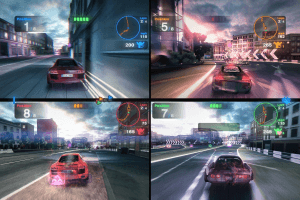
How to Play
The game version 1.2 has been tested on Windows 7 64-bit and Windows 10, works fine. The game supports widescreen and ultra-high resolutions up to 4k. You may experience some small troubles when you play the game, check our Guide and Notes for details
Install & play guide (for ISO image of original DVD):
- Mount the disc image. You will need the utility for mounting disc image files, like WinCDEmu, UltraISO, Alcohol 52%/Alcohol 102% or Daemon Tools Lite
- Install the game (if autorun doesn't work - try to launch Autorun.exe in compatibility mode with old version of Windows (98, 2000 or XP))
- Also it is recommended to install DirectX 9 from the disc (if you're using Windows 10/11 - enable DirectPlay, read this or this guide how to do it)
- And you will need to install PhysX Legacy Drivers, PhysX drivers are required for the correct work of the game
- Once you installed the game - install the patch v1.2. Please note that patch v1.2 may cause some troubles, read the Notes for details
- After that install NoDVD - simply copy Blur.exe from the archive and put it into game directory, replacing original Blur.exe. We added NoDVD for both v1.0 and v1.2
- Open the directory with the game and find Blur.exe. Right click on Blur.exe - Properties - Compatibility - Set "Run this app in compatibility mode with Windows 7" and "Run as administrator"
- Launch the game and play. If the game doesn't work in compatibility mode with Windows XP - try to launch it in compatibility mode with other version of Windows (98, 2000 or Vista)
Install & play guide (for repacks):
- Simply mount the .ISO file with the utility for mounting disc image files, like WinCDEmu, UltraISO, Alcohol 52%/Alcohol 102% or Daemon Tools Lite
- As alternative - extract the files from .ISO and launch Setup.exe
- Install the game (all of repacks includes the patch already). Also, if you're using Windows 10/11 - make sure to enable DirectPlay, read this or this guide how to do it
- Open the directory with the game and find Blur.exe. Right click on Blur.exe - Properties - Compatibility - Set "Run this app in compatibility mode with Windows 7" and "Run as administrator"
- Launch the game and play. If the game doesn't work in compatibility mode with Windows XP - try to launch it in compatibility mode with other version of Windows (98, 2000 or Vista)
How to play Blur in multiplayer now:
Blur had a big focus on multiplayer game with other players, but official servers are closed for years already. But you still can play LAN mode multiplayer with tools like Hamachi, Tunngle or Radmin. Fans of the game are still playing the game in multiplayer, you can find many other player in Blur Community Discord server
Notes:
- If the installation doesn't start - try to launch Autorun.exe in compatibility mode with old version of Windows (98, 2000 or XP)
- If you install the game from original DVD, and installer stucks: create
BLUR_DVDfolder on your hard drive, open the disc, copy all files from the disc toBLUR_DVDfolder, then run Setup.exe from that folder - NoDVD is required for the launch because the game is using SecuROM DRM protection, which doesn't work on modern systems. That NoDVD "breaks" DRM protection and allows the game to work on modern systems
- The game works on DirectX 9, so if you're using Windows 8, 8.1, 10 or 11 - you need to enable DirectPlay: Go to Control Panel, and select 'Programs'. Select 'Turn Windows features on and off', click on 'Legacy Components' and check the box 'DirectPlay'. Select OK, once the installation is done, restart your computer
- It is recommended to install all versions of Microsoft Visual C++ Redistributable, and NET Framework for the correct work of the game for the correct work of the game
- And you will need to install PhysX Legacy Drivers, PhysX drivers are required for the correct work of the game
- Also it is recommended to install RAD Video Tools and K-Lite Codec Pack for the correct work of in-game videos
- If you have black screen/freeze at launch, the game loads endlessly or crashes, you have random FPS drops. The game works unstable on some multi-core processors, so you can try to change CPU affinity, read this guide how to do that. Make sure you enabled DirectPlay and installed PhysX drivers before that
- By default the game v1.0 has capped framerate at 60 FPS, patch v1.2 unlocks framerate limit. However, it seems that too high framerate can cause troubles, especially audio issues (such as crackling and cutting-off earlier than expected) on "Medium" and "High" audio settings, and in rare cases graphical issues (broken motion blur or post-effects). Usually running the game in compatibility mode with Windows 7 solves that troubles, but if you still has some of that troubles, try next methods:
- Use one of framerate limiter utilities and cap the framerate at 60 FPS
- Modify Blur.exe with Cheat Engine or HeX-editor, to lock the game at desired framerate. Read this guide how to do that
- Or re-install the game and don't update it to v1.2, play on "vanilla" game v1.0
- The game supports controllers, including Xbox and PlayStation gamepads. But if the game cannot recognize your controller, try to add the game to Steam client as non-Steam game and use the 'Gamepad' preset in the controller configuration (vibration can be disabled via Steam Big Picture)
- For users of Windows 64-bit systems: if the game doesn't work after you launched it - open Task Manager (Ctrl+Alt+Del by default) and check for processes Blur.exe and rundll32.exe. Close Blur.exe but don't touch rundll32.exe (it's a Windows app for running old apps from 32-bit operational systems, most old games running through rundll32.exe). Now try to launch the game again, it must work. Don't forget to close rundll32.exe process in Task Manager after finishing playing
- Don't forget to check PCGamingWiki page if you have troubles, it is very useful!
 English
  French
  German
  Spanish
  Italian
 Russian





Comments and reviews
This game is so good for me 100%
I like this game 100%
so good i ilke the game
ineed a license key, where do i find it
where can i get a license keyyy
i realy wanted this game so give it to me
i love this game it is so cool
i love blur game
COMMENT JE DOIT FAIRE POUR AVOIR LE JEU BLUR JE COUR DANS WINDOW 10
THIS IS GREAT
it is a nice game to play
i want to download it
i enjoy blur
Please teach me how to downloadblur on ppsspp
How to download blur
I really like this game coz its very interesting and the graphics are very good
its a good game
just for funn
world class ultra racing game with awesome cars of all versions
i love old racing games. thanks so much
this sites is incredible for every game i install
those who have installed the 3.9 gb of blur, does it respond
wylyvelash@gmail.com
it is the best popular game i have ever seen
The game is the Best of racing
I love you guys you are life savers
once i saw this on yt i new i had to download
what is password of it
download faster
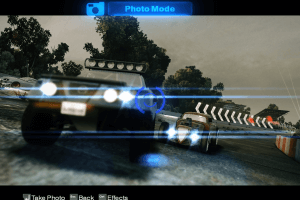
Cinematic mode
very good.how about linux users
تببةينؤتنسبةلوبتيوسنويرو
تبن لا استطيع تحميل هذه اللعبة
very good player
BEST CAR RACING GAME I HAVE SEEN EVER
I like this game
Eu não tenho acesso a licença, oque eu faço
l love to play blur
i love playing blur so i want to try this one.
its a good game
It's very good app in downloading games
good if downloan Blur on my oc
hmm hmm lalalalalalalallaallalalalalalalalallalalalalalalallalallalalallalalalalalallalalalaalalalalalllalalllalallallalalalala
good game thats peak
allow me to download it
i wanna play it
I like this game
THIS GAME IS FFFFFFFFFUN I LOVE THE POWER UPS IT'S SO AMAZING
Truly love games
I want to download this games
IT'S a great idea for sure
i like blur becoz it makes me happy
its ok 5 stars yo
it's giving fun
The game is sharp with amazing power ups
They don't have passwords ryt
Finally my dream come true
i love this game
Good website
❤️❤️nice game come try it out
Hi i wanna ask do i need to download emulator?
where is the lisence key
I'm interested with the game
good website
is my dream come trueeeeeeeeeeeeeeeeeeeeeeeeeeeeeeeeeeeeeeeeeeeeeeeeeeeeeeeeeeeeeeeeeeeeeeeeeeeeeeeeeeeeeeeeeeeeeeeeeeeeeeeeeeeeeeeeeeeeeeeeeeeeeeeeeeeeeeeeeeeeeeeeeeeeeeeeeeeeeeeeeeeeeeeeeeeeeeeeeeeeeeeeeeeeeeeeeeeeeeeeeeeeeeeeeeeeeeeeeeeeeeeeeeeeeeeeeeeeeeeeeeeeeeeeeeeeeeeeeeeeeeeeeeeeeeeeeeeeeeeeeeeeeeeeeeeeeeeeeeeeee
fantastic game! everyone should try this out!
thanks for blur
Download so slowly
HUUUUUUUUUUUR YEaaaH Car goes Brummmm
i'd rather be sleeping
its gooooooooooooooooooooooooooooooooooooooooooooooooooooooooooooooooooooooooooooooooooooooooooooooooooooooooooooooooooooooooooooooooooooooooooooooooooooooooooooooooooooooooooooooooooooooooooooooooooooooooooooooooooooooooooooooooooooooooooooooooooooooooooooooooooooooooooooooooooooooooooooooooooooooooooooooooooooooooooooooooooooooooooooooooooooooooooooooooooooooooooooooooooooooooooooooooooooooooooooooooooooooD
are you telling me this game is abandonware now? like... pretty old? 😬 that game was released some years ago :(
how to set this up
tysm i lv dis game
How to install
ITS A VERY FANTASTIC GAME TO PLAY ITS MORE LIKE BEACH BUGGY BUT A MORE REALISTIC VERSION WOW ITS SO AMASING
good game i cant wait to try it hhahahahhahahahahahahahahahahahahaaa
I like racing 🏁 with racers
this is good
awsome game i love it i rate this as a five star game
this is the best car racing game
sorry to interrupt that guy called vibe is very fooooooooooooooooooooooooooooooooooooooooooooooooooooooooooooooooooooooollllllllllllllllllllllllllllllllllllllllllllllllllllllllllllllllllllllllllllllllllllllllllllllllllllllllllllllllllllllllllllllllllllllllllllllllllllllllllllllllllllllllllllllsssssssssssssssssssssssssssssssssssssssssssssssssssssssssssssssssssssssssssssssssssssssssssssssssssssssssssssssssssssssssssssssssshhhhhhhhhhhhhhhhhhhhhhhhhhhhhhhhhhhhhhhhhhhhhhhhhhhhhhhhhhhhhhhhhhhhhhhhhhhhhhhhhhhhhh
i love this game
love it and wanna more of it
Rv7n6vtb7yn8u ugbgn7hbtonugmt8bij.6r 6r ri duvet first first h
it is a nice game
how to download
I love the game
blur my beloved game
it is awosome
i want the game
very good very nice
want to download the game
This game runs like absolute garbage on the lowest settings even though my device isn't even that old
Using a Ryzen 5 3500u with integrated graphics is there anything i can do to not get 15-30 fps on lowest settings?
sometimes it even runs better at 40 when use settings but the moment i change everything to the lowest to maximize performance it becomes unplayable running at like 10 max
I love this game
i love this game
c;:!!$^^*=)àç_è-(''"é&²²èè_ççàà=)à)àç_èèè-
i love this game and i will soon try it
i want to dawnload
guys is this game i can play with any loptop 8 ram and i5 13th h ?
yo man i used to play this game with my college mates in college days and wanted to experience it once more, thanks for the link.
game is so awesome
i like the game
Just wanted to drop a massive THANK YOU to the team behind this site and to the uploaders/repackers (special shoutout to ElAmigos, R.G. Mechanics, and all the others!). Your work is absolutely invaluable.
Finding a well-preserved, properly patched, and ready-to-play version of a classic like Blur in 2024 is a blessing. The fact that you take the time to create these repacks with compatibility fixes, widescreen support, and all languages included shows incredible dedication. You're not just sharing files; you're preserving gaming history and making it accessible for new generations. This effort keeps amazing communities alive. Please keep up the fantastic work!
And about Blur... What an absolute gem of a game! It's the perfect, insane cocktail of realistic cars and arcade-style power-ups that we didn't deserve but so desperately needed. It's pure, unadulterated fun. Every race is chaotic, strategic, and hilarious. It's a tragedy that we never got a sequel, but thanks to places and people like this, this masterpiece isn't forgotten.
To the site crew and the repack wizards: You are awesome. Your passion fuels ours.
To Blur: You are still one of the most uniquely thrilling racing games ever made.
We have updated the game, added new repacks and ISO version of original DVD.
Sorry about downloading speed, it depends on server location and your Internet provider.
In case with big files we recommend to use download managers
No comment nor review for this game at the moment.