


Alternate Realities.
Colin opened his computer. He was quite happy when he found Sega Rally at the computer store on the way home- he remembered liking it very much seeing it run on a friend's console. He sat in front of his 15" screen, and noted happily that the game required 16 MB. "Lucky to have bought the extra 8 last week", he thought. Inserting the CD into his 6x drive, he hoped that maybe he could have some real arcade fun with his new Pentium 100...
Troy, "cool-dude" to his friends, ran up the stairs, tearing the shrink-wrap from the new Sega Rally package. The clerk from the store called him at work to let him know the shipment came in- but hey, he was a really valued customer. Their best. His excitement showed as he slipped the CD into his new 12x SCSI CD drive. The MMX machine powered up slowly, like a giant waking from a slumber, counting the 64 MB of memory rather slowly, it seemed. "come on, come on", muttered Troy, fondling his grIp pad and felling the empty box to the floor, right next to the Righteous 3D one. The Windows 95 screen came up. "Lets have some fun"...
Do you like Port?
In what is becoming a popular tradition, Sega has ported their hugely successful arcade hit, Sega Rally Championship, to the PC. Being one of the best arcade racers around, I had high hopes for this Saturn port. Luckily, I got it just while I was replacing my system, and so I had the chance to see it from two different points of view- of the normal and power user. And believe you me, they are different. Installing it was a real snap, even on my relatively unstable machine (due to different hardware being replaced while writing the review). No crashes, hassles, or problems of any kind. Maybe Sega is willing to give "PC stability classes"? I know of several companies who would desperately need the lessons...
The game itself runs using DirectX, ships with version 3, and thoughtfully asks you whether you want it installed. It either runs in a window or in full screen mode, with the former requiring the use of a 16 bit color palette. SVGA is the standard, but VGA (320x240) is also supported.
The good, the bad, and the ugly
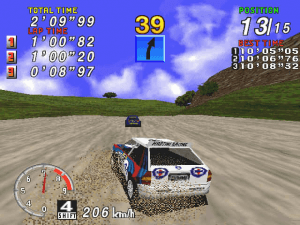
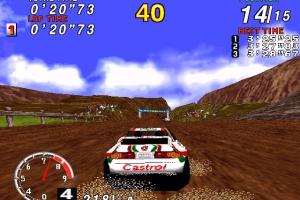
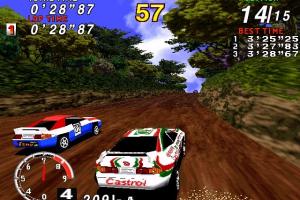
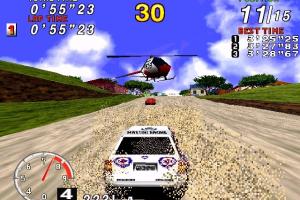
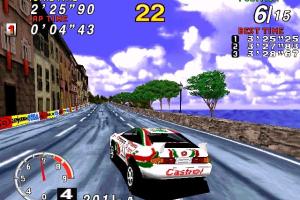
Sega Rally looks either very good or very bad, depending on your hardware. In SVGA, especially with 16 bit colors, its simply fantastic- I had some trouble playing the game as my attention always wandered to all the eye candy. It is really, really pretty. But if you are one of the majority, then you probably don't have the particulars needed to run it at maximum settings. This is where Sega Rally loses big. It is just awful at the lower resolutions, and if you decide that a low frame rate doesn't bother you and decide to run it at SVGA, then you'll have to turn off the sound. The thing is, the developers did something very nice with the sound- its actually affected but what is going on, and actually helps you drive better. You can tell a lot of things by just listening to the engine and wheels- on my system, I could distinctly hear my right front wheel losing grip on one of the tight turns. But since the game tries to lower the frame rate, instead of lose frames, the sound is slowed also. Its like listening to a 45 RPM vinyl record revolving at 33.
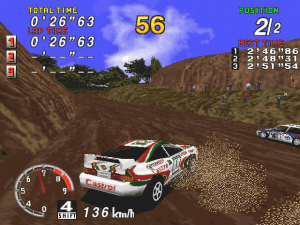
It gets even worse then that; Sega has managed to recreate the experience of driving a race car magnificently- for anyone who has the horsepower. On my previous P-90, the car handled just like any ordinary arcade racer- maybe it was a bit more responsive. On my MMX, though, the car transformed into something out of a dream. Your four wheel drive behaves like it should, and you should actually take into consideration whether you are driving over sand, grass, asphalt or whatever. its simply amazing.
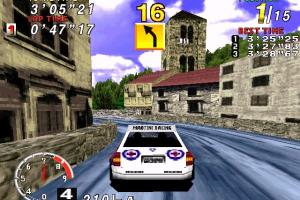
A virtual navigator of sorts keeps informing you of the nature of coming curves- things along the lines "long, easy right", or "medium right, medium left" in succession for a tight chicane. Nice, but if you turn off the sound because your computer isn't really up to the whole thing, you'll lose the nav as well. Luckily, these warnings are coupled by on screen warnings in the form of very noticeable colored arrows.
A minor bug does exist, in that the collision detection is not perfect. You may find yourself driving parallel to a wall with one half of your car on each side. No big deal, but not perfect.
Options? you want options?
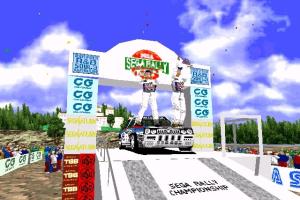
Sega Rally offers quite a number of options. The Arcade mode recreates the original quite well, and you can additionally choose to practice any of the three normally available courses. The races are normal arcade fare- you have a "timer to checkpoint" combination to beat, with extra time being carried over, as well as 14 computer opponents should you pick the Championship race. That latter mode requires that you run through the three courses, exposing a fourth. Going on to win first place on that will reveal a hidden car you may use from then on.
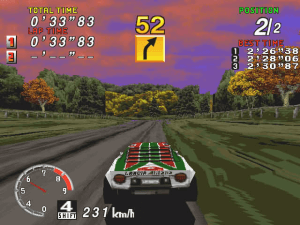
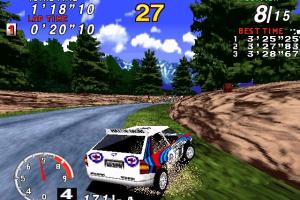
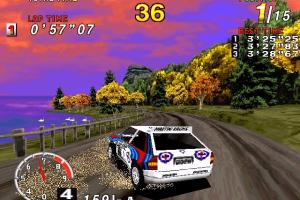
Before I go on, let me explain. Sega Rally is very weak in terms of the number of courses and cars it has to offer. Only three tracks are available from the off- Desert, Forest, and Mountain- which get progressively harder. The Lakeside track is hidden- it becomes exposed when you fight for championship and run successfully through all the other three. All of the tracks are beautifully designed, and this compensates somewhat for not having any more. Its still annoying having only two (!) possible cars to drive, the Lancia Delta and the Toyota Celica, so you should do your best to win first place on Lakeside. Manage that, and you will find a third car, the rear wheel drive Lancia Stratos. This provides for tons of fun, as you need to completely readjust your driving style, the Stratos being a totally different experience from the two all wheel drive cars. This also extends the game's longevity, by as much as double the playing time. Good.
Back to options; Time Attack mode allows you to try your luck vs. a running watch, instead of a timer. You may race each track indefinitely, improving your skills and exposing each track's secrets. Two player mode means split screen and multiple fun. You may link to another gamer through a modem, LAN, via the Internet, or take turns using the Ghost mode, where you drive against a ghostly previous incarnation of yourself. You can change your car settings, including transmission type, handling and tires (responsiveness), tightness of suspension springs, and the blow off valve (engine sound). You can even save up to four different setups. There are different difficulty settings, of course. In short, Sega Rally offers all the options required from an arcade racer. The interface might seem unnatural for PC users, but anyone with major arcade experience would feel right at home.
The Checkered flag... and the black
What can I say? Sega Rally is a wonderful game, if you can get it running at full steam. It just isn't worth it otherwise- if you have less then a P133, don't even think about it. Get Screamer instead. But if you do have the hardware, and you like arcade racing, then I suggest you run out and buy a copy. Great track designs, numerous options, close to perfect car modeling, delightful graphics and sound, nice hidden features, the list of adjectives is too long to print... if you can handle the demands, Sega Rally easily becomes a winner. Easily.
Review By GamesDomain
 English
  German
  Japanese
  Korean







Comments and reviews
Works perfect on sega model 2 emulator
im about to install this on windows 7 and then
place it into a usb and test it on windows XP
French :
https://www.abandonware-france.org/ltf_abandon/ltf_jeu.php?id=187&fic=liens
Cant seem to get it running in Win11 =(
Thank you for the upload!
For those who still has their game running in inconsistent speed and no music, please make sure your virtual disk drive is in F: which you can set it in your virtual CD drive software (Daemon Tools is recommended).
It is also important to keep in mind that you need to mount the disc every time you want to run it.
It works for any SEGA games as well* (VCOP2, DAYTONA, VON) so do keep this in mind.
*except HOTD1
@SAMBONZ Should be false positive, VirusTotal showed 0 warnings
https://www.virustotal.com/gui/file/d6695a535e2b7c41242d37802557ddfa4c095d89a4c9e5b8ea3f311e50af19fd RallyD3D.exe is a modified exe-file from Unofficial Direct3D patch, maybe your antivirus shows warning because of that.
Also, your antivirus may trigger false positive warnings on files of of patch, especially OBJECT2PE.TEX file https://www.virustotal.com/gui/file/4e9e2171827e364e7ecf4954bc58368618fbd1744562adc3078821242f590f10/detection . But it is "heritage" of original file, it shows many false positive warnings too https://www.virustotal.com/gui/file/5f5a31bce76bdb4ffb5c3be29c492cf4e47137dbe46527f168b67dce6b9a999f
Hi! I've never had any of your files flag my Bitdefender Antivirus before, but I installed the MagiPack version and then this happened: :(
Antivirus
The app G:\Games\Sega Rally Championship\RALLYD3D.EXE infected with Gen:Heur.ZTD.1 was moved to quarantine. It is recommended that you run a System Scan to make sure your system is clean
We updated this page, added more language versions plus some fixes for the comfort play on modern systems
Work 4 me porting kit for mac intel
This is my first old emulated pc game, so I don't know where to start to run this? Can it be run with retroarch? If so, do I need specific cores for it? Or is another software needed like Daemon Tools?
you can fix the speedup issues by restoring CD audio with _inmm. you can also externally cap the FPS to 30 but if you do this with the CD audio playing the game will run too slowly.
during the 3-2-1 countdown the game will speedup since there's no music playing but when the music starts the speedups stop. seems the game's timing is tied to the presence of cd audio
Game runs fine, and the text document trick seemed to fix the speed problems quite well. Thanks for the upload, now I guess I can finally join in the hype surrounding around how good this game is lmao
Sorry guys and Mr.admin of this site.
Looks like the latter half of wave files (for example, co-driver's voices) in SRAALY.nrg are really broken, even if you mount SRALLY.nrg as a virtual CD drive with Daemon Tools Lite. I think this ISO need a fix like other guys said.
1. At first, change your phisical CD drive's "drive letter" to Z:.
~~~~~~~~~~~~~~~~~~~~~~~~~~~~~~~~~~~~~~~
2. Use "Daemon Tools Lite" to mount SRALLY.nrg.
~~~~~~~~~~~~~~~~~~~
Other virtual CD drive apps can't handle SRALLY.nrg properly.
The virtual CD drive of Sega Rally must be "the first CD drive" like D: or E: or F:.
3. Select "Full install" from the virtual CD drive.
I use Win10-64bit Home, and I didn't need to fuss with a compatibility setting.
4. Now, you can play the game while listening to lovely Sega Rally musics.
It's because the vIrtual Sega Rally CD is the first CD drive.
Fix for crashes please!
bruh i cant control my car and no sound and music
If I mount nrg file and click install.exe I get "Cannot run on Windows NT 6.2" error. Changing compatibility settings doesn't help.
But if I extract nrg then install.exe don't work at all
Here's the speed fix:
Right click on desktop and create a new text document and paste this:
@ECHO OFF
START /MIN dxdiag.exe
ping -n 6 0.0.0.0
START /MAX /WAIT Rally.exe
taskkill /F /IM dxdiag.exe
Now go to File - Save As
In the first box Type in: Loader.bat
In the box below Select All Files
Click Save
Now Move Loader.bat to the Sega folder and run the game using the loader.
Thanks, let me know if it works for you.
Even with the ISO version mounted as a virtual drive I get no music. How can this be fixed?
Solution : Open Dxdiag.exe and leave it running
Strange but it works, at least in Win7 32bit it did
"Pulled out an old Windows XP PC from 2004, installed the game and it runs weird...like normal speed then a quick burst, normal speed, quick burst...repeat. Weird."
I Want To Play My Computer of SGR Part 1.
Working but whitout sound and music? Do you have a idea?
please run without cd plus practical
THIS IS GOOD
Hey Rico, I also had the same problem with the quick bursts of speed on WinXP, making the game unplayable. First, I installed the MMX patch, and ran compatibility mode for win95 and display settings for 640x480 under the .exe file's properties (compatibility tab). None of this was of any use. Then I ran dxdiag.exe from Start-Run and on the Display tab, I disabled Direct3D Acceleration. This worked for me, running DirectX v9.
how to run this game??????????????????
I just grab the originall disk out off my storage.
Audio files are corrupted, unplayable and unreadable. It runs but then it crashes, probably due to file corruption. Surprised it almost worked out of the box with not much tweaking.
The games doens,t run… to much dificult. why not easy?
Pulled out an old Windows XP PC from 2004, installed the game and it runs weird...like normal speed then a quick burst, normal speed, quick burst...repeat. Weird.
How is possible? 500Mb ripped for 10Mb? OMG!
No comment nor review for this game at the moment.