




Rowan have never been a company to shrink from simulating unusual subjects. From the skies of Vietnam (Flight of the Intruder) to the beachheads of WWII Europe(Overlord) via the fields of Flanders (DawnPatrol and the various incarnations of Flying Corps), not forgetting an exceedingly weird excursion into the realms of fantasy (Airpower), they have never tended to model the obvious or common.
Now it seems, they are showing signs of turning mainstream for their new sim, Mig Alley is set in what is becoming one of the more popular pages in the sim publisher's atlas, Korea.
This isn't the first Korean War sim we've seen of course. Virgin had a crack at the same subject almost two years ago with Sabre Ace - Conflict Over Korea and while that title had one or two problems, it certainly showed just how much potential the subject had. Have Rowan finally managed to do it justice?
Wot? No Corsair?
My first impressions of Mig Alley were slightly disappointing . For some reason, I had dreams in my head of flying Fairey Fireflies off RN carriers and prowling the skies in Gloster Meteors and the reality of the sim, which concentrates on US air activity with a Mig 15 thrown in to give players a chance to settle once and for all the argument over which was better, the Mig or the Sabre, seemed mainstream in comparison. Fortunately, Mig Alley wasted no time in redeeming itself.
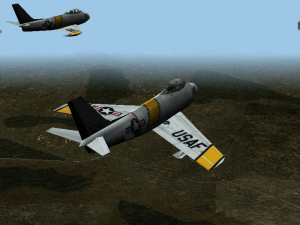
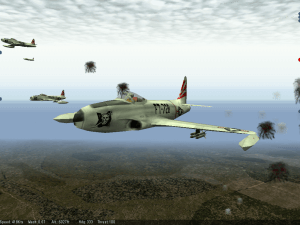
For the record, Mig Alley gives you the chance to fly 5 aircraft, the F51 Mustang, the F80 Shooting Star, the F84 Thunderjet, the F86 Sabre and the Mig15. In addition, three different marks of the F86 and two of the Mig 15 are modelled. This selection forms an interesting record of the development of fighter aircraft. The Mustang represents just about the pinnacle of piston engine design, the F80 and F84 represent an intermediate stage with the new jet engines installed in straight winged airframes which didn't show many advances over those which had fought in World War II and finally the Mig and the F86 representing the designer's first efforts to get to grips with the possibilities afforded by swept wings and more powerful engines.
It might have been simpler for Rowan if they had missed out the F51 and concentrated on the jets. The flight model of a piston engine tail dragger is a very different creature from that of a jet and there is always the danger that any sim which tries to model both runs the risk of ending up with a curate's egg of a model which in trying to satisfy both criteria ends up adequately modelling neither. One of the things that really annoyed me about the aforementioned Sabre Ace was that that the tail draggers modelled in that sim all seemed to have an invisible nose wheel which prevented the aircraft from nosing over, no matter what the provocation. Torque effects were also noticeable by their absence.
The Mig Alley F51 flight model is much better. Though perhaps not quite up to the standards of the very best flight models available (I tend to use Warbirds as my yardstick here though I know others would disagree), it is more than sufficient to prove a challenge to the player and trying to hold the Mustang straight on takeoff to avoid veering into your wingman is no easy task. There are some funnies such as the way that if you use the rudder on takeoff to try and straighten up , you end up skidding at an angle to your line of travel, accompanied by loud tyre screeching noises but by and large, the F51 flight model is more than acceptable.
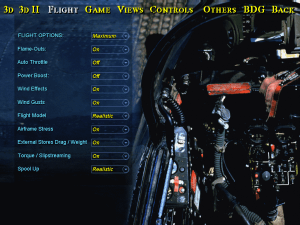
The same holds true for the jets. It's perhaps more difficult to judge the fidelity of the jets' flight but effects such as high speed stalls, flameouts at high angles of attack and buffeting at the onset of a stall are all modelled and feel realistic (though I have no real life experience to back up this assertion with).
There are also differences in the handling of each jet. A take off in an F80 or an F86 is a very different matter to a takeoff in a heavily laden F84 whose nickname, hog, doesn't refer to its somewhat pig-like snout but is a contraction of groundhog, testimony to its deep-seated reluctance to leave the tarmac. On the short airstrips of Korea, easing the hog into the air calls for some very delicate handling of the joystick. This behaviour may be accentuated by Rowan's puzzling decision to only model one flap position, that is, in Mig Alley flaps are either fully up or fully down. I am pretty sure that this does not accurately reflect real life. It's also slightly annoying to note that your wingmen have no problem getting airborn, usually accomplishing this several hundred meters before you lumber into the air. Guess you got stuck with the hanger queen again.
In the unlikely event that a pilot of your skill is actually on the receiving end of some damage, another pleasing aspect of the flight model becomes apparent. If say your port wing gets perforated, your aircraft will yaw to the left and drop that wing. Great stuff.
The glint of banking wings
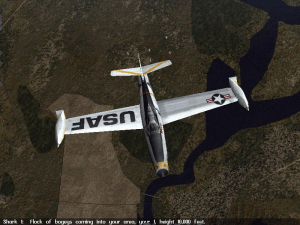
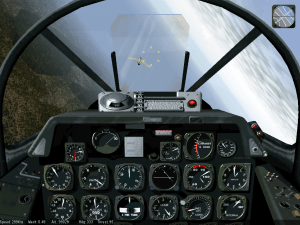
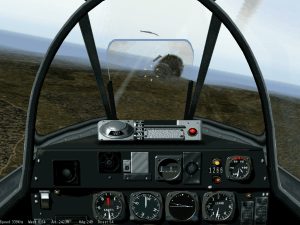
In addition to flying well, the aircraft in Mig Alley look great, as does the landscape. The graphics engine in Mig Alley is supposedly an all new one and if that is the case, Rowan have done a good job on it. Better still, on what may be the only Celeron 300A in the galaxy actually running at 300Mh and a *Creative TNT1 *graphics card, I was able to get smooth frame rates running at 800x600. Rowan have included the choice of having the game adjust graphical detail on the fly to maintain a high frame rate and this seems to work well, ironing out the occasional hesitations I saw when running the game with this feature switched off and the graphics detail set to the maximum setting. At the highest settings, ground detail extends to individual trees and even soldiers while the aircraft have all the features you would expect from one of today's sims such as battle damage and moving control surfaces. One graphical high spot is the fact that often the first time you will catch sight of an aircraft is as it banks towards you and sunlight reflects off its wings, just as happened in real life.
I do have one or two quibbles with the graphics. Down low (and believe me, in this sim you can spend a lot of time down low), landscape features can tend to blur into one another meaning that the railway line which seemed so distinct from 3000ft. can be nothing but a blur from 300ft. This was also a problem with FlyingCorps and it can detract a little from the enjoyment of low level mud moving missions. Up high, another problem manifests itself. As you might expect, your view of the landscape gradually fades into the distance (the distance in question being configurable) but if fades into a light blue colour for some reason. This means that you very often get the impression that you are flying towards the sea, even when you are in the middle of Korea. It's not a major problem but it does break the mood somewhat.
All mod cons
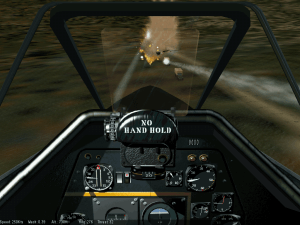
Previous Rowan sims tended to offer every internal, external and padlock view imaginable. Unfortunately, the user needed the mind of a genius, the memory of an elephant and the tentacles of a giant squid to get the best out of this system. Rowan have simplified the system for Mig Alley considerably and the game benefits as a result. A single key press toggles between fixed internal views and the virtual cockpit (in fact there seems to be very little difference between the two, all the instruments remain functional in the virtual cockpit and it pans so smoothly I practically never use the fixed views). There are four different padlock views, one for friendly aircraft, one for hostile aircraft, one for ground targets and one for waypoints.
This last view goes some way towards answering one of the biggest criticisms made of Mig Alley so far, the difficulty of navigating. 50s aircraft didn't feature useful markers on the head up display pointing towards the next waypoint and Rowan have faithfully modelled this lack of feature. The player must choose between calculating which direction they should be flying from the map and sticking to that course, using the timeskip feature to move between waypoints (which is what most people will probably end up doing even though this feature seems slightly broken)or padlocking the next waypoint and making sure that the gun sight is sitting in the centre of the screen. I tend to use a combination of methods 2 and 3.
A helpful aid when using method three is the information line at the bottom of the screen. This can be configured to show speed and altitude or information about the view in use, including distance and bearing to the waypoint if that is the current target. It can also of course be switched off.
Another feature I have persuaded myself that it's not too unrealistic to use is the peripheral view. When this is in action, aircraft which are just outside the area of the screen are represented by a small blob on the edge of the screen, grey for friendly aircraft and red for bandits. This is supposed to compensate for the fact that the computer screen represents a much smaller field of view than the human eye and who am I to argue. It's not a magic radar in the sense that aircraft sitting on your 6 don't show up so I've convinced myself that it's Ok to use it.
Far more dodgy on the realism front is what the game refers to as the head up display. With this feature enabled, small windows appear on the top left and right hand sides of the screen. The one on the right hand side is fair enough, it's an artificial horizon and this is very useful because on my set-up at least, the artificial horizon in the cockpit is a useless white blur. The left hand window is another matter. It reminds me strongly of the scanner in Elite (the space trading/combat game, not the IFR training package) and is nothing less than the aforementioned magic radar showing the location and relative height of every aircraft in your immediate airspace. This of course is a real no-no for realism freaks but sadly there is no way to have the artificial horizon present and the magic scanner absent.
You can cut it with a knife
Rowan appear to have let their imagination run riot a little when it came to sound. The noises made by the various aircraft are fine (though the F51 perhaps sounds a little lack-lustred), as are the in-flight voices and the explosions from the triple A, but get a little low on an attack run and you can hear the chuffing of the locomotive you're strafing and even the cursing of the enemy troops as they run for cover. I don't know what they're saying but they sound peeved.
Incidentally, it may just be a feature of my particular system but I found that the game ran a little faster if the voices heard over the radio in flight were turned off. I say that it may just be a feature of my system because I have an Ensoniq sound card which Rowan have said can cause problems. It's possible to have all important radio messages appear as text above the information line so this isn't a disaster but I preferred to keep the messages on and put up with the loss of framerate because of the atmosphere they add, even though the messages can become a little repetitive after a while and are sometimes misplaced. "Lead! He's on your six!" Yes, but he's also 10 miles away.
I mentioned the atmosphere of Mig Alley above and it is another aspect of the sim which is worthy of special mention. The excellence of the graphics, combined with the in flight chatter of your fellow pilots combine to give a level of immersion which I have seldom experienced in a flight sim. I found that I felt a real chill of apprehension when watching the contrails of a squadron of Mig 15s heading towards my flight of aircraft, followed by the glare from their wings as they banked towards us.
To War!
From all of the above, you will realise that I consider that Mig Alley is built on a firm foundation. But in any monumental sim, the penthouse apartment must be a satisfying campaign option (With the honourable exception of Flanker of course). Does Mig Alley remain good all the way to the top floor?
The first sample of flight Mig Alley style the player will probably experience is Hot Shot. This places the player in the cockpit of an F86 taking part in a major attack on a North Korean supply dump. The first reaction is one of helplessness as the player tries to cope with the calls of your fellow pilots over the radio and tries to keep an eye out for the marauding Migs which are plummeting like hawks on the defenceless bombers, coupled with amazement at the number of aircraft taking part in the battle. I haven't seen an instant action option which offers so much fun (is that allowed in a serious sim?) since Falcon 3.
When the player finally managed to escape the seductive clutches of hot shot, they will find 16 quick missions awaiting them. These differ from hot shot in that they offer a number of situations ranging from quick single combats to full blown bombing raids and in that certain parameters can be adjusted such as the proficiency of the computer pilots, the aircraft which the player will fly and even the side on which they fly. This is about the only opportunity the single player has to fly the Mig 15.
Once the single missions have been mastered, five campaigns await the player, set at different periods of the war. The first four campaigns serve as an introduction to the different aircraft at your command, each consisting of four missions illustrating the use of that particular aircraft. The first campaign sees you carrying out armed reconnaissance in an F80, the second close air support in a F51 and so forth. They give you the opportunity to get a feel for the aircraft, for the various tactics you will need to use, and to get used to issuing commands to the rest of your squadron.
These campaigns are however just a overture for the main event, the spring offensive of 1951 where the player is effectively handed the entire air assets of the Korean peninsular and told to get on with it. This is a fully dynamic campaign and the possibilities are endless. The ultimate point of the campaign is to reduce the Communist's ability to resupply their front line forces and this obviously requires that attacks be made on the communist supply routes. Knocking out a vital rail bridge may have a major impact on the effectiveness of the North Korean troops at the front line. The problem is that it's hard concentrating on your bombing accuracy when every time you begin your run, you find an entire squadron of Migs on your six so perhaps it would be better to start off reducing the effectiveness of the opposing air force by obliterating their air bases. Decisions, decisions.
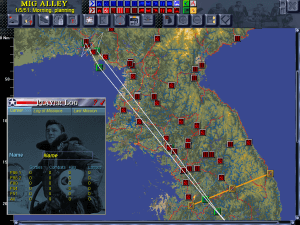
To help the poor player make and implement these decisions, Rowan have thoughtfully provided one of the best campaign interfaces I have seen. The player can choose exactly how much involvement they want in the planning process. At the shallowest level, this consists of deciding which class of target should be attacked (there are about 8 classes including air bases, choke points, supply depots and so on) and how many aircraft should be assigned to each type of attack. The campaign manager will then go off and plan missions for as many of the targets in the assigned classes as possible, given the restriction on aircraft numbers. Once planned, any of these missions can be edited in minute detail by the player.
Should the budding MacArthur wish to take a more personal approach to campaign management, individual targets can be selected and authorised for attack. Mig Alley comes with a range of preplanned attack profiles which can be employed or the player can create a new profile from scratch which can then be saved and reused in the future. A mission can consist of up to 6 separate waves of aircraft, each of which can have up to three components, strike, AAA suppression and escort. For example when attacking a major supply centre, the first wave might consist of two flights of F86s tasked with sweeping any defending Migs out of the way, the second might be two flights of F84s tasked with AAA suppression, supported by two flights of F86s for air cover, the third wave, the actual strike, might contain 4 flights of B29s from Japan supported by two flights of F51s to nail any flak the hogs may have missed, all covered by another two flights of F86s, the forth, another four flights of F51s loaded with napalm to finish up the destruction of the warehouses and the fifth, the remaining two flights of F86s at the disposal of the player to provide cover for the departing strike. According to the manual, each 2 plane element in a flight of four can be assigned two targets theoretically allowing one flight to attack four different targets in a single mission. I have to say though that the procedure for doing this is somewhat flawed. Often, the second target ends up in the middle of the Yellow Sea, no matter where you tried to place it.
Just to add the icing to the cake, once the missions have been planned, the player can opt to fly in any plane modelled in the sim which is taking part in the mission. If you're a mud mover, join that flight of F51s attacking a front-line airfield. If you prefer turning and burning, join the F86 squadron on BARCAP over Mig Alley. Uniquely in my experience of sims, you can choose which kind of flying career you want and stick to it or you can flit between BARCAPs and flak suppression. It's a range of choice which adds much to Mig Alley's longevity.
Unfortunately, all is not totally rosy in the Mig Alley sky. The deeper one delves into the abilities of the campaign planner, the flakier it seems to become. If you are happy to fly the generated missions with little modification, the program will run happily all day but if you persist in trying to plan your own routes and targets, it seems to become more and more likely that you will be faced with the dread box proclaiming that an error has occurred, followed by a quick return to the desktop. This seems to be a relatively rare problem among Mig Alley players, perhaps suggesting that there is something about my system Mig Alley doesn't like (that Ensoniq card again perhaps) but it's a pain.
Sadly, although the crashing campaign is the biggest problem I've come across while flying in Mig Alley's skies, there are also several smaller bugs present ranging from the amusing (hit the ground just right and the crater you create will go pinwheeling across the landscape) to the puzzling (sometimes the program notices when you die in a campaign, sometimes it ignores your sad demise) to the downright frustrating (the waypoint and accelerated time systems are broken. There's no way to select your current waypoint. If you bypass a waypoint, you can't select accelerated time afterwards because even if you've flown 100 miles past that waypoint, the program will still turn you around as soon as you enter accelerated time mode. Not that this is a major problem because most of the time after you've made your attack run or whatever, you're never able to select accelerated time again anyway). Another problem is that the F51 mini campaign is nearly impossible to win because your wingmen seem to lose the ability to find any targets after the first pass. Worst of all, the program occasionally changes your option settings without so much as a by-your-leave. Mind you, that's not all bad news. There's been a couple of times when, target fixated as usual, I've smacked into the ground during a strafing run and bounced straight back into the air again because Mig Alley has taken it upon itself to disable ground collisions. Must have spotted my standards of flying.
All is not lost. Rowan have an excellent (and well deserved) reputation for supporting their products (they almost ran out of alphabet when naming their Flying Corps patches) and if Mig Alley enjoys the same level of support, I am very hopeful that its problems will be ironed out.
Conclusion
If it were not for the presence of so many bugs, there's no question that I would be nominating Mig Alley for the GDR Gold Award. Sadly, the presence of so many glitches means that I can't really do that. Some may even question the award of a silver, given these problems but beneath it all, Mig Alley is a truly excellent sim which even in its present state will give the player many hours of enjoyment. With all the bugs fixed (as they hopefully will be for the US release, Europeans seemingly having been used as beta testers) there will be few sims to match it. Don't miss this one.
Review By GamesDomain
 English







Comments and reviews
Inutile sfiancarsi.........per far funzionare bene questo programma, occorre avere un computer dei tempi del primo periodo asburgico...
https://www.tales-from-darkenedroom.com/post/mig-alley-running-in-windows-10
I got the game working on Windows 11 using this archive.org version 1.1 ISO:
https://archive.org/download/MiGAlleyPCGAME1999/Mig%20Alley_v1_1.iso
I then applied the two patches in the separate 'Patches' download, this apparently gets TrackIR working (I haven't tested it yet):
https://archive.org/download/MiGAlleyPCGAME1999/PatchesforMiGAlley.zip
Has anyone got this to work without using a PC emulator? I can't for the life of me get the game to even install, much less even launch. I've tried the Archive.org install and instructions and nothing everytime. I don't think the game is still fully playable on modern devices. Even with PCem(which I have no idea how to use) I can't get anything to happen at all.
abandon is a fantaic app to download forgotten games
I am having problem with landscape/DIR.DIR file.
It is not working i guess. Is there any solution?
mig alley seems a good game
I got the game installed in pcem with all patches and no cd fix and it works fine but I'm stumped on how to now transport mig from pcem to host pc win 10. Gill says, "you can just mount the drives you used in Win 10 and copy over what you need. " I have no idea what he means. Can somebody please explain? I google and youtube search did not explain what he means, or I couldn't find an explanation, if there is one that coincides with his statement.
Still not quite working despite following the instructions to my best ability, the wall of text is indeed a bit daunting. Wondering on the chances of an abridged version or a video install guide.
Nice to see this old gem is still around. But question: does anyone have the 0.85F and 0.85F2 patches anywhere? I have been looking consistently but to no avail.
I had the demo from computer buyer issue cover cd Dec 1999,couldn't get it running on either a P4 Willamette or Pentium D Netburst on XP pro in over 15 years but i have a p3 with an AGPx4 Nvidia mx 400 card on Win 98se and it actually ran,can't say if will run the full game yet,seems it won't run well on even period hardware from around 2001...
When I change view pressing some of F key, game is freezing and quit to windows. Does anybody have same problem?
W10, instal from upgreated ISO Version, patched to 1,23 version
Do I need to apply the 1.23 patches to Been_Nath's install or does his come with the updated version of Mig Alley?
That annoying black screen in center really has to be rectified, no fix online has ever solved this windows 10 problem
The portable version doesn't work for me either, same white screen problem.
I managed to get it working on PCEM with heavy stuttering, but not on Windows 10.
Pre-deployed portable version doesn't work for me, either. Same white screen issue as previous poster.
The game runs without dxwnd. Uploaded file has it in its path, but its irrelevant. Try setting it up yourself via PCEM perhaps? There is no need to set up a powerful machine in there, just install all your stuff and extract it.
This doesn't work for me. Changed the paths in the roots.dir file, after running mig.exe (tried with and w/o "run as admin") white window pops up (with a menu items: File Edit View Help ?) for a moment and closes. @GILL do you run it with dxwnd? If not perhaps any compatibility settings need to be applied to mig.exe?
Need help says I need a code and I also have windows 10
Finally made it work on PCEM v17. Configuration as follows:
Windows 98
Voodoo 3
64MB RAM
K6-2 300
DirectX 7
Ran like a charm! Absolutely perfect.
Will NOT work even on PCEM V17 running Win98SE and emulated Voodoo 3.
AFAIK it only runs on Windows 98.
think just for XP platform.
has anyone been able to get this game to work id like th play it without it throwing an error i have followed all instructions and still throws errors
the install has a problem and throws an error
Korean war is forgotten and such few flight sims about it.
Wasn't much though. Just air patrol missions over the Yalu river and bombing runs over Pyongyang and elsewhere.
THis game is good. Its the best Korean war air sim they got.
In the final campaign you get to be the Big Air Marshall as well as a pilot. You can mold the war to the way you want maybe even conclude with total victory uniting the peninsula.
No comment nor review for this game at the moment.