You are on the beta version of My Abandonware. The live site is still myabandonware.com. Your favorites and ratings here are copied to the live site. Comments and other changes are not — we delete them every morning at 08:00 Paris time, when this site goes down for about an hour. Leave feedback through this link to Pastel (email required).
The beta goes down at 08:00 Paris time, in a few minutes. We rebuild the database from the live site. It comes back in about an hour.
This zipped expansion file actually includes the original game and the expansion...but you have to do a separate expansion install in order for the expansion to work. Here's how....
Unzip the file in Windows into a folder you create for the game. When you open the unzipped file in Windows, you will see the normal AOP program files along with an additional folder called "1946datadisk". Change the NAME ONLY of that folder to something that is only 8 characters...like "1946disk". Go into DOSBOX and enter into that "1946disk" directory. Type install. Wait for the files to uncompress. Go back into Windows and re-open the "1946disk" folder. Notice all the new files that are there....these are the uncompressed updates. Now paste your entire "1946disk" folder contents back into the original game folder that has the game files and the "1946disk" folder. Say yes to any overwrite notifications. You're good to go. Open AOP in DOSBOX and type in ACES to start the program. If you press "CTRL V", you'll notice that you now have Version 1.2...which is correct.
Additional note. It seems the default sound is IBM speaker which is the crappy 2 note sound. To change this, when you are in the DOXBOX game folder (before starting the game), type INSTALL and one of the choices will be to change the sound....switch to Adlib or something better and then save that configuration.
Please post any success or failure with these instructions. Enjoy the game!
2
Venom02 Sep. 2019
I can ran Aces of the Pacific but, how do I install the expansion from the folder? I tried using the install (in DosBox) but doesn't work.
0
Deathrow Bo Dean06 Sep. 2016
You can run Aop and the AoP Exp Pack with DosBox. However i'm not sure just how to check if the Exp pack is working. But AoP playes just fine with Dosbox7.3
2
Zaffle7705 Nov. 2015
What is the fire control and is there a way to change it?
0
Humpmaster17 Feb. 2015
Awesome! kinda slow though, and where the heck is the eject button? is there a manual for this game? or help screen that shows the control figs! seems to run ok, hard to keep the plane level, have to use the rudders to get it to level, then maintain altitude up and down, but will stay level, hate it when I run out of ammo! bombers keep shooting me down! and I cant eject! and there is no control once you have been shot, just a screen of your shot up dash, some smoke trails and wait for it! kaploosh! right in the drink! ha ha ha to funny! good job guy's! another fun old game to play!
0
bobsknob26 Dec. 2013
Also, if you've never played before, Alt+R brings up a "realism panel", one of the options of which is to decrease the flight model difficulty. The expert and intermediate flight models do result in lots of stalling when you aren't moving fast. Also, if you find yourself without speed far too often, turn of "engine burnouts" on the realism panel, and use the "=" key to throttle up all the way. If you don't turn off engine burnouts, it eventually fails due to WEP simulation (i guess...) As for strange words in the mission options, no clue at all... I'll post again if I get around to testing it.
0
bobsknob26 Dec. 2013
AOE is even worse, but this game can be a bear to get running due to memory constraints...
-1
Flyboy12 Dec. 2013
Can anyone tell me how to properly get this to work? I run the 1946 EXE and replace the files but then there's a lot of glitches like words being replaced in the Fly a Single Mission options and airplanes stall pretty easily. Can someone please help?
3
Pilot31 Aug. 2013
Does anybody know how to get the joystick working? I can`t select it (only mouse and keyboard works)??? Thanx!
-1
1992 gamer18 Jul. 2013
BEST PC GAME OF ITS TIME! still ok for quick fun when it came out I gave it a 9.9/10
0
Eighties Guy02 May. 2013
NVM I found a link to a old mvb viewer
http://www.reocities.com/sjg/pbmvb.html
now you can view the aces of the pacific manual
0
Blah02 Apr. 2013
I remember rushing home from school and playing hours of this game and aces over Europe instead of doing my homework.
To be a kid again.
2
Quickfire 2919 Oct. 2012
Wont even run on my old dos 6.1 Amd k5 100mhz
0
quickfire 2901 May. 2012
this GaME sUCKS D****
-3
stratosssss30 Nov. 2011
:)
0
Eighties Guy26 Sep. 2011
Is there a manual for this game or instructions? I downloaded the 10.1mb one from another site in a MVB file but you have to have some outdated program called microsoft multimedia viewer. I tried to find info on opening MVB files but everyone thinks it is a RMVB file for real player when it had nothing to do with real player.
0
No comment nor review for this game at the moment.






 English



Comments and reviews
This zipped expansion file actually includes the original game and the expansion...but you have to do a separate expansion install in order for the expansion to work. Here's how....
Unzip the file in Windows into a folder you create for the game. When you open the unzipped file in Windows, you will see the normal AOP program files along with an additional folder called "1946datadisk". Change the NAME ONLY of that folder to something that is only 8 characters...like "1946disk". Go into DOSBOX and enter into that "1946disk" directory. Type install. Wait for the files to uncompress. Go back into Windows and re-open the "1946disk" folder. Notice all the new files that are there....these are the uncompressed updates. Now paste your entire "1946disk" folder contents back into the original game folder that has the game files and the "1946disk" folder. Say yes to any overwrite notifications. You're good to go. Open AOP in DOSBOX and type in ACES to start the program. If you press "CTRL V", you'll notice that you now have Version 1.2...which is correct.
Additional note. It seems the default sound is IBM speaker which is the crappy 2 note sound. To change this, when you are in the DOXBOX game folder (before starting the game), type INSTALL and one of the choices will be to change the sound....switch to Adlib or something better and then save that configuration.
Please post any success or failure with these instructions. Enjoy the game!
I can ran Aces of the Pacific but, how do I install the expansion from the folder?
I tried using the install (in DosBox) but doesn't work.
You can run Aop and the AoP Exp Pack with DosBox. However i'm not sure just how to check if the Exp pack is working. But AoP playes just fine with Dosbox7.3
What is the fire control and is there a way to change it?
Awesome! kinda slow though, and where the heck is the eject button?
is there a manual for this game?
or help screen that shows the control figs!
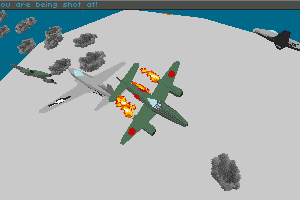
seems to run ok, hard to keep the plane level, have to use the rudders to get it to level, then maintain altitude up and down, but will stay level, hate it when I run out of ammo! bombers keep shooting me down! and I cant eject! and there is no control once you have been shot, just a screen of your shot up dash, some smoke trails and wait for it! kaploosh! right in the drink! ha ha ha to funny! good job guy's! another fun old game to play!
Also, if you've never played before, Alt+R brings up a "realism panel", one of the options of which is to decrease the flight model difficulty. The expert and intermediate flight models do result in lots of stalling when you aren't moving fast. Also, if you find yourself without speed far too often, turn of "engine burnouts" on the realism panel, and use the "=" key to throttle up all the way. If you don't turn off engine burnouts, it eventually fails due to WEP simulation (i guess...) As for strange words in the mission options, no clue at all... I'll post again if I get around to testing it.
AOE is even worse, but this game can be a bear to get running due to memory constraints...
Can anyone tell me how to properly get this to work? I run the 1946 EXE and replace the files but then there's a lot of glitches like words being replaced in the Fly a Single Mission options and airplanes stall pretty easily. Can someone please help?
Does anybody know how to get the joystick working? I can`t select it (only mouse and keyboard works)??? Thanx!
BEST PC GAME OF ITS TIME! still ok for quick fun
when it came out I gave it a 9.9/10
NVM I found a link to a old mvb viewer
http://www.reocities.com/sjg/pbmvb.html
now you can view the aces of the pacific manual
I remember rushing home from school and playing hours of this game and aces over Europe instead of doing my homework.
To be a kid again.
Wont even run on my old dos 6.1 Amd k5 100mhz
this GaME sUCKS D****
:)
Is there a manual for this game or instructions? I downloaded the 10.1mb one from another site in a MVB file but you have to have some outdated program called microsoft multimedia viewer. I tried to find info on opening MVB files but everyone thinks it is a RMVB file for real player when it had nothing to do with real player.
No comment nor review for this game at the moment.