You are on the beta version of My Abandonware. The live site is still myabandonware.com. Your favorites and ratings here are copied to the live site. Comments and other changes are not — we delete them every morning at 08:00 Paris time, when this site goes down for about an hour. Leave feedback through this link to Pastel (email required).
The beta goes down at 08:00 Paris time, in a few minutes. We rebuild the database from the live site. It comes back in about an hour.
1 - Install it anywhere 2 - Download gamecopyworld's fixed exe and paste it to the game's folder (you might have to rename the executable so you can paste it over the original). 3 - Run it on XP compatibility mode 4 - Enjoy your game
About StarForce: Modern Windows is NOT a fan of 20 year old stuff requesting Kernel access, it blocks it automatically. I did a thorough search and could not find any hint of StarForce after the installation. If anyone could look into this further however, I'd be grateful.
1
randalmcdaniels18 Apr. 2026
Do you know many collective thousands of human man hours of suffering you could save if you just didnt upload all these various retarded file format? Wtf is a mdx not even anyburn knows what the fk that is
-1
Atka@19 Mar. 2026
Nekem nem indul el ez a játék! Akármit is csinálok vele! És akárhonnan is letöltöm, az nem műkszik. Miért nem? Szeretném dobozosban megvenni, mert már vagy 20 éve ki akarom próbálni, de nem lehet kapni itthon. És nem is tölthető le. illetve igen, de az nem működőképes.... Szomorú...
0
VanceKraven04 Jan. 2026
The rip version of the game available at the weblink below is working well for me on Windows 10 when I go to the NuEnginePC.exe file "Properties" and set the compatibility mode to Windows XP SP2 and to run as administrator. Also, it's working just fine for me without the widescreen fix, though I do have a widescreen monitor.
Sadly, the game doesn't work for me :( With or without the widescreen patch mentioned in the comment below, the game won't launch. All I get is a black screen, and no response in the task manager. I can only kill the process
0
Edomaru03 Jun. 2025
Jogo divertido, não entendo ingles mas parece ser bem comico Para rodar o arquivo MDX faça o download do Daemon Tools, instale o jogo, procure o patch no google "D.I.R.T.: Origin of the Species - D.1.R.T Widescreen Fix", coloque na pasta do jogo e execute esse arquivo no modo compatibilidade Windows XP, por aqui funcionou perefeitamente
Fun game, I don't understand English, but it seems to be quite funny To run the MDX file, download Daemon Tools, the game, search for the patch on Google "D.I.R.T.: Origin of the Species - D.1.R.T Widescreen Fix", put it in the game folder and run this file in Windows XP compatible mode, it worked perfectly here
0
Bouncer19 May. 2022
I wish there was a rip version of the game without the StarForce DRM so I don't screw up my computer.
4
PRIVATE MARTIN05 May. 2022
Does it have StarForce?
3
No comment nor review for this game at the moment.






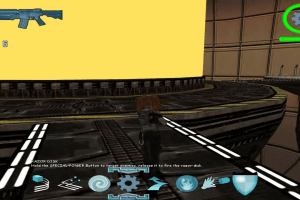
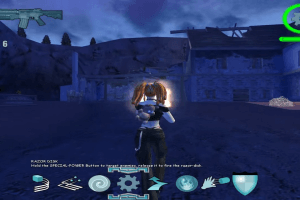
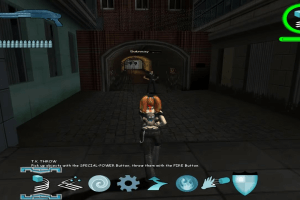
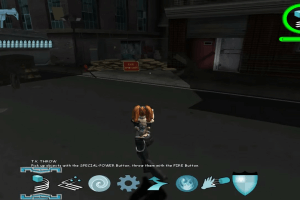



 English



Comments and reviews
1 - Install it anywhere
2 - Download gamecopyworld's fixed exe and paste it to the game's folder (you might have to rename the executable so you can paste it over the original).
3 - Run it on XP compatibility mode
4 - Enjoy your game
About StarForce: Modern Windows is NOT a fan of 20 year old stuff requesting Kernel access, it blocks it automatically. I did a thorough search and could not find any hint of StarForce after the installation. If anyone could look into this further however, I'd be grateful.
Do you know many collective thousands of human man hours of suffering you could save if you just didnt upload all these various retarded file format? Wtf is a mdx not even anyburn knows what the fk that is
Nekem nem indul el ez a játék! Akármit is csinálok vele! És akárhonnan is letöltöm, az nem műkszik. Miért nem? Szeretném dobozosban megvenni, mert már vagy 20 éve ki akarom próbálni, de nem lehet kapni itthon. És nem is tölthető le. illetve igen, de az nem működőképes.... Szomorú...
The rip version of the game available at the weblink below is working well for me on Windows 10 when I go to the NuEnginePC.exe file "Properties" and set the compatibility mode to Windows XP SP2 and to run as administrator. Also, it's working just fine for me without the widescreen fix, though I do have a widescreen monitor.
https://www.old-games.com/download/9759/d-i-r-t-origin
Sadly, the game doesn't work for me :(
With or without the widescreen patch mentioned in the comment below, the game won't launch. All I get is a black screen, and no response in the task manager. I can only kill the process
Jogo divertido, não entendo ingles mas parece ser bem comico
Para rodar o arquivo MDX faça o download do Daemon Tools, instale o jogo, procure o patch no google "D.I.R.T.: Origin of the Species - D.1.R.T Widescreen Fix", coloque na pasta do jogo e execute esse arquivo no modo compatibilidade Windows XP, por aqui funcionou perefeitamente
Fun game, I don't understand English, but it seems to be quite funny
To run the MDX file, download Daemon Tools, the game, search for the patch on Google "D.I.R.T.: Origin of the Species - D.1.R.T Widescreen Fix", put it in the game folder and run this file in Windows XP compatible mode, it worked perfectly here
I wish there was a rip version of the game without the StarForce DRM so I don't screw up my computer.
Does it have StarForce?
No comment nor review for this game at the moment.