You are on the beta version of My Abandonware. The live site is still myabandonware.com. Your favorites and ratings here are copied to the live site. Comments and other changes are not — we delete them every morning at 08:00 Paris time, when this site goes down for about an hour. Leave feedback through this link to Pastel (email required).
The beta goes down at 08:00 Paris time, in a few minutes. We rebuild the database from the live site. It comes back in about an hour.
So, when the project is finished, the wiki will be created
1
Aelryss23 Jul. 2026
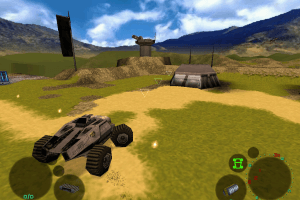
Hi there! I’m currently working on improving *Infestation* for modern PCs—fixing issues like the vehicle getting stuck. I also plan to create a brand-new game mode unrelated to the original story: *Infestation RPG*. To do this, I’m using AI and reverse engineering to decode the game. I’ve already decoded about half of it, but there’s still work to be done. Once it’s fully decoded, I’ll be able to create tools—like a map editor—to make modding easier and implement the new systems needed for *Infestation RPG*! I won't go into too much detail—that would take too long—but basically, instead of controlling a vehicle, you’ll control a soldier. This character will use the scientists' movement logic but in a more modern, fluid way. There will be systems for rarity, leveling, dungeons, and more. It’s a very complex project, so I’m not sure if I’ll pull it off, but with GPT-5.6, it should be doable. This game made a real impression on me when I was young, so I want to give it a second life. If I finish the project, I’ll create a wiki with all the info and guides on how to play. I’ll post the wiki link in the comments here, so keep an eye out!
1
Michel09 Nov. 2025
Hello, How do you play with the CD music? I tried installing the game on a virtual machine (XP and also win 98), but no music is playing during the game. And in the game options, the volume music option is disabled.
0
RandalMcdaniels11 Jan. 2025
The iso image does work. Use anyburn to browse/extract the contents to a folder on your desktop or somewhere
0
Zekthus19 Feb. 2024
The ISO image doesnt work, please fix it I try the RIP version but the vehicle have physics problem, just get stuck in some terrains, and complete the tutorial was the most difficult part because i need the big wheels and turbo to move on those moments, i can reach 5th mission but this problem its a mess and unconfortable (i speak spanish, sorry for the bad english)
0
Grom06 Jun. 2022
When ever a tutorial message pops up I lose the ability to drive forward or backwards, I've turned off pause on message but it still happens, I can turn use guns every thing else I'm just stuck in place. any body got a fix?
3
Mohammad19 Jan. 2022
To save the game you should place the game in this directory: C:\Program Files\Infestation\
1
Gerhalt27 Dec. 2020
Top comment
@FRANCISTHEBRAVE909, in order to work that around you'll have to run RegEdit (registry editor utility), then within its left section you'll need to gradually expand the path starting from My/This Computer - hkey_current_user - software - frontier developments ltd - 1.0. First of all, seek this exact path, it should be existing, otherwise the game will be unable to save its settings. If everything's fine with it, do the following: check if there's a line reading "save path" - it should be within the right section of RegEdit window. If there's no such line you'll need to create it manually by means of context menu. Once the parameter (the whole line "save path" IS a parameter) has been created, now you should edit it by double-clicking. Its value can be either full path to game's executable OR a simple dot/period - you decide. Both values are fully legit & working. BTW don't forget to check 1) whether you launch the game with administrative rights (if not, set "run from admin" within context menu after right-clicking upon the game's executable) AND 2) whether or not the entire game's folder has full permission attributes.
8
Francisthebrave90902 Jul. 2020
I have a problem with the infestation game, it does not save the games, it appears that "it could not be saved" and it sends me to the list of selections of saved slots and the same thing that could not be saved is repeated, and that frustrates me too much and I want to find a solution to this test everything even with the desktop turned off and using the task manager and nothing remains the same .... please help me ... thanks
-2
Mur16 Feb. 2019
If anyone is having trouble installing this on a new computer download the ISO version. It downloads a .zip that you can unzip with 7zip or winrar tool. After this find the .ccd file (there is 3 files) and mount (double click) with a tool like daemon tools (needs to be installed beforehand). If it says unable to mount, check that you have extracted it (it is in a new folder). It will show up in My Computer but by double clicking it, it will only start windows media player (win7) that does nothing. Back in My Computer right-click and press Open to open the folder. From there choose INFEST.EXE to get that old but gold running (atleast on win7).
2
No comment nor review for this game at the moment.






 English



Comments and reviews
So, when the project is finished, the wiki will be created
Hi there! I’m currently working on improving *Infestation* for modern PCs—fixing issues like the vehicle getting stuck. I also plan to create a brand-new game mode unrelated to the original story: *Infestation RPG*. To do this, I’m using AI and reverse engineering to decode the game. I’ve already decoded about half of it, but there’s still work to be done. Once it’s fully decoded, I’ll be able to create tools—like a map editor—to make modding easier and implement the new systems needed for *Infestation RPG*! I won't go into too much detail—that would take too long—but basically, instead of controlling a vehicle, you’ll control a soldier. This character will use the scientists' movement logic but in a more modern, fluid way. There will be systems for rarity, leveling, dungeons, and more. It’s a very complex project, so I’m not sure if I’ll pull it off, but with GPT-5.6, it should be doable. This game made a real impression on me when I was young, so I want to give it a second life. If I finish the project, I’ll create a wiki with all the info and guides on how to play. I’ll post the wiki link in the comments here, so keep an eye out!
Hello,
How do you play with the CD music?
I tried installing the game on a virtual machine (XP and also win 98), but no music is playing during the game. And in the game options, the volume music option is disabled.
The iso image does work. Use anyburn to browse/extract the contents to a folder on your desktop or somewhere
The ISO image doesnt work, please fix it
I try the RIP version but the vehicle have physics problem, just get stuck in some terrains, and complete the tutorial was the most difficult part because i need the big wheels and turbo to move on those moments, i can reach 5th mission but this problem its a mess and unconfortable (i speak spanish, sorry for the bad english)
When ever a tutorial message pops up I lose the ability to drive forward or backwards, I've turned off pause on message but it still happens, I can turn use guns every thing else I'm just stuck in place. any body got a fix?
To save the game you should place the game in this directory:
C:\Program Files\Infestation\
@FRANCISTHEBRAVE909, in order to work that around you'll have to run RegEdit (registry editor utility), then within its left section you'll need to gradually expand the path starting from My/This Computer - hkey_current_user - software - frontier developments ltd - 1.0. First of all, seek this exact path, it should be existing, otherwise the game will be unable to save its settings. If everything's fine with it, do the following: check if there's a line reading "save path" - it should be within the right section of RegEdit window. If there's no such line you'll need to create it manually by means of context menu. Once the parameter (the whole line "save path" IS a parameter) has been created, now you should edit it by double-clicking. Its value can be either full path to game's executable OR a simple dot/period - you decide. Both values are fully legit & working.
BTW don't forget to check 1) whether you launch the game with administrative rights (if not, set "run from admin" within context menu after right-clicking upon the game's executable) AND 2) whether or not the entire game's folder has full permission attributes.
I have a problem with the infestation game, it does not save the games, it appears that "it could not be saved" and it sends me to the list of selections of saved slots and the same thing that could not be saved is repeated, and that frustrates me too much and I want to find a solution to this test everything even with the desktop turned off and using the task manager and nothing remains the same .... please help me ... thanks
If anyone is having trouble installing this on a new computer download the ISO version. It downloads a .zip that you can unzip with 7zip or winrar tool. After this find the .ccd file (there is 3 files) and mount (double click) with a tool like daemon tools (needs to be installed beforehand). If it says unable to mount, check that you have extracted it (it is in a new folder). It will show up in My Computer but by double clicking it, it will only start windows media player (win7) that does nothing. Back in My Computer right-click and press Open to open the folder. From there choose INFEST.EXE to get that old but gold running (atleast on win7).
No comment nor review for this game at the moment.