



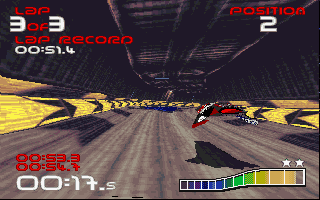
Definitely one of the best futuristic racing games ever made, Wipeout XL not only once again cements Psygnosis' reputation as the powerhouse of action genre, but also introduces many novelties to the genre.
The game takes place 97 years after the events of the original Wipeout, when improvements on Anti-Gravity Ballistic Racing technology have enabled sleeker and more maneuverable hovercrafts. You know the drill: blast down futuristic raceways, hit speed-up icons, pick up different weapons, and lay waste to whoever might stand in your way. But even if you've seen it all before, Wipeout XL is still a fun, incredibly addictive racer you'll want to play more than once.
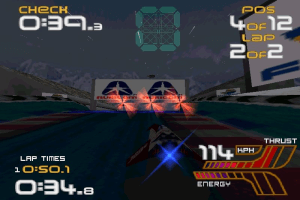
While the original game's graphics are inferior to the better-selling Playstation version, Wipeout XL takes advantage of 3D accelerators to produce one of the best-looking games on the PC (although it probably doesn't support all modern 3D cards released after 1996). With all the graphic effects turned on, the game is simply breathtaking -- with transparent vapor trails spewing from the sterns of opposing ships, subtle colored light-source shading, and bilinear filtering. DirectX mode for people like me who don't have a 3D card is still very pretty, although of course not on par with 3D accelerated mode.
Graphics aside, it's the game that counts, and here Wipeout XL delivers plenty of satisfying destructive mayhem. The game is much more difficult and realistic than Wipeout. Whereas you can easily blow up your opponents in the original game with a well-placed missile or two, this time around all vehicles sustain damage first before they spectacularly explode. The selection of weapons has been expanded, and ranges from proximity mines to track-shredding earthquake bombs. If your energy is running low, just fly through one of the pit stops and you’ll be back in one piece. You can even turn the weapons off altogether if you prefer more pure racing.
The only bad thing you can level about this game is the disappointing lack of network play, so you can't blast your best friends on-line. Other than this obvious oversight, though, just about everything else in Wipeout XL makes it a great game that will hold your interest until the wee hours.
Two thumbs up, way up!
Review By HOTUD
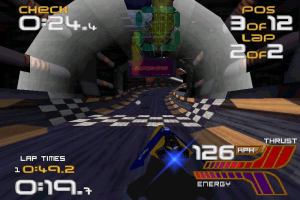
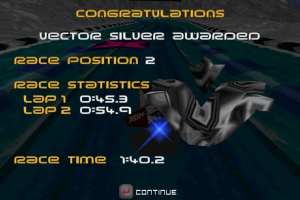
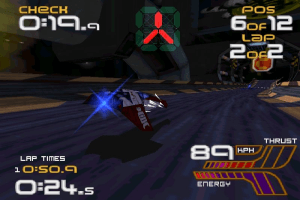
 English
  Japanese







Comments and reviews
Running WipEout 2097 (XL) on Windows 11
I used the Install-WipeoutXL.exe from https://www.play-old-pc-games.com/racing/wipeout-xl/ to install from the original CD. If using a disc image mount the bin/cue file, I like imgdrive https://www.yubsoft.com/imgdrive/ to mount disc images. I installed the WipEout 2097 (Europe) version which needed some file name changes in order to work.
Make sure to install the game in folder C:\Wobble and from the Windows RIP version from myabandonware https://www.myabandonware.com/game/wipeout-xl-cok copy the Wipeout2.exe no cd and replace the exe in C:\Wobble.
Then using https://github.com/ThirteenAG/Ultimate-ASI-Loader I added dinput8.dll and renamed it to dinput.dll to get my xbox controller recognised.
Copy dgvoodoo2 https://dege.freeweb.hu/dgVoodoo2/dgVoodoo2/ D3D8.dll, D3D9.dll, and D3Dlmm.dll to C:\Wobble.
Edit dgVoodoo.conf with a text editor, I recommend Visual Studio Code Portable is the zip file https://code.visualstudio.com/download
[General]
FullScreenMode = true
ScalingMode = stretched_ar
[GeneralExt]
WindowedAttributes = borderless,fullscreensize
FullscreenAttributes = Fake
FPSLimit = 0
SystemHookFlags = cursor
[DirectX]
VideoCard = internal3D
VRAM = 4096
Filtering = 16
Mipmapping = autogen_bilinear
KeepFilterIfPointSampled = false
Resolution = max
Antialiasing = 4x
AppControlledScreenMode = false
DisableAltEnterToToggleScreenMode = false
Bilinear2DOperations = false
PhongShadingWhenPossible = false
ForceVerticalSync = false
dgVoodooWatermark = true
FastVideoMemoryAccess = true
Then copy ddraw.dll from https://github.com/narzoul/DDrawCompat into C:\Wobble. Create a file named DDrawCompat.ini in C:\Wobble and add the following:
AltTabFix = noactivateapp(PassToApp: 0)
CompatFixes = nodwmflush
CpuAffinity = 1
CpuAffinityRotation = on
EnableDDrawCompat = on
FpsLimiter = msgloop(60)
PresentDelay = off
VSync = on(3)
Finally if WipEout 2097 was installed some file name changes have to be made. https://www.wipeoutzone.com/forum/showthread.php?9898-How-I-got-WipEout-2097-(European-version)-to-work-on-Win8-1-64bit&s=1af777e066664882880b6d9a6ec78f7a
C:\wobble\BLITSURF\HI-RES\RSTART97.PPM RSTARTXL.PPM
C:\wobble\BLITSURF\HI-RES\2097COPY.PPM WOXLCOPY.PPM
C:\wobble\BLITSURF\LO-RES\RSTART97.PPM RSTARTXL.PPM
C:\wobble\BLITSURF\LO-RES\2097COPY.PPM WOXLCOPY.PPM
C:\wobble\PICS\HI-RES\2097LOGO.TGA XLLOGO.TGA
C:\wobble\PICS\LO-RES\2097LOGO.TGA XLLOGO.TGA
To play the game with music you have to mount the disc first before starting Wipeout2.exe.
Enjoy!
EDIT: My bad, you really have to copy the Wobble folder (from the RIP version) at C:/Wobble. And I didn't have to copy over the sound files, and it worked. I didn't hear any music though, I don't know if this game has music. After copying Wobble to C:/Wobble, you can run it from anywhere (also keep CD mounted).
For anyone having issues with music, it's simple. Mount the CD, and copy over all the folders to the RIP version. A README in the Wobble folder tells you that it should be installed to C:/Wobble - but you can ignore it. You only need to mount the CD and copy the full sound files from the ISO. Without mounting the CD, it will crash.
Anyone know how to bypass the disc requirement on the game launcher when installing via the ISO? The RIP version lacks the music and videos, which is why I'm asking.
on the original disc case , it says, only works with creative sound cards only, hope this helps
MDF/mds corrupted .,.. what the heck ?
@HOTHUD
How did you get the music to work?
No comment nor review for this game at the moment.