You are on the beta version of My Abandonware. The live site is still myabandonware.com. Your favorites and ratings here are copied to the live site. Comments and other changes are not — we delete them every morning at 08:00 Paris time, when this site goes down for about an hour. Leave feedback through this link to Pastel (email required).
The beta goes down at 08:00 Paris time, in a few minutes. We rebuild the database from the live site. It comes back in about an hour.
If asked, use the following serial key: CKZ9-VXPA-GHVT-AP4B-XGEZ
Comments and reviews
KickAndTrash21 Jun. 2026
Right-click on the game's EXE file, then select “Properties.” Next, go to “Compatibility” and configure the following settings: -Windows 8 Compilitlity Mode -Disable Full Screen Optimisations -Run this Program as and admin
Last but not least ... Then add the Game on Steam then Run it.
0
larryluvjr22 Dec. 2025
I got it to run, but I get just a white screen with sound effects in the background. using dgvoodoo2. what am I doing wrong?
0
ojfortheclub12 Oct. 2025
i would love to download this but i dont have a clue what im doing has anyone got any advice or could possibly point me in the right dirrection
3
scott4534228 Feb. 2025
Installed on my trusty old beige PC Tower P4 3.0GHz 3GB RAM 500GB SSD - WXP Home Edition 32bit SP3 with nVidia GeoForce 210 video card and Sound Blaster Live! B800 sound card with the NO CD patch and it works beautiful! Can't wait to dive into this game and actually enjoy myself instead of stressing out for 2 days over a stupid INSERT CD error message! LOL, Thanks a million guys :)
0
Rocket Belle25 Aug. 2024
I cannot locate the Key Code any place(!!??) Downloaded game, update, and patch. Where is the elusive key located, please??
Thank you, Rocket Belle
1
Toni07 May. 2024
The game is perfect for me, it's the best of all in the series, but when I save a game later I don't see the option to load the saved game anywhere in the game menu. Thank you
1
Rick05 Apr. 2024
CD KEY??? ANYONE???
1
This game was awesome09 Oct. 2023
When I launch the game it says I do not have enough video memory which is hilarious considering I have a 3080 and a Ryzen 9 5900x with 64 gigs of RAM
0
LostRealist30 Sep. 2023
For me this one runs without much issue with the NoCD patch. Sadly, the game itself was somewhat disappointing for me as I was looking for a simulation. In career mode, the game very heavily scripts your shots. On the Amateur level I've been chipping in inexplicable miracle shots left and right and after some time of playing the game pivots and starts to cut you down with inexplicably sending your shots off to the parking lot. Putts can simply go opposite direction off your club than you aimed them if the game doesn't want you to advance too quickly. It's very frustrating when it does this and it's quite unsatisfying when you hit a shot that has a magnet in it and finds the pin no matter what. It's quite typical EA bullshit for this era, the FIFA games of this time were also MAJOR offenders in the "Nintendo hard" category.
That's my two cents. This game is actually quite lackluster for those looking for simulation, especially compared to the new 2023 iteration which is punishingly realistic.
-2
Anon12 Dec. 2022
I got lucky, I was able to play TW 2004 with no problem, but I had to borrow Doc Brown's DeLorean to do it...
-2
@Cameron25 Oct. 2022
Has anything changed for you? Evidently the previous solutions did not work
1
Cameron20 May. 2022
Seems this one just won't run on Windows 10 no matter what you throw at it unfortunately. I've tried every combination of dgvoodoo, compat mode, fullscreen/windowed and 1.0/1.1 patch and there's no way to get video, only a black screen with intro and menu audio.
1
MG04 Feb. 2022
Mount disc 1 first whatever your method then right click mount in your dvd drive and open This brings up game install folder install and during procedure the install will ask you to mount next CD's 2 & 3 then back to 1 Then confirm close Then patch with 1.1 patch and 1.1 No CD which can be found online
When I start game intro video doesn't show but plays audio in background. Let that do it's thing and game should go to front menu of game. Please note this will only happen when compatibility set to Windows 98/ME. No compatibility or other the game will hang after intro. But there's a twist. In Windows 98/ME compatibility you may experience sound issues. Therefore I left compatibility blank and when the game hung after intro press ctrl/alt/del to bring up task manager. Then press cancel and game should go to main menu after intro. Then you have better sound. Only issue you have to press ctrl/alt/del every time you start game. Unless someone knows another solution or you want to just go with the 98/ME compatibility and sound issue. Lastly you may see in modern Win 10 the graphics flickering in game. To solve this right click the game exe and properties. There you will see option at bottom 'Disable screen optimisations' tick this box and graphic in game flicker should be gone.
5
Chugster01 Feb. 2022
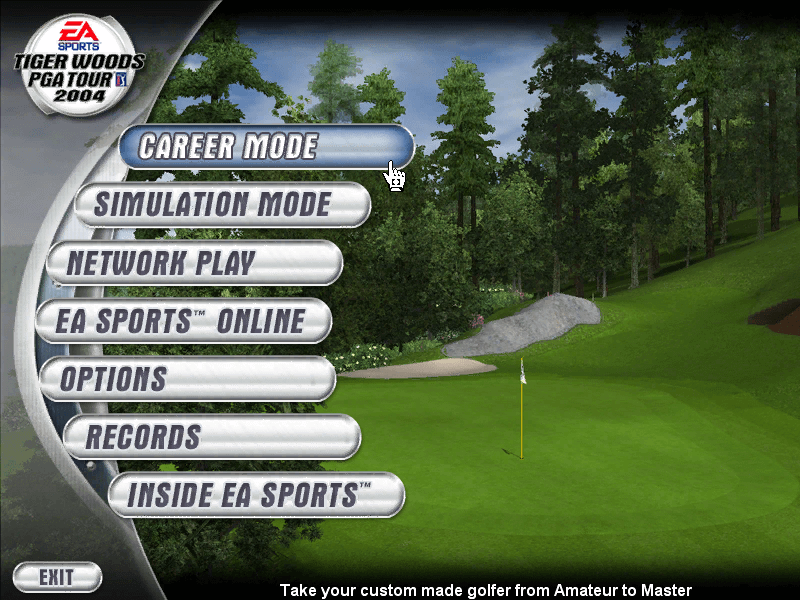
Ok so i got the game to install but when i run i get the EA Sports logo, then i get the sounds of the menu and the mouse but i cant see the main screen.
Is there a way to set the game to windowed mode?
2
K08 Jan. 2022
I'm trying to use dgVoodoo to get the game running but I'm having no luck getting it configured correctly. Any advice?
-1
Morgan27 Sep. 2021
@ASTRO_ZOMBIE1984 You need to Mount the 2CD Thats The Media disk
1
mdg28 Aug. 2021
do i need to download all 3 disk? im new to this thing
-4
astro_zombie198402 Aug. 2021
It is asking me to insert media disk. I know nothing about modern computing. What am I missing?
0
EasyGamer10 Jul. 2021
Using dgVoodoo I was able to get the game to run on Windows 10. It fixes that DirectX issue.
1
Happy Days29 Apr. 2021
I am getting the error "DirectX is reporting that there is not enough video memory to run the game". Does anyone have a fix for this? Would greatly appreciate it.
2
Miller10 Apr. 2021
Any advice on the Media Disk prompt when installing?
-1
Tits McGee07 Apr. 2021
If you're having a problem with pre-2010 EA keys, look for a keygen from a guy named FFF. Usually goes by 'EA.Games.Multi.Keygen.(83) or (168) or some other number. I've been using them for the better part of 15 years and they never fail.
0
admin14 Jan. 2021
Admin
Please try: AEUL-B8RC-QX8Z-HRZ4-ABHR
4
Phil Tripcony12 Jan. 2021
What a bout serial number for install? i did not find one
-1
admin11 Jan. 2021
Admin
@Maarcis just found it, will upload soon
0
Maarcis31 Dec. 2020
Nice addition on myabandonware, i wanted to ask is there any chance Madden NFL 2002 gets added to the site?
0
No comment nor review for this game at the moment.





 English





Comments and reviews
Right-click on the game's EXE file, then select “Properties.”
Next, go to “Compatibility” and configure the following settings:
-Windows 8 Compilitlity Mode
-Disable Full Screen Optimisations
-Run this Program as and admin
Last but not least ...
Then add the Game on Steam then Run it.
I got it to run, but I get just a white screen with sound effects in the background. using dgvoodoo2. what am I doing wrong?
i would love to download this but i dont have a clue what im doing has anyone got any advice or could possibly point me in the right dirrection
Installed on my trusty old beige PC Tower P4 3.0GHz 3GB RAM 500GB SSD - WXP Home Edition 32bit SP3 with nVidia GeoForce 210 video card and Sound Blaster Live! B800 sound card with the NO CD patch and it works beautiful! Can't wait to dive into this game and actually enjoy myself instead of stressing out for 2 days over a stupid INSERT CD error message! LOL, Thanks a million guys :)
I cannot locate the Key Code any place(!!??) Downloaded game, update, and patch. Where is the elusive key located, please??
Thank you, Rocket Belle
The game is perfect for me, it's the best of all in the series, but when I save a game later I don't see the option to load the saved game anywhere in the game menu. Thank you
CD KEY??? ANYONE???
When I launch the game it says I do not have enough video memory which is hilarious considering I have a 3080 and a Ryzen 9 5900x with 64 gigs of RAM
For me this one runs without much issue with the NoCD patch.
Sadly, the game itself was somewhat disappointing for me as I was looking for a simulation. In career mode, the game very heavily scripts your shots. On the Amateur level I've been chipping in inexplicable miracle shots left and right and after some time of playing the game pivots and starts to cut you down with inexplicably sending your shots off to the parking lot. Putts can simply go opposite direction off your club than you aimed them if the game doesn't want you to advance too quickly. It's very frustrating when it does this and it's quite unsatisfying when you hit a shot that has a magnet in it and finds the pin no matter what. It's quite typical EA bullshit for this era, the FIFA games of this time were also MAJOR offenders in the "Nintendo hard" category.
That's my two cents. This game is actually quite lackluster for those looking for simulation, especially compared to the new 2023 iteration which is punishingly realistic.
I got lucky, I was able to play TW 2004 with no problem, but I had to borrow Doc Brown's DeLorean to do it...
Has anything changed for you? Evidently the previous solutions did not work
Seems this one just won't run on Windows 10 no matter what you throw at it unfortunately. I've tried every combination of dgvoodoo, compat mode, fullscreen/windowed and 1.0/1.1 patch and there's no way to get video, only a black screen with intro and menu audio.
Mount disc 1 first whatever your method
then right click mount in your dvd drive and open
This brings up game install folder
install and during procedure the install will ask you to mount next CD's 2 & 3 then back to 1
Then confirm close
Then patch with 1.1 patch and 1.1 No CD which can be found online
When I start game intro video doesn't show but plays audio in background. Let that do it's thing and game should go to front menu of game. Please note this will only happen when compatibility set to Windows 98/ME. No compatibility or other the game will hang after intro.
But there's a twist. In Windows 98/ME compatibility you may experience sound issues.
Therefore I left compatibility blank and when the game hung after intro press ctrl/alt/del to bring up task manager. Then press cancel and game should go to main menu after intro. Then you have better sound. Only issue you have to press ctrl/alt/del every time you start game. Unless someone knows another solution or you want to just go with the 98/ME compatibility and sound issue.
Lastly you may see in modern Win 10 the graphics flickering in game. To solve this right click the game exe and properties. There you will see option at bottom 'Disable screen optimisations' tick this box and graphic in game flicker should be gone.
Ok so i got the game to install but when i run i get the EA Sports logo, then i get the sounds of the menu and the mouse but i cant see the main screen.
Is there a way to set the game to windowed mode?
I'm trying to use dgVoodoo to get the game running but I'm having no luck getting it configured correctly. Any advice?
@ASTRO_ZOMBIE1984 You need to Mount the 2CD Thats The Media disk
do i need to download all 3 disk? im new to this thing
It is asking me to insert media disk. I know nothing about modern computing. What am I missing?
Using dgVoodoo I was able to get the game to run on Windows 10. It fixes that DirectX issue.
I am getting the error "DirectX is reporting that there is not enough video memory to run the game". Does anyone have a fix for this? Would greatly appreciate it.
Any advice on the Media Disk prompt when installing?
If you're having a problem with pre-2010 EA keys, look for a keygen from a guy named FFF. Usually goes by 'EA.Games.Multi.Keygen.(83) or (168) or some other number. I've been using them for the better part of 15 years and they never fail.
Please try: AEUL-B8RC-QX8Z-HRZ4-ABHR
What a bout serial number for install? i did not find one
@Maarcis just found it, will upload soon
Nice addition on myabandonware, i wanted to ask is there any chance Madden NFL 2002 gets added to the site?
No comment nor review for this game at the moment.