You are on the beta version of My Abandonware. The live site is still myabandonware.com. Your favorites and ratings here are copied to the live site. Comments and other changes are not — we delete them every morning at 08:00 Paris time, when this site goes down for about an hour. Leave feedback through this link to Pastel (email required).
The beta goes down at 08:00 Paris time, in a few minutes. We rebuild the database from the live site. It comes back in about an hour.
es un juego espectacular me iso volver a mi infancia gracias
0
McWhippey04 Dec. 2025
Magipack has uploaded a repack on internet archive: https://archive.org/download/magipack-games-official-repository-v-z/V-Z/
0
NeWolf19 Nov. 2025
To fix reflections and shadows - install dgVoodoo2: put dgVoodooCpl.exe, and the contents of MS/x86/ folder into the game's folder VRally3.
run dgVoodooCpl.exe as administrator and press .\ button to set config folder into VRally3 directory. Under DirectX tab select 64MB for VRAM (this is the recommended system requirement for the game), and untick dgVoodoo Watermark option (annoying).
The sound is still crackling, and the cockpit cam is still way too shaky.
0
NeWolf18 Nov. 2025
So I've underclocked my cpu to the game's recommended specs 1.2 GHz (I've also tried minimum spec 800 MHz but there wasn't much of a difference other than occasional lag). The game is not ridiculously fast anymore, and car handling improved. Other issues still remain: sound is crackling, shadows do not work, and interior view is way too shaky.
0
NeWolf18 Nov. 2025
You can make the game run slower by going into Control Panel Power Options, on the left bar go to "Create a power plan". You can change anything you want in there, it doesn't matter. Then, to the right to your power plan go to "Change plan settings" "Change advanced power settings". After that, look for "Processor power management". There you can change "Maximum processor state" and "Minimum processor state" percentage settings. I've set them both to 0% and the game still runs too fast for me, but much better/slower than on default power plan (I have AMD FX-8300 Eight-Core Processor 3.30 GHz. I'll see if I can find anything else, but that's about it for now.
0
NeWolf14 Nov. 2025
I remember playing the Java version of this game, V-Rally 3D, when I was a kid, and the main menu soundtrack has stuck with me to this day. For this reason, I decided to check out the series on PC recently. The first two games were okay-ish - there's something special about them. I find the intro and ending video in V-Rally 2 very cool, so I came to this game with some expectations.
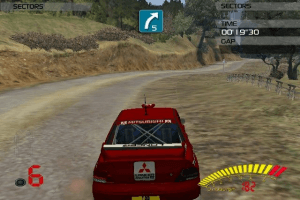
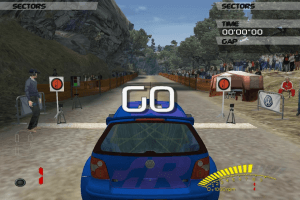
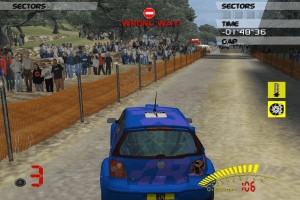
This game doesn't start off much differently: banger intro, banger menus, banger soundtrack - until the moment you load into a track. Something went awfully wrong when they developed it for Windows. The helicopters overhead and people move way too fast, and the physics are strange: sometimes you get very little grip, and sometimes you get tons of it. The car tends to strafe left and right instead of turning. This is especially noticeable on curvy roads, where the surface isn't perfectly straight; you can drive in a straight line and see the car sliding from side to side. The moment you stray even slightly off the road, the car won't turn naturally - it will strafe based on you input, which feels very jarring.
Limiting the framerate doesn't do much, if anything. If I had to guess, they probably tied the game logic to the CPU clock speed or something along those lines. In any case, it's a terrible game to play as-is. I'll try to see if I can run it properly on an Xbox emulator; otherwise, I'm skipping this one.
I've read on PCGamingWiki that you couldn't map the controls, but that's not true. I was able to map the steering wheel controls just fine, you can do it just before starting the rally: in the DrivingControls menu. Other than that, I couldn't find fixes for it online.
1
TimRockIt23 Apr. 2025
All of the V-Rally's are awkward with controls. Takes a while to get adjusted while practicing your butt off, but it's doable. Noticed there is a way to remap control keys while in the challenge races. Take a closer look at driver setup there. Anyway, so far, so good, runs good on W11, a little too good, need to slow it down, sheesh, a lot of these roads are insane!
1
Chris0427 Mar. 2025
ByteComputer78@ The handling of your car is awkward, mainly because this game was released first for PlayStation 2 only. One year later it was released for PC too, but this game is know for its worst PC port of a racing game ever. The game menu runs way too fast, the terrible car handling, and the jumpy camera is caused by running the game at extremely high fps, which makes the game totally unplayable. The only way i find to fix this is to lock the game at 60fps or even lower like 30fps with RivaTuner. This might lower the issues in the game but wont fix it completely. I remember the PS2 version was flawless, but the pc version is just awful, which is pretty sad because this is a great rally game.
3
ByteComputer7822 Feb. 2025
My game runs fine but I don't understand why the handling of my car is so awkward. At the beginning, it takes some time to start, the car is freezing for some seconds, and after that the car is moving too far on the right when using right arrow key or too far on the left when using left arrow key. When seeing videos on YouTube I don't see this. I don't understand those big moves when pushing one button or that awkward sensibility. The camera always zoom in and out. Does anyone experience this ?
1
CoolioTHEcool04 May. 2024
Is there a way to change the controls? I don't want it to be just the arrow keys.
2
CoolioTHEcool04 May. 2024
@Kanjotaz i watched the widescreen video and i did everything the video told me. i applied everything and the game no longer opens. Any fix?
0
spiro22 Mar. 2024
How to run in Windows 11: 1. Install game 2. Download dgVoodoo 3. Copy files: dgvoodooCpl.exe, dgVoodo.conf, (3Dfx/x86) Glide.dll, Glide2x.dll and Glide3x.dll to game folder 4. Run the game (You can configure ressolution and more if you run dgvoodooCpl.exe first).
0
ByteComputer7822 Feb. 2024
The game is not working for me on Windows 11 64-bit. I have burned the Install .iso et the Play .iso. I can install the game but I cannont start anything from both cds. I click, it's blanking for 2 seconds and closing after. Do I need DosBox or something, does not work with Compatibility mode also.
1
Rayit14 Jun. 2023
Does anyone know if there is a way to play this with a controller?
-4
Killswitch21 Jan. 2023
I'm having the same issue as @Mental. The game runs normally, but the menus and the gameplay itself are laggy as fuck, with a lot of stuttering. That's weird, anyone has a fix to that problem?
1
Nauman17 Jan. 2023
Can somebody tell me, how to completely install the game. My setup doesn't get completed and the system shows 'Couldn't find the specified file, Error Code 02'. Has anybody got experience with this situation?
0
WesternSpy26 Jun. 2022
the game, although not great, is part of my childhood. Plus the game shines once you get on the 2l AWD and start having to really push through stages, what to repair during the rally and team choices. solid 7 out of 10
2
RAXER21 Feb. 2022
@ Tim Suetens My comment was to let rally fans know who actually "do care" about the handling in a racing game and never played this before not for people who are playing out of nostalgia reasons, it will save them time and bandwidth in the process so I'm sure they will appreciate me letting them know ;)
-1
VibeCheck9822 Jul. 2021
One of the games that forged me as the gamer I am today. Fond memories of playing this game circa 2004 on my Xbox :) Time to give it a look again in 2021
0
Mental02 Jul. 2021
The game runs - but the whole thing, menus included, runs at literally one frame per second. Interestingly, character animations play at superspeed. I've tried several compatibility modes, with no success.
2
Tim Suetens02 Jul. 2021
Yes the handling is terrible - always has been! And those of us who play out of nostalgia, probably won't care.
-1
raxer04 Apr. 2020
The handling is terrible.
1
No comment nor review for this game at the moment.









 English





Comments and reviews
es un juego espectacular me iso volver a mi infancia gracias
Magipack has uploaded a repack on internet archive: https://archive.org/download/magipack-games-official-repository-v-z/V-Z/
To fix reflections and shadows - install dgVoodoo2: put dgVoodooCpl.exe, and the contents of MS/x86/ folder into the game's folder VRally3.
run dgVoodooCpl.exe as administrator and press .\ button to set config folder into VRally3 directory. Under DirectX tab select 64MB for VRAM (this is the recommended system requirement for the game), and untick dgVoodoo Watermark option (annoying).
The sound is still crackling, and the cockpit cam is still way too shaky.
So I've underclocked my cpu to the game's recommended specs 1.2 GHz (I've also tried minimum spec 800 MHz but there wasn't much of a difference other than occasional lag). The game is not ridiculously fast anymore, and car handling improved. Other issues still remain: sound is crackling, shadows do not work, and interior view is way too shaky.
You can make the game run slower by going into Control Panel Power Options, on the left bar go to "Create a power plan". You can change anything you want in there, it doesn't matter. Then, to the right to your power plan go to "Change plan settings" "Change advanced power settings". After that, look for "Processor power management". There you can change "Maximum processor state" and "Minimum processor state" percentage settings. I've set them both to 0% and the game still runs too fast for me, but much better/slower than on default power plan (I have AMD FX-8300 Eight-Core Processor 3.30 GHz. I'll see if I can find anything else, but that's about it for now.
I remember playing the Java version of this game, V-Rally 3D, when I was a kid, and the main menu soundtrack has stuck with me to this day. For this reason, I decided to check out the series on PC recently. The first two games were okay-ish - there's something special about them. I find the intro and ending video in V-Rally 2 very cool, so I came to this game with some expectations.
This game doesn't start off much differently: banger intro, banger menus, banger soundtrack - until the moment you load into a track. Something went awfully wrong when they developed it for Windows. The helicopters overhead and people move way too fast, and the physics are strange: sometimes you get very little grip, and sometimes you get tons of it. The car tends to strafe left and right instead of turning. This is especially noticeable on curvy roads, where the surface isn't perfectly straight; you can drive in a straight line and see the car sliding from side to side. The moment you stray even slightly off the road, the car won't turn naturally - it will strafe based on you input, which feels very jarring.
Limiting the framerate doesn't do much, if anything. If I had to guess, they probably tied the game logic to the CPU clock speed or something along those lines. In any case, it's a terrible game to play as-is. I'll try to see if I can run it properly on an Xbox emulator; otherwise, I'm skipping this one.
I've read on PCGamingWiki that you couldn't map the controls, but that's not true. I was able to map the steering wheel controls just fine, you can do it just before starting the rally: in the DrivingControls menu. Other than that, I couldn't find fixes for it online.
All of the V-Rally's are awkward with controls. Takes a while to get adjusted while practicing your butt off, but it's doable. Noticed there is a way to remap control keys while in the challenge races. Take a closer look at driver setup there. Anyway, so far, so good, runs good on W11, a little too good, need to slow it down, sheesh, a lot of these roads are insane!
ByteComputer78@ The handling of your car is awkward, mainly because this game was released first for PlayStation 2 only. One year later it was released for PC too, but this game is know for its worst PC port of a racing game ever. The game menu runs way too fast, the terrible car handling, and the jumpy camera is caused by running the game at extremely high fps, which makes the game totally unplayable. The only way i find to fix this is to lock the game at 60fps or even lower like 30fps with RivaTuner. This might lower the issues in the game but wont fix it completely.
I remember the PS2 version was flawless, but the pc version is just awful, which is pretty sad because this is a great rally game.
My game runs fine but I don't understand why the handling of my car is so awkward. At the beginning, it takes some time to start, the car is freezing for some seconds, and after that the car is moving too far on the right when using right arrow key or too far on the left when using left arrow key. When seeing videos on YouTube I don't see this. I don't understand those big moves when pushing one button or that awkward sensibility. The camera always zoom in and out. Does anyone experience this ?
Is there a way to change the controls? I don't want it to be just the arrow keys.
@Kanjotaz i watched the widescreen video and i did everything the video told me. i applied everything and the game no longer opens. Any fix?
How to run in Windows 11:
1. Install game
2. Download dgVoodoo
3. Copy files:
dgvoodooCpl.exe, dgVoodo.conf, (3Dfx/x86) Glide.dll, Glide2x.dll and Glide3x.dll to game folder
4. Run the game (You can configure ressolution and more if you run dgvoodooCpl.exe first).
The game is not working for me on Windows 11 64-bit. I have burned the Install .iso et the Play .iso. I can install the game but I cannont start anything from both cds. I click, it's blanking for 2 seconds and closing after. Do I need DosBox or something, does not work with Compatibility mode also.
Does anyone know if there is a way to play this with a controller?
I'm having the same issue as @Mental. The game runs normally, but the menus and the gameplay itself are laggy as fuck, with a lot of stuttering. That's weird, anyone has a fix to that problem?
Can somebody tell me, how to completely install the game. My setup doesn't get completed and the system shows 'Couldn't find the specified file, Error Code 02'. Has anybody got experience with this situation?
the game, although not great, is part of my childhood. Plus the game shines once you get on the 2l AWD and start having to really push through stages, what to repair during the rally and team choices. solid 7 out of 10
@ Tim Suetens
My comment was to let rally fans know who actually "do care" about the handling in a racing game and never played this before not for people who are playing out of nostalgia reasons, it will save them time and bandwidth in the process so I'm sure they will appreciate me letting them know ;)
One of the games that forged me as the gamer I am today. Fond memories of playing this game circa 2004 on my Xbox :) Time to give it a look again in 2021
The game runs - but the whole thing, menus included, runs at literally one frame per second. Interestingly, character animations play at superspeed. I've tried several compatibility modes, with no success.
Yes the handling is terrible - always has been! And those of us who play out of nostalgia, probably won't care.
The handling is terrible.
No comment nor review for this game at the moment.