

How to Play
The installer for VP3 codec inside DVD of German version showed 10 warnings on VirusTotal, here's the report. All other files on that DVD are clear. Just don't use that installer and instead install VP3 codec from the installer on our website, it is installer from English version, it showed only 1 warning
The game was using StarForce 3 DRM protection, which can break your system! Make sure to use NoCD before the first launch of the game!
The game with NoCD has been tested on Windows 7 64-bit, it works but not perfect. The game has a lot of bugs, including critical bugs, so don't forget to check our Guide and Notes
Install & play guide:
- Mount the disc image. You will need the utility for mounting disc image files, like WinCDEmu, UltraISO, Alcohol 52%/Alcohol 120% or Daemon Tools Lite
- Launch the installation (if autorun doesn't work - launch Autorun.exe in compatibility mode with Windows 2000 or XP)
- When the installation process will ask for next discs - mount the disc image of CD2 and CD3
- Also it is recommended to install DirectX (if you're using Windows 10 - enable DirectPlay, read this or this guide how to do it)
- English version of the game is already patched to the latest version, so no need to install the patch
- After you installed the game - install NoCD (simply copy RA.exe from archive and put it into directory with installed game, agree to replace original file)
- Open the directory with the game and find Starter.exe and RA.exe. Right click on both exe-files - Properties - Compatibility - Set "Run this app in compatibility mode with Windows XP SP2" and "Run as administrator"
- Run Starter.exe to configure the game settings. Launch the game and play. If the game doesn't work in compatibility mode with Windows XP - try to launch it in compatibility mode with other version of Windows (98, 2000 or Vista)
Restricted Area ReBuild is a compilation of game with fixes, created by user Foxx. ReBuild includes 3 versions of the game: English, German & Russian, the installer is Russian only but we added text guide in archive. You can always find new version of ReBuild on RuTracker (it's Russian website, use online translator)
Notes:
- If the installation doesn't start - try to launch Setup.exe in compatibility mode with old version of Windows (98, 2000 or XP)
- NoCD is required for the launch because the game is using StarForce 3 DRM protection, which doesn't work on modern systems. That NoCD "breaks" DRM protection and allows the game to work on modern systems
- The game works on DirectX 9, so if you're using Windows 8, 8.1, 10 or 11 - you need to enable DirectPlay: Go to Control Panel, and select 'Programs'. Select 'Turn Windows features on and off', click on 'Legacy Components' and check the box 'DirectPlay'. Select OK, once the installation is done, restart your computer
- It is recommended to install all versions of Microsoft Visual C++ Redistributable for the correct work of the game
- Also it is recommended to install VP3 codec for the correct work of in-game videos. If you're using 64-bit Windows, that codec must be installed in
C:/Windows/SysWOW64, not inC:/Windows/system32 - VP3 codec is an obsolete video codec and it is completely broken on new Windows systems, so in-game videos can not to work even if you installed VP3 codec. If the game crashes when in-game video starts, like intro videos or story videos - completely disable videos in Launcher (Starter.exe)
- For users of Windows 8 and newer: if in-game videos doesn't work - try to run the game in "Reduced color mode", it helped to some users
- There is a critical bug that can occur due to in-game videos and VP3 codec - sometimes when the video starts, the game may stop working but does not close, causing your system to be soft-locked. If it happens, disable all videos in the Launcher (Starter.exe) before next launch
- If you have troubles with running the game on Windows 7 and newer OS - try to run it through dgVoodoo utility (copy the dll-files from the MS/x86 folder, dgVoodooCpl.exe and dgVoodoo.conf to the game folder, then launch the game from RA.exe; to change dgVoodoo settings - open dgVoodooCpl.exe). We also added pre-ready dgVoodoo config, simply copy & paste files to the game folder
- As alternative - you can try to run the game with DDRaw Compat, WineD3D or DxWnd. For more details how this game works with DxWnd check this thread
- For users of Windows 8 and newer: there's a common graphical bug when minimap doesn't shown, in that case use Minimap fix, simply drop ddraw.dll in game folder. Also, you can use DDRaw Compat or dgVoodoo to fix that bug
- For Windows 10 users: if the game works too slow, try to enable GPU Hardware Scheduling: go to Windows display settings -> Graphics settings -> Enable Hardware-accelerated GPU scheduling
- There's a common mouse lag problem, when mouse cursor works slow. Usually it happens on mouse with high DPI, lower your DPI to 250~500. Also, if you have gaming mouse with high Mouse Rate Checker, lower that rate to 100 Hz
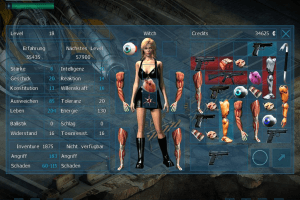
- Some people compain that in-game inventory is freezing when you click on it with left mouse button, but it works normally when you click on it with right mouse button
- If the game works unstable or doesn't want to launch - run the game on Virtual Machine with Windows XP 32-bit, also don't forget to install inside Virtual Machine the disc image utility like UltraISO, to emulate the game CD
 English
  German
  Russian
  Polish
  Traditional Chinese







Comments and reviews
اشتغلت عندي بدون سي دي خاوه غصبن عن يزن مشاكل و عن عبسي و غصبن عنك انت شخصيا
أطلقت النار
Restricted Area was tested with this method on Windows 10 and can confirm that it worked.
Accidentally pressed send - Continued. Make sure to install it to the C:\Windows\SysWOW64 folder. Select the option for Windows XP and install. After setup finishes copy the crack from the data folder to the location of your game. Overwrite.
This step you can decide if you want to download or not as the game worked for me either way and I just thought it might help with the inventory issue. Download the recent DDRAW.dll from github and drop it in your RA folder. Right click on both RA.EXE AND STARTER.EXE and select properties. Select compatibility and set compatibility for Windows XP Service pack 2 and Run as Administrator and apply. Nothing else. No other settings has to change. When you run the game to make sure it runs as administrator right click on the ra.exe and select run as administrator. It should work for you as well. I am too scared to patch the game ( patch on MyAbondonware ) and then it doesn't work again so I play it as is.
The mentioned inventory glitch. If you select a weapon/item using left click the game hangs for a while and if you swap weapon/item again with left click it hangs again. Best is to just teach yourself to right click everything. If you buy something right click. Go out of the shop, into your inventory and right click to swap it out.
Saves - Each time to make sure I start clean ( wasn't sure if my saves was maybe broken ) I started a new game. I haven't tested my old saves with this version yet but feel free to test it out and see if it works. I was just so relieved and excited when I got past that point. What also assisted me with quickly getting to the Jessica part was SaveGame.pro. There is a Save Game for RA that has the characters boosted for easier progress that I used instead of having to grind each time just to have the game exit.
If this works for you as well post it and the fix far and wide. RA deserves much more credit than it got and it would really be great if it could get a community build ( rebuild revamp/remaster ) as well. Thanks for The Gaming Beehive for the lightbulb idea and off course for Myabandonware for holding onto this gem.
To add to The Gaming Beehive comment. I had the Restricted Area ReBuild version. I played this version ( Johnson ) till the prison mission saving Jessica. The video plays and where you would make a choice it cuts out. Tried multiple option, edits, voodoo, ddraw and just nothing. Till I saw The Gaming Beehive post.
This is what I did. Try the following steps exactly as I did and it should work. From the downloads download Disc 1, Disc 2, Disc 3 and the nocd patch. All from MyAbandonware. Save them to where you'd prefer. Also note that you don't have to remove the other version if you have it installed as it seemed not to make any difference. You can also clean install would you prefer. Backup your save folder ( found in the Restricted Area folder ).
Unzip all 4 zip files ( Disc 1 - 3 + nocd ). I used PowerISO and mounted each disk to a drive ( E - G ) and started the setup found on Disk 1. Install where you prefer as I just used C:\RA. Setup will ask for Disc 2, Disc 3 just select to whichever drive you linked them. When Setup finishes it will run the codec program on Disc 1. Make sure it install to the
The video explains how to apply the game's translation, to: Brazilian Portuguese and Esperanto, the international language:
https://www.youtube.com/watch?v=ZxMCgNjmdms
For those interested, the download link:
https://www.terabox.com/portuguese/sharing/link?surl=9-0oRUIPGJ7v-rhqO6uWFg
I run it one time in windows 10, trying hundred absurd combination with dgvoodoo, but in the next gameplay that simply didnt run. Sad because game looks cool and is fun
I just tried running it on a Windows XP VM, followed the instructions, and it refuses to open. Any ideas on how to fix it?
I'm planning to run this game on a Windows XP VM. Does the NoCD patch work that way?
если не работают ролики на win 10
Can't load movie:Movie Please install VP3 Codec from the DVD codec folder!
решается установкой кодыка "FFDShow 20130312 rev 4504"
скачать можна по этой ссылке "https://ffdshow.ru.uptodown.com/windows/download"
Some tips on how to make the game run on newer versions of windows:
https://www.purebasic.fr/english/viewtopic.php?t=85193
The Restricted Area Rebuild would not work for me, but I was able to install the game with the three English version ISOs and the NoCD file. The game looks pretty cool so far. However, I will have to play it more and see if I encounter the game-breaking bugs mentioned by others.
@SABIN77 You won't be able to. I tried everything and it's not possible. You can play the game without the videos but I had a game-breaking bug probably halfway through the game. Plus, it's not worth it. The game is poorly balanced with the last level the difficulty skyrocketed; the attributes don't make sense; there is no variety in the level design; despite having so many free keys on the keyboard you can assign skills to very few. This is not a good game. It's not worth your time.
can't get VP3 Codec to work so I can't play.
It turned out that it couldn't load a section that asks you which direction you want to take, the sewers or the roof after you save Jessica. However, I found the stupidest workaround for the crash. I installed the game from my physical copy and just added the NoCD exe. Nothing else. Then I just copied my save folder from the 1.13 version to the new install, started the game, passed the section and made a save again. Then copy back the save folder. Now I have 2 copies of the game... I think this should work with the 3 DVDs here. It was just easier for me to use my copy of the game. I'm not sure it's worth the effort tho.
Unfortunately, the game is unplayable for me. On the 3rd main mission, you have to save a woman named Jessica and as soon as I click on her the game crashes. I tried everything, but it didn't work. I even downloaded the 1.14 version.
This is the error I got. If anyone has an idea how to, if possible, fix it I would really appreciate it
Error Main:CrashTyp04:6:56:58645:1:2BildVorDisplay...DisplayDone
Error Crash:Font:1:200:0-1:::::
Location:0
No comment nor review for this game at the moment.