


Prince of Qin
Windows - 2002
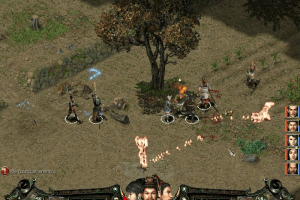
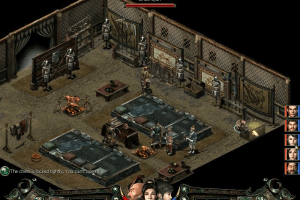
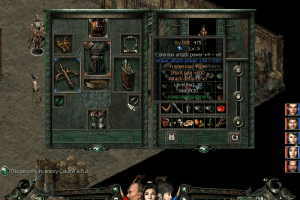
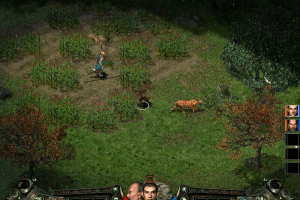
Buy on Digital Stores
Prince of Qin is available for a small price on the following websites, and is no longer abandonware.
Prince of Qin is available for a small price on the following websites, and is no longer abandonware.





 English
Comments and reviews
It is now also available at GOG DRM-FREE.
Coderah. How do I get in touch? With poq on steam now I want to talk about starting a dedicated server. I know you and your bro have done a ton of work on this game. I still have a couple of the old crew on my facebook and I bet they'd want to join up. My steam name is the same as here.
Followed instructions from comment below and installed just fine. Make sure that you are mounting each CD .ISO to the same drive letter as the last CD .ISO file. I'm about 6 hours in and no issues. As for screen lag/tearing, I have a little lag when fighting lots of enemies at once. Make sure to zoom all the way out (using mouse wheel) when playing or you will have weird screen tearing/blurs.
Love this game and upload
The game lost the story after i save the game.
would like to know how to use the patch files. there are some bugs for example after talking to the old man in zaucoun village for the gui guzi mission the entire log vanished. if someone found a fix please share.
Excellent sites. I love this game since 2003.
Very under rated one, despite some imperfections here and there.
Thanks for preserving on one the valuable gems of RPG with realistic graphic depicting close to reality of people lives in ancient China.
If you have WINRAR/7ZIP installed... Double clicking these ISO files will only open the extraction program folder!!
TO INSTALL please FOLLOW NEXT STEPS BELOW
-------------------------------------------------
Right click - Prince Of Qin CD1
Open With... - Windows Explorer
This mounts the ISO with built in windows 10 virtual drive abilities.
When mounted it becomes its own drive [mine was DVD Drive E: but yours may be a different one depending how many other Drives you may already have].
That's why following these steps in order is important.
Install game using... - PoQ setup (the application file from in that mounted drive folder)
When it asks for disc two (2) - Rick click mounted Drive and EJECT
(This closes the Drive folder it made, so you will have to go back into the folder that you have your ISOs stored in, because each time you eject, it closes that folder, but only if that's the current folder you're viewing, it doesn't if you're in any other folder and you happen to be right clicking the quick access side of drives to dismount that way.
--------------------------------
Right click - Prince Of Qin CD2
Open With... - Windows Explorer
Install - When it asks for disc three (3)
Rick click mounted ISO and EJECT
--------------------------------
Right click - Prince Of Qin CD3
Open With... - Windows Explorer
Install - Finally it asks for disc one (1) again
Rick click mounted ISO and EJECT disc 3 and mount disc 1 again
--------------------------------
Desktop shortcut is up to you.
Don't worry about installing Direct X 8 (You're on WIN 10 with better direct X!)
Don't worry about installing video drivers either, because it gives an error not supporting 64bit system etc, but I played the game already and it works just fine without it. Also did a fresh install while writing this up to see what happens when you click not to install video drivers (because originally I clicked yes).
--------------------------------
With disc 1 mounted - If you made a desktop shortcut click that to play or load up autorun application file within the folder manually which then brings up the game menu of options - click Play - Enjoy.
--------------------------------
Hopefully I typed this out clearly enough. I believe you will be able to figure it out from the gist of what's written here or maybe you even figured a faster way of doing it than how I did it?! If so share in comments please! :)
~~~~~~~~~~~~~~~~~~~~~~~~~~~~~~~~~~~~~~~~~
I am playing this for the first time ever. My husband just introduced this game to me the other evening. Back in 2005 we played this game called Conquer Online and we played it for years! Awesome awesome game the older version at least, not the now-a-days version, they completely ruined it by adding a ton of junk including literally changing the visuals of EVERYTHING!! :''''''(
~~ANYWAYS~~
He said this game was shadowed by games like CO and others, so it didn't get much glory, said it really reminded him of Conquer Online (CO) and since CO is no longer as it used to be I've really missed playing it, now I am excited to give this game a try! From what I've done so far it's similar, a little diablo style too, kind of a few different games slammed into one really and I'm digging it!
Well anyway, words.. take care and enjoy this game!
I hope my instructions helped!
GOOD LUCK!!!
So I finally found a possible way to play prince of qin without the screen lag. You will need a stable version 1.30 which you can find on IGG-games. Install its 3CD with virtual drive, make sure you also install the 1.30 version. Then proceed to https://playlegends.online/ and download only the legend launcher.exe, don't download his base game since it's not stable(no hard feelings, coderah, you already did an amazing job!). Place the launcher.exe in the file location and COPY the original game launcher qin.exe to different folder. Now you run the launcher.exe. You don't need to register if you don't want to, but I'll recommend since it's all his work.(Thanks coderah!). then you go back to the copy original launcher qin.exe and copy and put it back into the folder. Now you can run the game smoothly without any lag. I also found a fix screen resolution which will also work on wsgf.org, you just need to find your suitable screen size, don't go over. (You need a 1.30 version again).
For those who are still interested in this, I'm a very long time fan of PoQ, I played the demo over and over as a kid and got the full game for christmas. Played the Strategy First hosted multiplayer from beginning to painful end. My sibling and I have run multiple servers over the years and even patched bugs in the game over the years to try to bring that back. It's been a long time since I've come back to it, but once again I'm working on this game. Windows 7+ can run the game smoothly if you use DXWND, I've managed to get fullscreen running really well with dgVoodoo as well. I'm also patching server-side and working on a few mods to the game. If you are interested I expect to have a client patch and a few other things out as well as a first test-run of a Public Test Server within a few weeks. Follow at https://playlegends.online/ would love to hear from fans of the game and even if all you get is a patch to play the game locally I'd be happy to know I helped. If you want would love to see you on discord/reddit or in-game on my PTS helping me bring back the fun of PoQ servers.
How do I install this in my Win 10 PC
The download can be trimmed by 261MB to just under 1.3GB if an admin unpacks and repacks it as the archive contains the third CD twice, an exact duplicate taking up the same 261MB as the other. In fact I doubt repacking is necessary, you can just cut the duplicate disc and re-save the file.
You can message me on Facebook search for facebook/johnchuynh
I'll help you unlimited mana or max mana regend
I really want to play my childhood game prince of qin with unlimited mana can someone help??
No comment nor review for this game at the moment.